Agent Handoff Board · Obsidian plugin documentation
Agent Handoff Board documentation
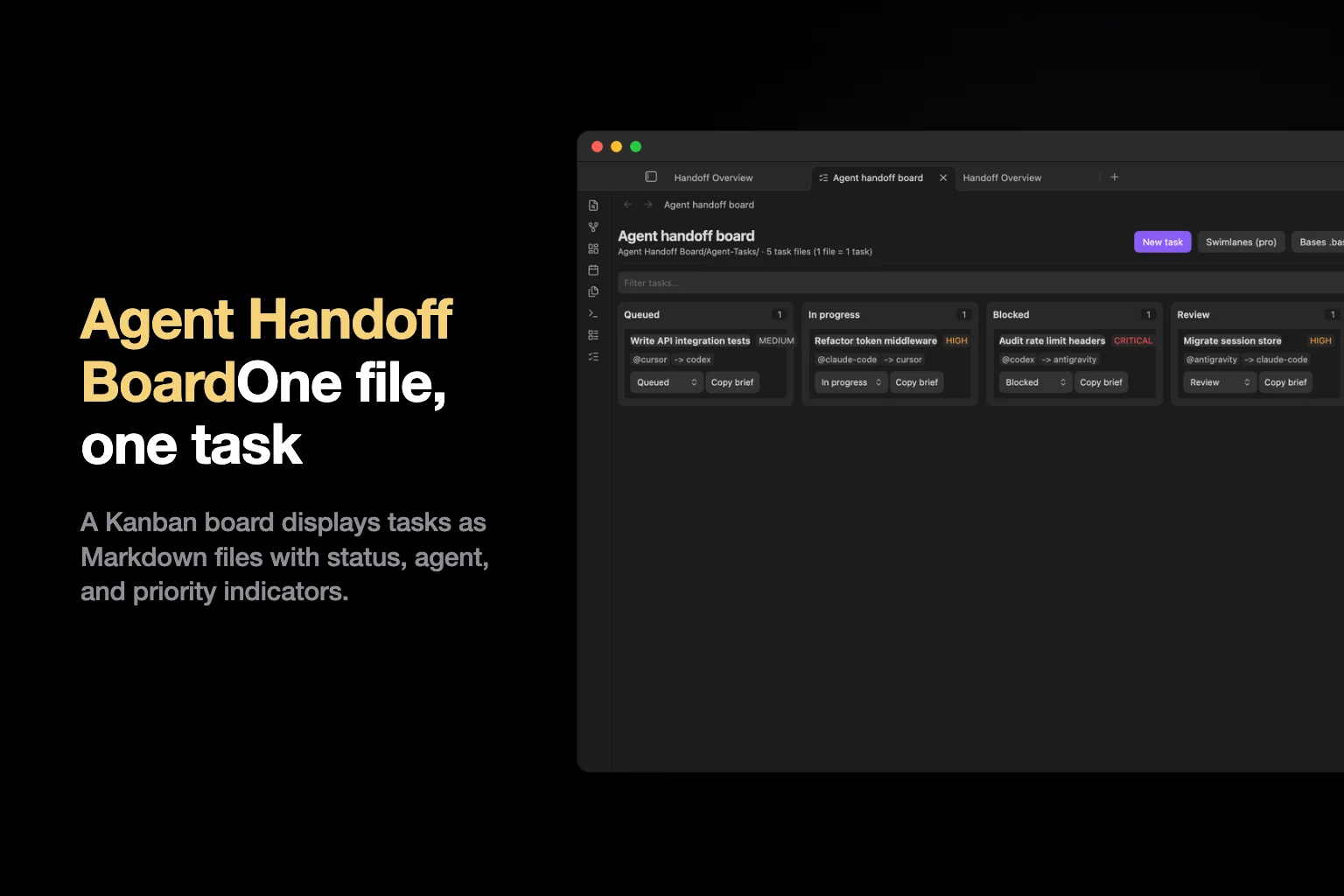
Agent Handoff Board turns a vault folder into a conflict-free Kanban board and task queue for local coding agents such as Claude Code, Cursor, Codex, and Antigravity. One Markdown file equals one task, so multiple agents and humans can claim, update, and hand off work without shared-file Git merge conflicts.
Version 1.0.0. Requires Obsidian 1.13.4 or later. Works on desktop and mobile.
1 Installation
- Open Settings in Obsidian and select Community plugins.
- Turn off Restricted mode if it is active.
- Select Browse, search for Agent Handoff Board, and select Install.
- Select Enable to load the plugin.
For manual installation from a release:
- Download
main.js,manifest.json, andstyles.cssfrom the latest GitHub release. - Copy the three files into
<vault>/.obsidian/plugins/agent-handoff-board/. - Reload Obsidian and enable Agent Handoff Board in Settings -> Community plugins.
2 Getting started
- Select the Open agent handoff board ribbon icon or run the Open board command from the command palette.
- Select New task to create your first atomic task note in
Agent-Tasks/. - Use the status dropdown on any card to move the task between
Queued,In progress,Blocked,Review, andDone. - Select Copy brief on a card (or run Copy handoff brief for active task while viewing a task note) to copy a Markdown brief with task metadata, linked context files, and body text ready to paste into Claude Code, Cursor, Codex, or Antigravity.
- With Pro enabled, toggle Swimlanes to group by
assigned_agent, select Release lock when a crashed agent leaves a stale lock, run Generate bases queue view to create a.basetable file, or open Audit trail to review and export handoff history.
Example task note frontmatter:
---
status: in_progress
priority: high
assigned_agent: claude-code
claimed_at: "2026-11-27T08:15:00Z"
handoff_to: cursor
blocked_by:
  - "[[schema-migration]]"
context_files:
  - "[[Architecture/Auth]]"
---
# Refactor token middleware

Split JWT verification from session store lookup and verify refresh token rotation.
3 Features
Conflict-free multi-agent Kanban board
Each Markdown note inside your configured tasks folder (default Agent-Tasks/) represents one task card. The plugin reads structured YAML frontmatter fields (status, assigned_agent, priority, claimed_at, handoff_to, blocked_by, and context_files) and renders five columns: Queued, In progress, Blocked, Review, and Done.
Every status change uses atomic vault.process updates on that single task file. Unrelated frontmatter keys, Markdown body content, and Windows CRLF line endings stay intact. When a task moves into in_progress, the plugin records a claimed_at ISO timestamp. When a task moves back to queued or finishes in done, claimed_at is cleared automatically. You can filter cards by agent, priority, or text query, and copy a structured Markdown handoff brief for any card in one click.
Atomic task creation modal
Use the Create new agent task command or the New task button in the board toolbar to create a dedicated task note. The modal collects the task title, initial status, priority, assigned agent, handoff target, blocked_by wikilinks, context_files links, and task brief body. It writes a clean, slugified Markdown file into the tasks folder and adds a numeric suffix if a file with the same name already exists.
Stale-lock detection, swimlanes, dependency validation, and Bases queue (Pro)
Pro adds coordination controls for multi-agent teams and long-running autonomous loops:
- Stale-lock detector and one-click release: flags
in_progresstasks whoseclaimed_attimestamp exceeds your configurable TTL in minutes (default 60 minutes) and lets you release a single lock or all stale locks back toqueuedin one click. - Multi-agent swimlanes: groups the board horizontally by
assigned_agentso you can compare active workloads across Claude Code, Cursor, Codex, and Antigravity at a glance. - Dependency blocker and cycle validation: resolves
blocked_bywikilinks across task notes, highlights unmet blockers, warns before starting blocked tasks, and catches circular dependencies. - Obsidian Bases
.basequeue generator: generates a ready-to-open.basefile inside your tasks folder with table views for Active queue, In progress locks, and Blocked and review tasks. - Handoff audit trail: records status transitions, lock releases, and handoff brief copies with a modal viewer and Markdown audit log export.
Flexible settings and interactive Pro previews
All core board behavior and Pro coordination rules live in one settings tab. You can change the tasks folder, default agent name, handoff brief protocol toggle, stale-lock threshold, swimlane default, blocker validation, audit trail toggle, and Bases queue filename without editing JSON files by hand.
4 Commands
Open the command palette and type the plugin name to see these commands. You can give each one a hotkey in Settings, Hotkeys.
| Command | Command id |
|---|---|
| Open board | agent-handoff-board:open-handoff-board |
| Create new agent task | agent-handoff-board:create-agent-task |
| Copy handoff brief for active task | agent-handoff-board:copy-active-handoff-brief |
| Release stale locks (pro) | agent-handoff-board:release-stale-locks |
| Generate bases queue view (pro) | agent-handoff-board:generate-bases-queue-view |
| Open handoff audit trail (pro) | agent-handoff-board:open-handoff-audit-log |
| See what pro adds | agent-handoff-board:open-what-pro |
5 Settings
| Setting | Tier | Default | Description |
|---|---|---|---|
| Tasks folder | Free | Agent-Tasks |
Vault folder where one Markdown file equals one task. |
| Default assigned agent | Free | claude-code |
Pre-filled agent identifier in the New agent task modal. |
| Include handoff protocol in copied brief | Free | On | Appends conflict-free single-file update instructions to copied briefs. |
| Stale lock threshold (minutes) | Pro | 60 |
Flags in_progress tasks whose claimed_at age exceeds this threshold (5 to 1440 minutes). |
| Clear assigned agent on lock release | Pro | Off | Removes assigned_agent when releasing a stale lock back to queued. |
| Group board into agent swimlanes | Pro | Off | Opens the board grouped by assigned_agent instead of a flat five-column grid. |
Validate blocked_by dependencies |
Pro | On | Highlights unmet blocked_by wikilinks and circular dependencies. |
| Record handoff audit trail | Pro | On | Stores status transitions, lock releases, and brief copies for review and Markdown export. |
| Bases queue file name | Pro | Agent Handoff Queue.base |
Filename written inside the tasks folder when generating an Obsidian Bases view. |
6 Privacy, payment and network
The core features are free. Pro features need a GitHub Sponsors sponsorship of theluckystrike: $5 a month or more, or $15 once. A total payment of $15 meets the payment requirement for Pro without further payment. Sign-in and the checks below still apply. Your notes stay readable and editable with or without Pro.
GitHub handles the payment. Sponsor at https://github.com/sponsors/theluckystrike. You need no account for the free features. Pro needs the GitHub account that sponsors.
Until you select "Sign in with GitHub" in the settings, Agent Handoff Board makes no network requests. Sign in uses the GitHub device flow. Agent Handoff Board sends its public client ID and the scope read:user to https://github.com/login/device/code and shows you a code. While you enter the code at https://github.com/login/device, it asks https://github.com/login/oauth/access_token every few seconds to check the sign-in status. The scope permits profile reads only. GitHub needs this access to show the sponsorship tier. It grants no repository scope and no write access.
After sign in, Agent Handoff Board sends one query to https://api.github.com/graphql. It checks if the signed-in account sponsors theluckystrike. It asks for the tier and the total payment to theluckystrike. The plugin reuses a successful check for 7 days. Failed checks can retry after 6 hours. Select Refresh to request an earlier check. It sends no note content, file names or other vault data, and it has no telemetry.
After a successful check, Pro can work offline for up to 14 days. Sign out or a negative sponsorship answer turns Pro off. The plugin stores the GitHub token through the secret storage API of Obsidian. It does not put the token in its saved settings or its local sponsorship data. The local storage of this device keeps your GitHub login, the tier and the time of the last check. Sign out clears the token. You can also revoke the access in your GitHub settings, under Applications.
7 Questions and answers
Why use one Markdown file per task instead of a single Kanban note?
When two coding agents or a human and an agent edit the same To-Do.md file at once, Git sync produces merge conflicts that break automation. Isolating each task in its own Markdown file means status updates only touch that single file.
Does the plugin modify my note body or custom frontmatter keys?
No. Status transitions and lock releases use atomic vault.process edits that update only status, claimed_at, and optionally assigned_agent. Existing custom frontmatter keys, body text, and CRLF line endings remain preserved.
Can I use this plugin without an internet connection or an LLM API key?
Yes. Every free and Pro feature runs locally inside Obsidian using your vault files. No LLM API key is required.
What happens if a task has a blocked_by cycle?
With Pro dependency validation active, the board displays a cycle banner at the top, tags affected cards, and includes a dependency warning in the copied handoff brief.
8 Support
Report bugs, share workflow feedback, or request new agent handoff fields on the GitHub issue tracker for this repository. Include your Obsidian version, plugin version, and a minimal sample task frontmatter block when reporting a parsing or transition issue.