One payment turns on every NoteMods Pro tool
Pro adds extra tools, such as exports, reports and presets.
One payment of $15 turns on Pro in 134 NoteMods plugins.
20,759 downloads in total, +3,099 downloads since 15 November.
The founding price is $15 for licenses 1 to 50. 17 sold so far. Then $19 for licenses 51 to 150. The price is set on the 1st of each month and goes up only after a tier is full. Price tiers
You pay on GitHub Sponsors. Then select Sign in with GitHub in the settings of each plugin you use. Questions before you buy? Ask in the chat.
The two prices
One time
$15 one time
Pay $15 one time. Pro turns on in each plugin that has Pro after you sign in with GitHub in that plugin. Nothing renews.
Get Pro for $15 one timeMonthly
$5 a month
Pro is on in each plugin that has Pro while you sponsor. Once GitHub reports $15 paid in total, Pro stays on.
Get Pro for $5 a monthPrice tiers
17 of 50 founding licenses sold.
- Founding price · now$15licenses 1 to 50
- Tier 2$19licenses 51 to 150
- Tier 3$24licenses 151 to 300
- Tier 4$29licenses 301 and more
The price is set on the 1st of each month. It goes up only after a tier is full. Until then it stays $15. The next price review is on 1 December 2026.
A price change does not change a license that you paid for. The $5 a month option stays.
Need a plugin for your company? See the prices for custom work.
What Pro adds in the most used plugins
Footnotes in Callouts and Tables
- A footnote panel lists each footnote of the note with its text and where it is used. Select a row to go to its definition.
- A command changes an inline footnote into a named footnote and puts the definition at the end of the note.
- A command moves the cursor from a footnote definition back to its first reference.
- A command names each reference without a definition and each definition that no reference uses.
- A reference without a definition shows in red with a dashed underline.
Search Operators
- Put OR between two groups of terms to find the notes that match either group.
- Put a minus sign before a word or an operator to leave out the notes that match it.
- Property operators find notes by a property value, for example [status:done] or [priority:>5].
- Ctrl or Cmd + Shift + Enter writes the results into the open note as a Markdown list of links.
- Ctrl or Cmd + S saves the search, and the command "Run a saved search" runs it again.
Bases Freeze Panes
- Freeze 2 or 3 columns on the left. The free version freezes 1 column.
- Set the number of frozen columns for one file or for one view of a base.
- Keep the last column at the right edge while you scroll sideways.
- Pin a property, so that its column stays next to the frozen columns.
Bases Link Graph
- Size by sets the node size from the value of a number property.
- Color by sets the node color from the value of a property, with a legend.
- Color links by relation gives each relation its own color, with a Links legend.
- Headings hang from their parent heading, and you can hide the headings below a level.
- Notes that share a property value get a dashed edge.
- Local depth shows only the notes up to 1 to 5 links away from one note.
- Export the graph to a PNG or an SVG file.
- Save the positions of the nodes in the base file.
Bases Filter Switches
- Add any number of switches and groups to a base. The free version has 1 group of 3 switches.
- Save the switches that are on as a preset. Apply it from the bar or from its own command.
- Save the default switches of a base, and apply them again with one command.
- Make one switch for each value of a property.
- Use up to 5 quick property filters at the same time. The free version has 1.
Turn Pro on in four steps
Sponsor theluckystrike on GitHub Sponsors, at $5 a month or $15 one time.
In Obsidian, open the settings of the plugin.
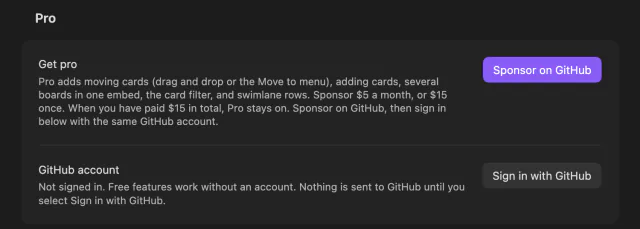
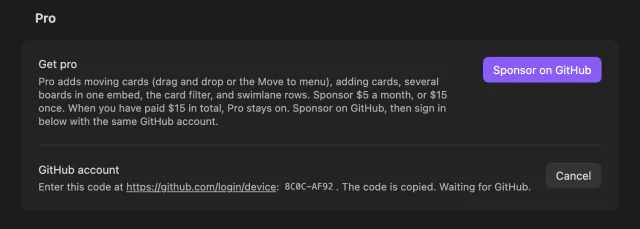
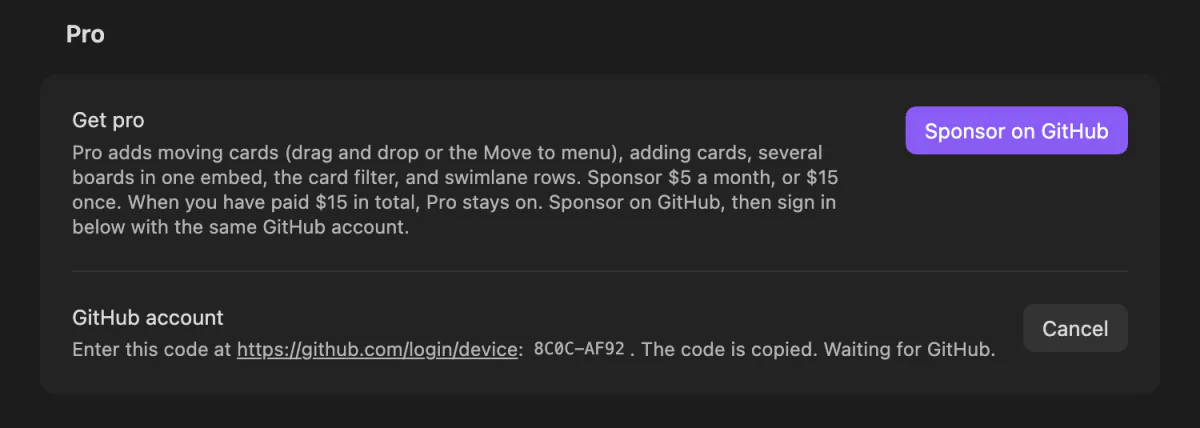
Select "Sign in with GitHub". The plugin copies a code and opens
github.com/login/device.Paste the code on that page and approve. The status line then shows your GitHub login and the tier.
What sign in looks like
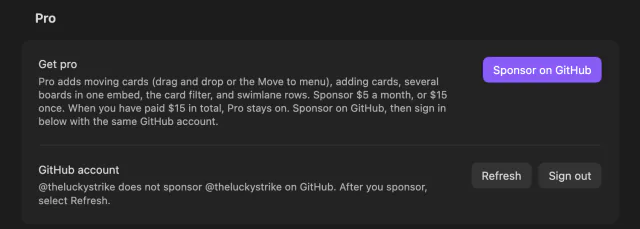
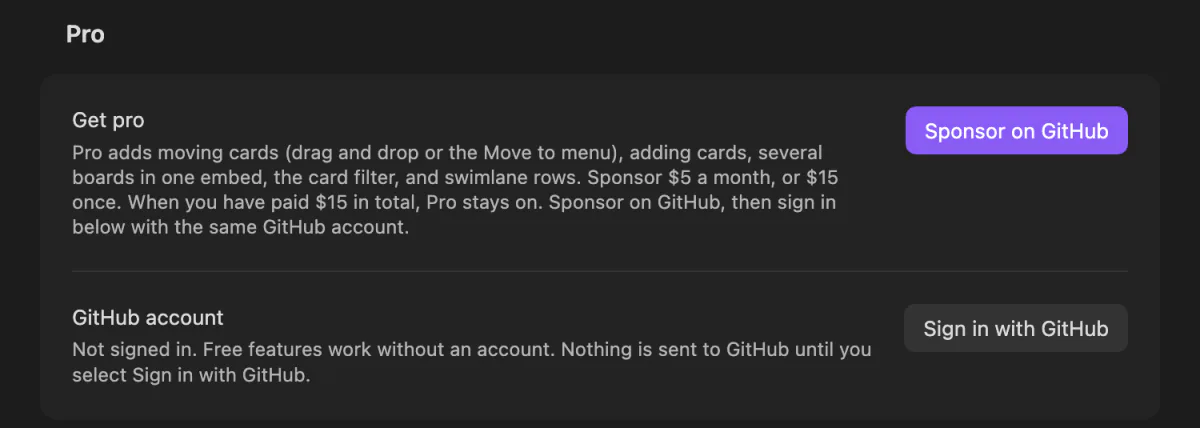
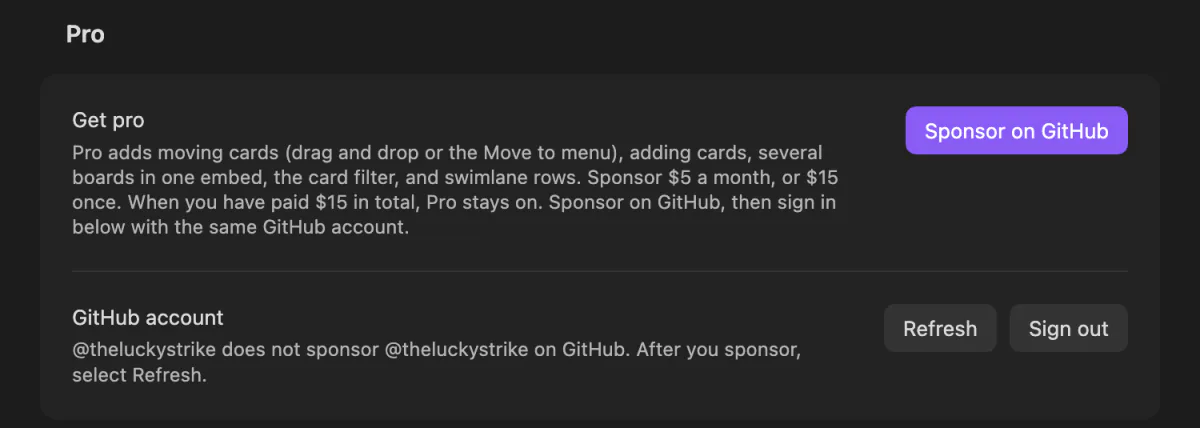
These three pictures show the Pro part of the settings window. They come from the check of Kanban Embed 1.1.0 on 10 October 2026. The code in the second picture was used once that day, and a code expires after 15 minutes.
The rules in plain words
- One sponsorship turns on Pro in every plugin that has Pro features. Each of those plugins asks GitHub the same question, whether your account sponsors theluckystrike.
- Sign in once in each plugin you use, in each vault and on each device. The token stays in that vault on that device and doesn't sync.
- Pro is on while you sponsor $5 a month or more.
- Once GitHub reports $15 paid in total, Pro stays on. One payment of $15 does it. You still sign in, and the plugin still asks GitHub.
- With a monthly sponsorship, the rule counts the dollars that GitHub reports, not the number of payments. GitHub can prorate a charge.
- If a monthly sponsorship ends before GitHub reports $15 in total, Pro turns off at the first successful check after the paid period ends.
- After a successful check, a plugin waits 7 days before it asks GitHub again. After a failed check it tries again every 6 hours.
- If a check fails, for example with no connection, Pro keeps working for 14 days after the last successful one.
- If you sponsor after you sign in, select Refresh.
- The core features are free. Your notes stay readable and editable with or without Pro.
What Pro adds in each plugin
Every plugin works without Pro. The table shows what the same sponsorship adds to each one.
| Plugin | What Pro adds |
|---|---|
| Annotator JSON Export | Export a selected folder, Save dated archive copies and an error report |
| AsciiDoc Files | Includes from the vault, Outline and links panel, HTML export and copy |
| Bases Card Wrap | Vault default rule |
| Bases Checkbox Router | Saved rules for note types, Several routed columns |
| Bases Descendant Filter | Explain a shortest route |
| Bases Filter Switches | Switches from the values of a property, Presets, Default switches, Up to 5 quick filters |
| Bases Freeze Panes | Two or three frozen columns, Pinned last column, Pin a property |
| Bases Link Graph | Size and color by a property, Edges from shared values, Color links by relation, Local depth, Export and saved layouts, Nested headings and a level limit |
| Bases Manual Order | Separate orders |
| Bases Multi-Row Edit | Save repeated actions |
| Bases Note Templates | More templates with a list to pick from, A template for each view, Duplicate as new note, Templater on new notes |
| Bases Property Repair | Saved rename maps, Change journal and guarded restore |
| Bases Read Only | Folder and glob rules, Editable properties, Kiosk mode |
| Bases Row Deltas | Compare several properties, Choose an earlier row, Show change per day |
| Bases Task Rows | Groups by date, note, heading or tag, Edit due dates, move to today, complete many, Several tags and notes without a next task |
| Bases Transpose Table | Edit a property across visible notes, Mark equal and different rows, Save named sets, Export Markdown |
| Bases View Checkpoints | Several named checkpoints, Compare with the current view |
| Bases View Extract | Separate sections for several views, Named query presets |
| Bases View Tabs | Pinned views and icons |
| Bibliography Path Audit | Named local audit reports, Several profiles in one run |
| Block Drag Links | Drag every block of a selection, Readable block IDs |
| Button Blocks | Template buttons, Calculate buttons, Check buttons in vault |
| Call Notes Sync | Transcript with speaker labels, Note template, Link in the daily note, Filters by date and participant, Template, daily note link and filters, Tags, properties and attendee links |
| Canvas Mind Tree | Balanced and radial layouts, Outline export, Tree from a note, Depth colours, Branch move |
| Card Question Sheet | Named page settings, Folder export with one tag |
| Chapter Batch Export | Select ranges and formats, Save named presets |
| CherryTree Import | Tags and creation dates, Parent index notes, Selected subtree |
| ColorNote Backup Import | Saved mapping profiles, Compare two backups |
| Compile Loss Check | Comparison profiles with exclusions, Several compiled notes and report history |
| Context Trees | Regular expressions and saved queries, View state for each note, Export the results |
| Conventional Commit Draft | Project type names and heading order, Named report templates |
| Craft Link Repair | Saved output paths and date formats, Repair when new exports arrive |
| CSS Settings Panel | Presets, JSON export and import, Color gradients, Search, Undo |
| CSV Formula Shield | Saved export policies, Combined audit report |
| CSV Glossary Lookup | Separate glossary profiles, Search several glossaries |
| CSV Rule Check | Preview trim and default fixes, Check chosen files with saved rules |
| Data Format Converter | Validate a local JSON Schema, Convert chosen code blocks into new files |
| Date Property Alerts | Longer and custom snooze durations |
| Date Property Backlinks | Roll up a week or month |
| Daylio Backup Import | Daily note section, Date filters and file name rules |
| Diaro Backup Import | Saved mapping presets, Compare a later backup, Monthly review notes |
| Discussion Brief Cards | Compact discussion list |
| DOT Diagrams | Notes that open from nodes, Export to SVG and PNG, More engines and style presets |
| Embed Outline | Nested embeds, Word counts, Broken embeds, Copy as a Markdown list |
| Embedded Text Finder | Save presets and keep a local index, Export linked results |
| Enterprise Issue Cards | Named server profiles, Scheduled saved-list refresh, Local project list |
| Epoch Note Converter | Selected column conversion, Saved time zone comparisons, Saved output format |
| Fence File Export | Output folder profiles, Export index |
| Fixation Reader | Live Preview, Folder and tag rules, Custom style |
| Flatten Table | No 50-note limit, Group rows, Filter rows, Export to a note or CSV |
| Fold Stop | Folder rules, Note override property |
| Footnotes in Callouts and Tables | Footnote panel, Warnings for unused and missing footnotes, Way back from a definition to its reference |
| Fountain Reference Panel | Project folder filters, Reference report |
| Frontmatter Link Repair | Saved folder and key presets, Export the repair report |
| Glossary Term Audit | Folder checks, Client glossary profiles |
| Heading Link Sync | Markdown links, Block IDs, Preview the changes, Broken heading link report |
| Icon Frontmatter Mirror | Extra properties and folder notes |
| Inline Block Embeds | List items, Every embed inline and styles |
| Joplin Export Import | Resync changed notes, Audit several archives |
| Journey Diary Import | Daily note merge, Folders and file names |
| JSON Payload Delta | Save named pairs, Ignore pointer paths |
| JUnit Failure Notes | Folder reports, Local baseline comparison |
| Kanban Draft Vault | Saved draft versions, Search across boards, Retention limits by board |
| Kanban Embed | Move cards, Add cards, Several boards in one embed, Card filter, Swimlanes |
| Line Cut Guard | Second press mode |
| Live Template Results | Enable rules by folder or property, Refresh after selected property changes, Results and errors panel |
| Local API Reference | Write endpoint notes, Save bookmarks and tag filters |
| Local JSON Queries | Several chosen files, New report files |
| Lockfile Upgrade Notes | Named file pairs, Local project baselines |
| Mobile Timer for Clockify | Project and tag pickers, Reports by project, day or description, Edit and delete past entries, Offline queue |
| Mobile Timer for Toggl Track | Project and tag pickers, Reports by project or day, Edit and delete past entries, Offline queue |
| Month Calendar | Quarter and year cells, Heat colours, tag colours and date property |
| Note RIS Export | Filtered groups, Named field maps, Repeated export |
| Note Station NSX Import | Notebook mapping profiles, Compare later backups |
| One-way Backlinks | Link back, Hidden folders |
| OPML Note Import | Save layouts, Preview repeated imports |
| Pandoc Crossref Preview | Saved number and prefix profiles, Local label reports |
| Paragraph Spell Focus | Section focus, Saved folder rules |
| Parallel Paragraph Reader | Save manual alignment maps, Remember the last row |
| Paste Link Titles | Title rules, Link formats, Folder batch, Title refresh, Page details as properties |
| PDF Cover Cards | Covers beyond the free limit, Cover crop, Saved covers, Contact sheet export |
| PDF Crop Refresh | Refresh a selected folder, Report changed source PDFs |
| PDF Quote Join | Find eligible pairs, Save named formats |
| PDF Reply Export | Author and saved date filters, Selected PDF folder export |
| Plain Text Tables | Column alignment |
| Pocket Letter Chords | Folder dictionaries, Dictionary files, Three-letter chords |
| Pocket Markwhen | Combine files, Save named filters, Export Markdown list |
| Pocket Mochi Export | Folder export, one deck for each note, Folder export as one deck with sub-decks, Named presets |
| Pocket Note Quiz | Folder quizzes, Dated score reports, Named question-marker presets |
| Pocket Symbolic Solver | Tables of results, Saved equations and parameter sets, Search the solve history |
| Properties in PDF Export | Folder layouts |
| Property Change Ledger | Named watch profiles, Filtered CSV export, Status change counts by note |
| Reading Tap Guard | Shorter double tap interval |
| RedNotebook Backup Import | Category mapping rules, Merge into a daily-note section |
| Relative Image Width | Default size for a note |
| RemNote JSON Import | Save layout presets, Compare source changes, Group selected subtrees |
| Research Source Review | Named review groups, Dated local review reports |
| Retraction Review Queue | Save column maps, Export a dated local report |
| Revision Session Marks | Keep named baselines for several notes, Create folder review copies, Add author labels and a change summary |
| Scene Notes to Fountain | Saved mappings, output settings and note groups |
| Scene Subtree Mover | Several moves in one preview, Named orders and checked restore |
| Search Operators | OR, NOT and property operators, Results as a Markdown list, Saved searches |
| Secret Parcel | Saved export profiles, Dated encrypted backups, Keychain comparison |
| Shared TeX Preamble | Named macro libraries, Library preview with errors |
| Shortcuts Bridge | Output at the cursor, over the selection or at the end, Output in a note property, A default shortcut for each folder, A button in the note, Replace the line with the output |
| Standard Notes Import | Save destination rules by tag, Preview changed records |
| Steady Inline Math | Saved folder rules, Equation panel |
| Substack Export Import | Save field mappings and folder profiles, Compare later exports by post ID |
| Subtitle Sentence Miner | Save card templates, Combine subtitle sources |
| Sync Churn Watch | Keep session history, See write rate notices, Review Sync folder suggestions |
| Table CSV Encoding | Export a folder batch |
| Table Rollup | Summary rows and group subtotals, Filter rows, Task list rollup, Export to a note or CSV |
| Table Row Links | Search the vault, Reading-view row links, Remove unused anchors |
| Tag Pairings | Counts |
| Tag Properties | Combine properties |
| Task Date Links | More dates and week and month notes, Back-fill the whole vault, Folder rules |
| Task Field Labels | Custom labels and display presets, Folder display rules, Compact field layout |
| Task Format Bridge | Check a folder |
| Task ID Audit | Save project profiles and reports, Repeat after file changes |
| TBX Term Import | Import several term files, Review a concept ID merge |
| TextBundle Files | Folder import with a report, Export every note in a folder, Keep info.json in a property |
| TheBrain Import | Import note bodies, Copy attachment files, Create a Canvas file |
| Translation Token Audit | Declared folder pairs, Dollar-brace grammar |
| Vault Loss Alarm | Thirty-day history and date comparisons, Folder thresholds, Restore checklist notes |
| Vault Path Portability | Apply a suggested rename, Scans on change and report notes |
| Vimwiki Import | Map ISO diary filenames, Combine unresolved-link reports |
| Visual Line Numbers | Count folded lines, Highlight the current row, Motion hint, Per-note property, A color for each mode |
| Wikilink Alias Markup | Math in aliases |
| Word Comment Export | Authors from labels, Tables and local images, Join several notes |
| Word Count Property | Local reading preview |
| WordPress WXR Import | Folder and field mapping profiles, Compare a later export |
| Zettelkasten Archive Import | Saved keyword and file name rules, Compare two archives before a later import |
| Zim Notebook Import | Save import rules, Compare a later source |
| Zoho Znote Import | Save mapping profiles, Compare a later export |
Before you sponsor
- Do I need to pay for each plugin?
- No. One sponsorship of theluckystrike turns on Pro in every plugin that has Pro features. You sign in once in each plugin you use, in each vault and on each device. Each one finds the same sponsorship.
- What happens if I cancel?
- If GitHub reports $15 or more paid in total, you meet the payment rule for Pro. Sign in and the sponsorship check still apply. If you've paid less, Pro turns off at the first successful check after the paid period ends. The free features keep working, and your notes stay readable and editable.
- Does it work on mobile?
- The Obsidian directory lists all 137 plugins for desktop and mobile. The automated tests run in the desktop app only, so report a mobile problem in the plugin's GitHub issues. The token stays on the device where you signed in, so sign in again on your phone.
- Do I need a GitHub account?
- Not for the free features. Pro needs the GitHub account that sponsors, because GitHub handles the payment and answers the sponsorship check.
- What can a plugin see in my GitHub account?
- Sign in asks for one scope,
read:user. It's read-only access to your profile, which GitHub needs to show the sponsorship tier. It gives no access to repositories and no write access. - What do I pay for the $5 tier with yearly billing?
- GitHub Docs say a sponsorship follows the billing cycle of your account. In the developer's check, the checkout on an account with yearly billing showed "Due today $60.00" for the $5 tier. GitHub Docs don't state that amount, so read the amount on the checkout page before you confirm.
- Does Pro end when the 30 days of a one-time sponsorship end?
- No. The GitHub checkout for the $15 tier says "You will count as a sponsor of @theluckystrike for 30 days". GitHub Docs say a one-time sponsorship stays visible for one month. The plugin keeps Pro on for a one-time payment of $15 or more, also after those 30 days.
One price covers every Pro feature
Sponsor on GitHub for $5 a month or $15 one time. This enables all available Pro features.