How to rename a heading in Obsidian without breaking links
Right-click the heading and choose Rename this heading. Obsidian then updates every link to that heading. If you just type over the heading text, the links keep the old text, as of October 2026, unless a community plugin updates them.
Updated · 4 ways compared · 10 sources
Background
The forum request for automatic updates dates from 9 October 2021 and is still open. As of October 2026 it has 351 likes and 80 posts. Its first post states the gap. Updating heading links needs an explicit action that opens a dialog.
In May 2022 a poster relayed an answer from an Obsidian developer on Discord. Watching every keystroke for heading edits was called impractical for performance, and the app can't know when a rename is finished. Other posters reply that they change text by typing, not by right-clicking, and forget the command.
4 ways to do it
The core Rename this heading command
Right-click the heading in the editor and choose Rename this heading. Type the new text in the dialog. Obsidian changes the heading and the links that point to it.
Block IDs have the same kind of menu since version 0.14.13, from May 2022. Right-click a block ID to rename it and all references to it follow.
limits
It only helps when you remember to use it. Type over the heading in the editor and the links keep the old text.
Heading Autolink is a community plugin with a setting named Enable heading rename updates. With it on, the plugin updates matching heading wikilinks across the vault after you rename a single heading. A notice shows how many files and links changed.
limits
The setting is off by default, and vault-wide updates are reverted from a backup or version history. Its page lists embeds, same-note links, block links and Markdown links as unsupported.
Heading Keeper is a community plugin for automatic heading numbers. Its README adds link upkeep. Rename a uniquely referenced heading and wikilinks and Markdown links follow it. A separate audit command finds older broken heading links and asks before it repairs them.
limits
Its README limits the automatic update to renames it can identify uniquely. Ambiguous or older broken links stay untouched until you run the audit.
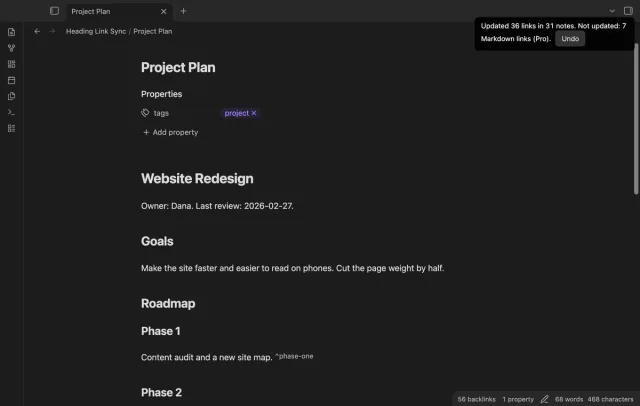
Heading Link Sync updates the links when you retype a heading in the editor. It waits until the cursor leaves the heading line, or until you stop typing for 1.5 seconds. Then it shows one notice with the count of links and notes, and an Undo button.
The free version updates wikilinks, embeds, same-note links, nested heading paths and wikilinks in properties. Markdown links, block ID links, a preview of each change and the broken link report need Pro.
limits
It acts only on edits you make in the editor, not on changes from sync tools or git. Stop typing in the middle of a word and the links follow the half-typed text first.
Install Heading Link Sync from Community plugins and turn it on.
Open a note that other notes link to, and type over the text of one of its headings.
Move the cursor to another line, or stop typing for a moment.
Read the notice, for example Updated 36 links in 31 notes. Select Undo if you didn't want the change.
To confirm each update first, set When a heading changes to Ask first in the settings.
If your vault uses Markdown links, you need Pro for those. The free version leaves them alone, and the notice says how many.
Common questions
Why doesn't Obsidian update heading links while I type?
A poster in the forum thread relayed the developer's reason in May 2022. An automatic rename would mean watching every keystroke, and the app can't tell when a rename is done. The right-click command was the answer given.
How do I know that a heading has links before I change it?
A reply from August 2025 suggests the Strange New Worlds plugin. It shows a counter next to a heading or block that other notes link to. In May 2026 another poster wrote that it works better than expected as a reminder.
Can I link to a heading in a way that survives a rename?
You can add a block ID to the heading line and link to that ID. Posters in the thread tried it in 2022. One found that an embed through the block ID doesn't bring the content under the heading along.
Obsidian doesn't open .adoc files on its own. AsciiDoc isn't in the list of accepted file formats, and a moderator wrote in July 2025 that core support isn't on the roadmap. As of October 2026 you either convert the files to Markdown or install a community plugin that opens them.
Obsidian's help site, read in October 2026, describes no way to merge Markdown tables from several notes into one table. Bases builds its rows from files and its columns from properties, and Dataview doesn't read tables either. You can move the rows into properties, write SQL with SQLSeal, or add a Bases view that reads the tables.