
AsciiDoc Files
Edit AsciiDoc source and see its preview side by side.
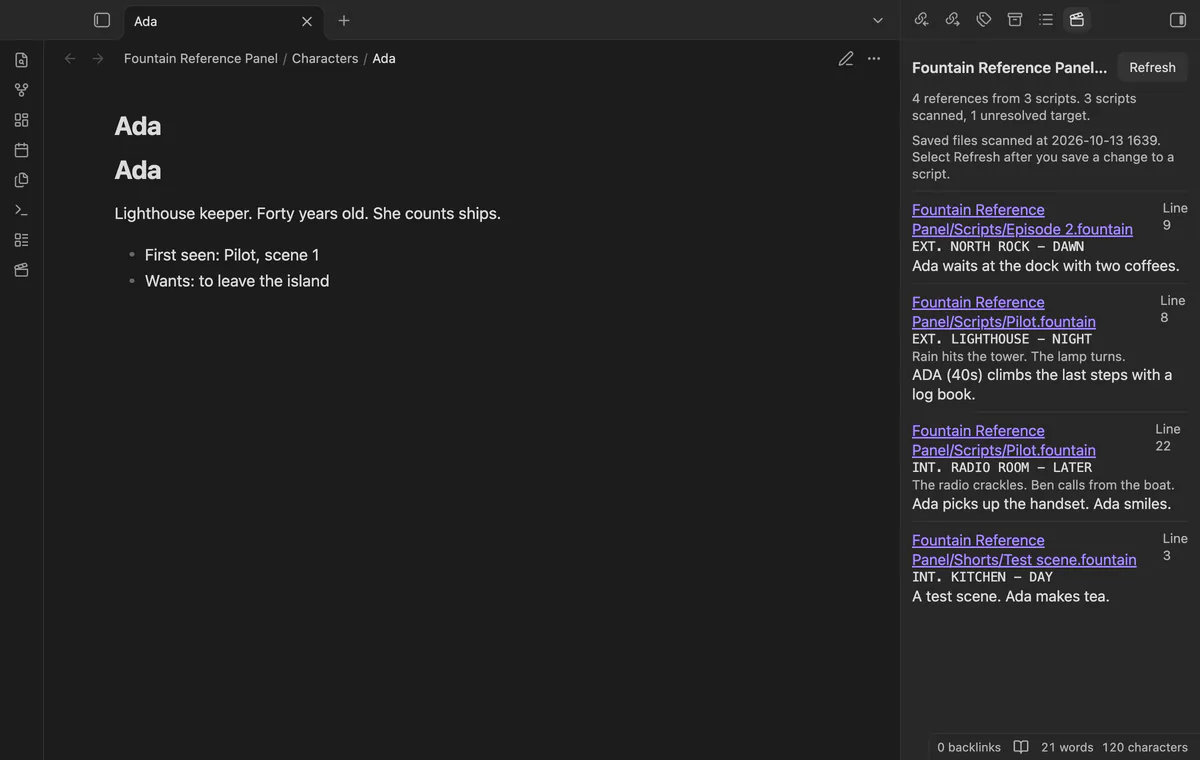
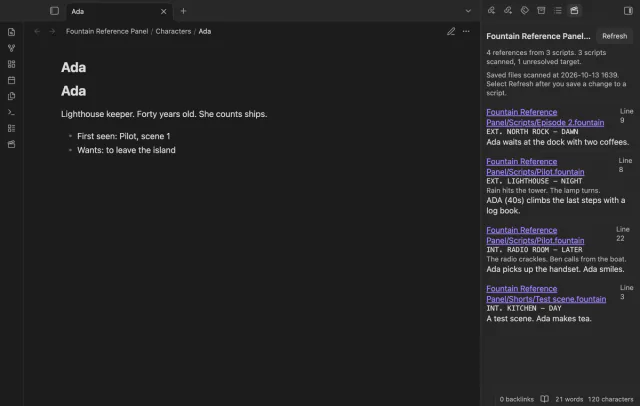

See saved script references beside character or location notes.
MIT · no telemetry · core features free
The directory takes these platforms from the plugin manifest. The automated tests run in the desktop app only.
Directory facts fetched from community.obsidian.md/users/theluckystrike.
You keep Fountain scripts beside character, location or prop notes in your vault.
Write references such as [[>Ada]] in a saved Fountain script. Open Ada’s note to see matching references with their scene headings and nearby text.
 Play demo
The panel lists saved script paths, line numbers, scene headings and reference lines. It resolves targets relative to the script through Obsidian’s link lookup.
References can include display text, and heading fragments are removed for note lookup. The scanner skips boneyard blocks and ordinary Fountain notes.
Select a script path to request that file. Refresh rebuilds references from saved scripts and reports unresolved targets and read failures.
Pro costs $5 a month or $15 one time through GitHub Sponsors. One sponsorship turns on Pro in every plugin that has it.
Save project folders to restrict the scan to those folders and their subfolders. Refresh after changing the list.
Select referenced notes from the last scan and export a new Markdown report. Each selected note gets a table of its script references.
needs
steps
Open a character, location or prop note.
Run Open the reference panel or select the clapperboard ribbon icon.
Open another note to see its references from the same scan.
Save script changes and select Refresh.
If the app can't find a new plugin yet, try again later. Obsidian says a plugin that passes the review shows in the app within 24 hours.
Need a change for your team? I build custom Obsidian plugins and features.
The first scan runs when you open the panel. Save your script and select Refresh after later changes.
The plugin asks Obsidian to open the script file. It shows the line number but doesn't open at that line.
Scanning saved files needs no Fountain editor. Opening those files inside Obsidian requires a plugin that supplies a Fountain view.
Before you select Sign in with GitHub, the plugin makes no network requests. Sign-in sends its client ID, the read:user scope and device-flow data to github.com, then sends an authenticated sponsorship query to api.github.com. Checks reuse success for 7 days, retry failures after 6 hours or run on Refresh; they send no vault data.
Tell me what is broken in Fountain Reference Panel, or what it should do next.
Fountain Reference Panel 1.1.0, MIT license
MIT · no telemetry · core features free
Edit AsciiDoc source and see its preview side by side.
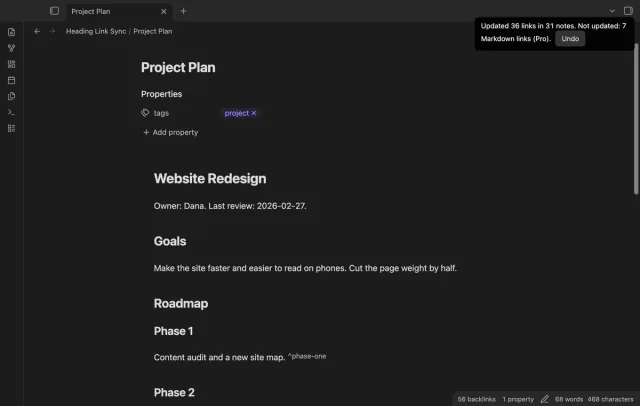
Update heading links and embeds when you edit a heading.