Agent Index Compiler · Obsidian plugin documentation
Agent Index Compiler documentation
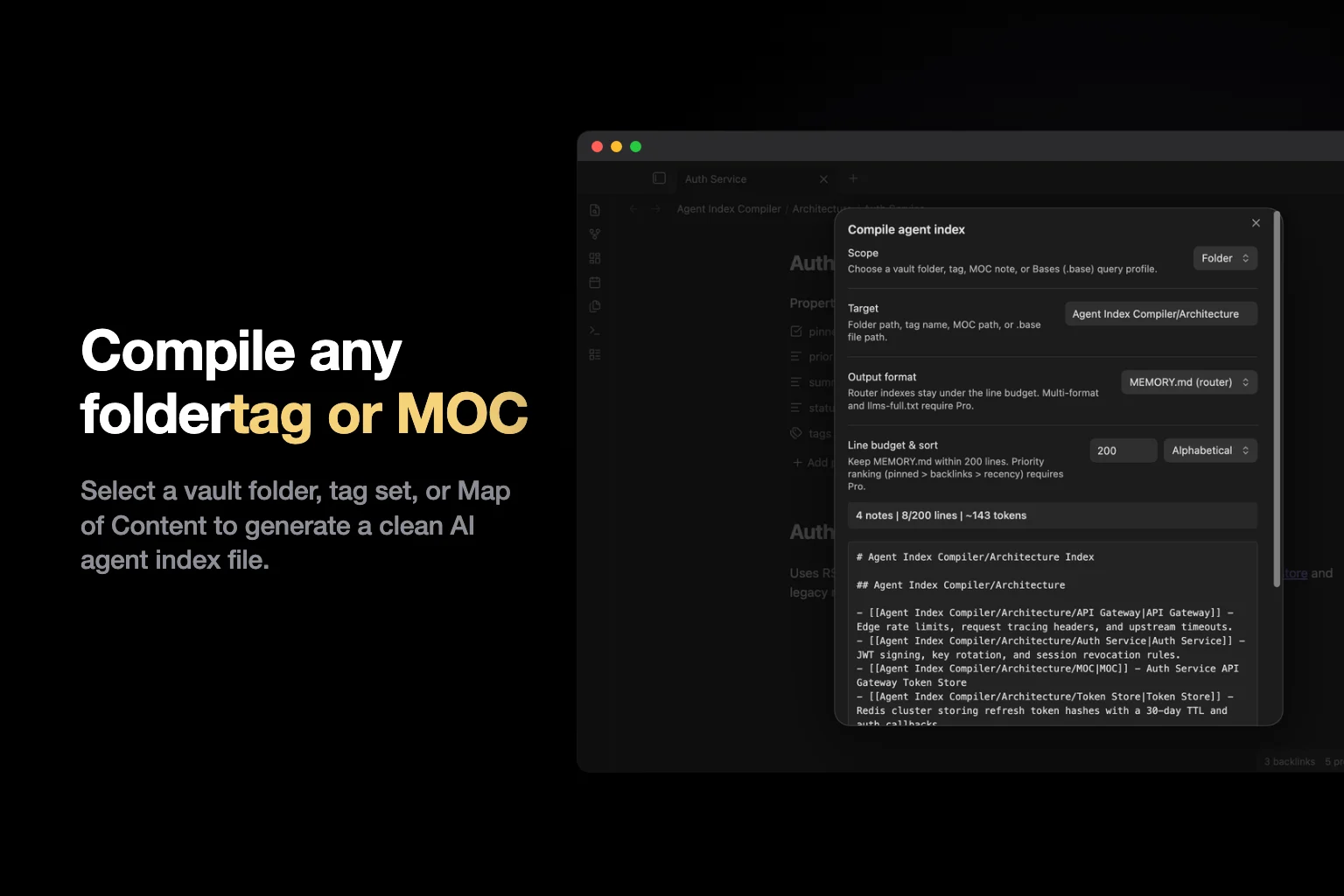
Compile any Obsidian vault folder, tag set, or Map of Content (MOC) into a clean, line-budgeted MEMORY.md or llms.txt router index for AI coding and knowledge agents.
Local agents such as Claude Code, Cursor, Codex, and MCP clients start every session with a fixed context window. Scanning a large vault wastes tokens, and Claude Code truncates MEMORY.md after 200 lines. Agent Index Compiler builds compact, deterministic router indexes offline inside your vault without a vector database or external API key.
Version 1.0.0. Requires Obsidian 1.13.4 or later. Works on desktop and mobile.
1 Installation
- Open Settings in Obsidian and go to Community plugins.
- Select Browse and search for Agent Index Compiler.
- Select Install, then select Enable.
For manual installation, copy main.js, manifest.json, and styles.css from the latest GitHub release into <vault>/.obsidian/plugins/agent-index-compiler/, then enable the plugin in Community plugins.
2 Getting started
Compile interactively from the modal
- Open any note in the folder you want to index.
- Run "Agent Index Compiler: Compile agent index" from the command palette.
- Choose the scope (Folder, Tag, MOC note, or Bases
.baseprofile in Pro) and confirm the target path or tag. - Pick the output format (
MEMORY.md,llms.txt, or in Prollms-full.txtand "All 3 formats") and review the live line count and token estimate. - Select "Write to vault" to update the target file atomically, or select "Copy" to paste the index into an external repo.
One-command folder compilation
- Run "Compile active folder to MEMORY.md" to rebuild
MEMORY.mddirectly from the active note's folder. - Run "Compile active folder to llms.txt" to rebuild
llms.txtdirectly from the active note's folder. - Run "Compile multi-format bundle (MEMORY.md + llms.txt + llms-full.txt)" (Pro) to update all three files with priority ranking in a single command.
- Run "Compile from Bases (.base) profile" (Pro) to open the compiler preloaded with your configured
.basequery file.
Tips for better summaries
Add a concise summary or description property in YAML frontmatter for key notes. Without frontmatter, Agent Index Compiler extracts the first clean paragraph from the note body.
3 Features
Line-budgeted MEMORY.md and llms.txt compiler
Open the Compile agent index window from the command palette to select a folder, a tag, or a MOC note. Choose MEMORY.md for wikilink routing or llms.txt for a spec-compliant Markdown index with a top-level heading, a blockquote summary, and folder sections. Each entry pulls a clean one-line summary from YAML frontmatter (summary or description) or falls back to the first prose paragraph of the note body while stripping Markdown links, bold markers, code fences, and HTML comments.
The compiler enforces your configured line budget (200 lines by default) and displays the exact line count and estimated token count before you write or copy. When notes exceed the budget, lower-ranked entries are omitted cleanly with a single comment line so the file never crosses the limit.
Atomic vault writes and managed-block safety
Select "Write to vault" to update MEMORY.md or llms.txt atomically through Obsidian's vault.process API, or select "Copy" to place the compiled index on your clipboard. When "Preserve managed blocks" is enabled, Agent Index Compiler wraps generated lines between <!-- agent-index-compiler:start --> and <!-- agent-index-compiler:end -->. Rebuilding an existing index updates only the managed section and leaves your handwritten notes above and below untouched while preserving LF or CRLF line endings.
Router defaults and Pro workspace settings
Configure default output formats, line budgets, output paths, token ceilings, Bases .base profile paths, and staleness thresholds from the plugin settings tab. Free settings stay grouped separately from optional Pro automation controls, and the settings tab includes a direct "What Pro adds" button to inspect paid features on sample notes before upgrading.
Simultaneous multi-format bundles, Bases profiles, and diagnostics (Pro)
Pro adds four workflows for teams and heavy agent users:
- Simultaneous multi-format compilation with priority ranking: Compile
MEMORY.md,llms.txt, and a full-contentllms-full.txtbundle in one pass within a configurable token ceiling. Priority ranking placespinned: trueand high-priority notes first, followed by notes with more incoming backlinks and recent edits. - Bases
.basequery-driven index profiles: Point the compiler at an Obsidian.basefile to filter notes by folder (file.inFolder), tag (file.hasTag), and frontmatter properties (note.status == "active"). - Auto-rebuild on vault changes: Watch a folder or the whole vault with a debounce timer so
MEMORY.md,llms.txt, andllms-full.txtstay current after every edit without clobbering human prose outside managed markers. - Stale-link and oversize budget warnings: Surface unresolved wikilinks, notes older than your staleness threshold, and entries dropped due to line or token limits before agents read the index.
4 Commands
Open the command palette and type the plugin name to see these commands. You can give each one a hotkey in Settings, Hotkeys.
| Command | Command id |
|---|---|
| Compile agent index | agent-index-compiler:compile-agent-index |
| Compile active folder to MEMORY.md | agent-index-compiler:compile-active-folder-memory |
| Compile active folder to llms.txt | agent-index-compiler:compile-active-folder-llms |
| Compile multi-format bundle (MEMORY.md + llms.txt + llms-full.txt) | agent-index-compiler:compile-multi-format-bundle |
| Compile from Bases (.base) profile | agent-index-compiler:compile-bases-profile |
| What Pro adds | agent-index-compiler:what-pro-adds |
5 Settings
| Setting | Default | Description |
|---|---|---|
| Default output format | MEMORY.md |
Output format preselected in the compiler modal. |
| Default line budget | 200 |
Maximum line count for MEMORY.md and llms.txt router indexes. |
| Default sort order | Alphabetical |
Deterministic ordering (Alphabetical, Most recent, or Priority in Pro). |
| MEMORY.md output path | MEMORY.md |
Vault path written for MEMORY.md output. |
| llms.txt output path | llms.txt |
Vault path written for llms.txt output. |
| Preserve managed blocks | On |
Updates only the region between managed comments and keeps surrounding prose. |
| llms-full.txt output path (Pro) | llms-full.txt |
Vault path written for the full-content bundle. |
| llms-full.txt token ceiling (Pro) | 16000 |
Maximum estimated tokens included in llms-full.txt. |
| Default Bases (.base) profile (Pro) | Architecture.base |
Default .base file loaded by the Bases profile command. |
| Auto-rebuild on vault changes (Pro) | Off |
Recompiles configured targets after note edits with a debounce delay. |
| Auto-rebuild scope folder (Pro) | (empty) | Optional folder to watch for auto-rebuild; empty watches the whole vault. |
| Stale note threshold (Pro) | 90 |
Number of days after which unmodified notes trigger a staleness warning (0 disables). |
6 Privacy, payment and network
The core features are free. Pro features need a GitHub Sponsors sponsorship of theluckystrike: $5 a month or more, or $15 once. A total payment of $15 meets the payment requirement for Pro without further payment. Sign-in and the checks below still apply. Your notes stay readable and editable with or without Pro.
One payment turns on Pro in every NoteMods plugin.
GitHub handles the payment. Sponsor at https://notemods.com/pro/go?p=agent-index-compiler&s=readme. You need no account for the free features. Pro needs the GitHub account that sponsors.
Until you select "Sign in with GitHub" in the settings, Agent Index Compiler makes no network requests. Sign in uses the GitHub device flow. Agent Index Compiler sends its public client ID and the scope read:user to https://github.com/login/device/code and shows you a code. While you enter the code at https://github.com/login/device, it asks https://github.com/login/oauth/access_token every few seconds to check the sign-in status. The scope permits profile reads only. GitHub needs this access to show the sponsorship tier. It grants no repository scope and no write access.
After sign in, Agent Index Compiler sends one query to https://api.github.com/graphql. It checks if the signed-in account sponsors theluckystrike. It asks for the tier and the total payment to theluckystrike. The plugin reuses a successful check for 7 days. Failed checks can retry after 6 hours. Select Refresh to request an earlier check. It sends no note content, file names or other vault data, and it has no telemetry.
After a successful check, Pro can work offline for up to 14 days. Sign out or a negative sponsorship answer turns Pro off. The plugin stores the GitHub token through the secret storage API of Obsidian. It does not put the token in its saved settings or its local sponsorship data. The local storage of this device keeps your GitHub login, the tier and the time of the last check. Sign out clears the token. You can also revoke the access in your GitHub settings, under Applications.
7 Questions and answers
Does Agent Index Compiler send my vault notes to an AI API or cloud service?
No. All parsing, summarization, sorting, token estimation, and file writing happen locally inside Obsidian. No note content ever leaves your device.
How are tokens estimated?
Token counts use a deterministic 4-character-per-token baseline (Math.ceil(chars / 4)). The count is reproducible across runs and platforms with zero external tokenizer downloads.
Will rebuilding overwrite my manual notes in MEMORY.md?
No, as long as "Preserve managed blocks" is enabled. Agent Index Compiler replaces only the text between <!-- agent-index-compiler:start --> and <!-- agent-index-compiler:end --> and preserves your file's existing LF or CRLF line endings.
Does auto-rebuild trigger an infinite loop when it writes MEMORY.md?
No. Configured output paths (MEMORY.md, llms.txt, llms-full.txt) are excluded from the watcher and from compiled note inputs, and rebuilds are debounced and guarded against re-entry.
Can I try Pro features before sponsoring?
Yes. Run "Agent Index Compiler: What Pro adds" or select "What Pro adds" in Settings to run live interactive demos on sample notes right inside Obsidian.
8 Support
- Report bugs or request features in the GitHub repository issues tab.
- Open "Agent Index Compiler: What Pro adds" or visit NoteMods Pro to learn more about Pro features across the NoteMods suite.