Agent Rules Compiler · Obsidian plugin documentation
Agent Rules Compiler documentation
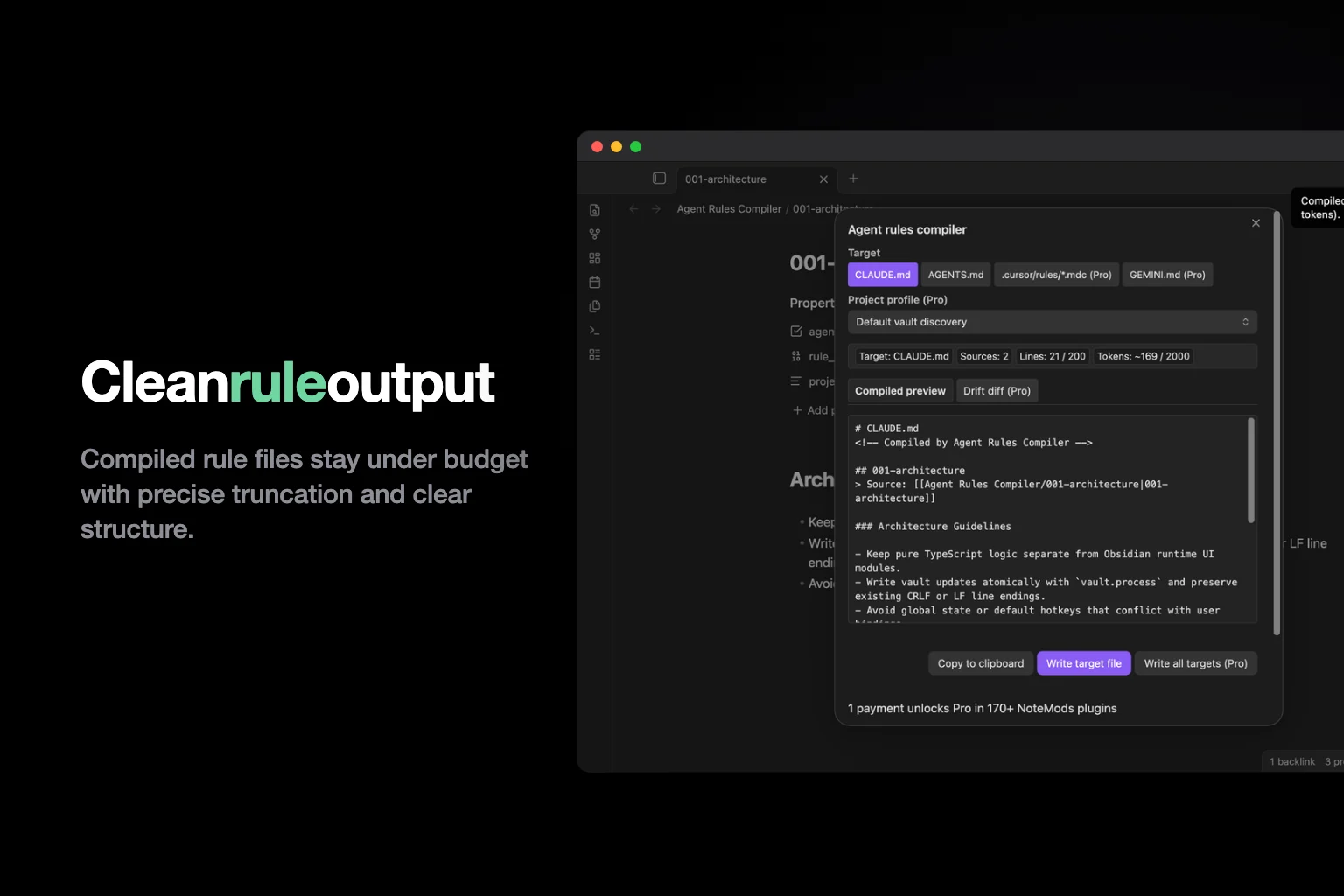
Agent Rules Compiler turns tagged or frontmatter-marked Obsidian notes and Architecture Decision Records (ADRs) into lean, token-budgeted rule files for coding agents. Keep your architecture rules in Obsidian as your single source of truth, then compile a deterministic CLAUDE.md, AGENTS.md, .cursor/rules/*.mdc, or GEMINI.md file inside your vault with exact line and token counts.
Version 1.0.0. Requires Obsidian 1.13.4 or later. Works on desktop and mobile.
1 Installation
Community Plugins
- Open Obsidian Settings and go to Community plugins.
- Select Browse and search for Agent Rules Compiler.
- Select Install, then select Enable.
Manual installation
- Download
main.js,manifest.json, andstyles.cssfrom the latest GitHub release. - Copy the three files into
<vault>/.obsidian/plugins/agent-rules-compiler/. - Reload Obsidian and enable Agent Rules Compiler in Community plugins.
2 Getting started
Mark rule notes in your vault
Mark any note or ADR for compilation using one of three methods:
- Add
agent_rule: trueto its YAML frontmatter (optionally addrule_priority: 10to place critical rules first). - Add
#agent-rule(or a nested tag such as#agent-rule/backend) in the note body or frontmatter tags. - Set a Source folder in Settings (for example
ADRsorRules) to include every note in that folder.
Compile, copy, or write rule files
- Run
Compile agent rulesfrom the command palette. - Check the live
Sources,Lines, andTokensbudget bar and inspect the compiled preview. - Select
Copy to clipboardto paste rules elsewhere, or selectWrite target fileto writeCLAUDE.mdorAGENTS.mdatomically into your vault. - You can also run
Copy compiled agent rulesdirectly from the command palette without opening the modal.
Use multi-target compilation, profiles, and drift diff (Pro)
- Switch to the
Drift diff (Pro)tab inside the compiler modal to review exact added and removed lines against the existing file before overwriting. - Select a saved profile in
Project profile (Pro)to scope rules by tag, folder, and frontmatter property. - Select
Write all targets (Pro)or runCompile all target rule files (Pro)to emitCLAUDE.md,AGENTS.md,.cursor/rules/*.mdc, andGEMINI.mdtogether. - Turn on
Auto-recompile on source note change (Pro)in Settings to keep compiled files synced automatically when you edit an ADR.
3 Features
Deterministic compilation with live line and token budgets
Run Compile agent rules from any note to collect matching vault rules marked with agent_rule: true, #agent-rule, or inside your chosen source folder. Agent Rules Compiler sorts notes deterministically by rule_priority descending, then title and path. It strips YAML frontmatter, demotes top-level headings outside fenced code blocks so section hierarchy stays clean, adds optional [[path|Title]] wikilink attribution, and displays live line and token counts before you copy or write.
Atomic writes and clean budget truncation
Coding agents lose focus when rule files grow past ~200 lines. Set your Max lines budget and Max tokens budget in Settings to keep compiled files concise. When matched notes exceed the budget, Agent Rules Compiler truncates cleanly and appends a truncation comment marker instead of emitting oversized files. Every write uses Obsidian vault.process and preserves existing Windows CRLF or Unix LF line endings.
Rule discovery defaults and Pro project profiles
Configure your primary target (CLAUDE.md or AGENTS.md), output file path, frontmatter key, source tag, source folder, and budget limits in Settings. Pro users can enable simultaneous multi-target compilation (AGENTS.md, .cursor/rules/*.mdc with globs and alwaysApply YAML frontmatter, and GEMINI.md), define named project profiles scoped by tag, folder, and frontmatter property, and enable debounced auto-recompile on source note changes.
Pro features and interactive previews
Pro adds four workflow upgrades on top of the free compiler:
- Multi-target simultaneous compilation: emit
CLAUDE.md,AGENTS.md,.cursor/rules/*.mdc(with valid YAMLdescription,globs, andalwaysApplyfrontmatter), andGEMINI.mdin one click. - Profile-based project scoping: create named project profiles filtered by
#tag, folder path, and frontmatter property (key=value), each with its own output folder, target list, and budget. - Live drift diff viewer: compare compiled output against the existing target file (
+added,-removed, unchanged line counts) inside the modal before overwriting. - Auto-recompile on source note change: update compiled rule files atomically via
vault.processwhenever a source note changes, with managed-output loop protection so compiler writes never re-trigger themselves.
Run What Pro adds at any time to test all four Pro features on in-memory sample notes without changing your vault.
4 Settings
| Setting | Tier | Description |
|---|---|---|
| Primary rule target | Free | Choose whether free compilation targets CLAUDE.md or AGENTS.md. |
| Output file path | Free | Vault path for the primary compiled rule file (default CLAUDE.md). |
| Frontmatter property key | Free | Include notes whose YAML frontmatter sets this property to true (default agent_rule). |
| Source tag | Free | Include notes carrying this tag without # (nested tags also match; default agent-rule). |
| Source folder | Free | Optional folder path whose notes are always included (for example ADRs). |
| Max lines budget | Free | Hard line limit for compiled rule files (default 200). |
| Max tokens budget | Free | Estimated token limit before clean truncation (default 2000). |
| Include source wikilink attribution | Free | Add a > Source: [[path\|Title]] wikilink under each compiled section heading. |
| Show confirmation notices | Free | Show a short Obsidian notice after copying or writing compiled rule files. |
| Multi-target toggles | Pro | Enable simultaneous AGENTS.md, .cursor/rules/*.mdc, and GEMINI.md output. |
| Cursor rule globs and alwaysApply | Pro | Configure globs and alwaysApply YAML frontmatter for .cursor/rules/*.mdc. |
| Auto-recompile on source note change | Pro | Automatically recompile target files via atomic vault.process when a source note changes. |
| Project profiles | Pro | Named profiles scoped by #tag, folder, and frontmatter property with independent targets and budgets. |
5 Privacy, payment and network
The core features are free. Pro features need a GitHub Sponsors sponsorship of theluckystrike: $5 a month or more, or $15 once. A total payment of $15 meets the payment requirement for Pro without further payment. Sign-in and the checks below still apply. Your notes stay readable and editable with or without Pro.
One payment turns on Pro in every NoteMods plugin.
GitHub handles the payment. Sponsor at https://notemods.com/pro/go?p=agent-rules-compiler&s=readme. You need no account for the free features. Pro needs the GitHub account that sponsors.
Until you select "Sign in with GitHub" in the settings, Agent Rules Compiler makes no network requests. Sign in uses the GitHub device flow. Agent Rules Compiler sends its public client ID and the scope read:user to https://github.com/login/device/code and shows you a code. While you enter the code at https://github.com/login/device, it asks https://github.com/login/oauth/access_token every few seconds to check the sign-in status. The scope permits profile reads only. GitHub needs this access to show the sponsorship tier. It grants no repository scope and no write access.
After sign in, Agent Rules Compiler sends one query to https://api.github.com/graphql. It checks if the signed-in account sponsors theluckystrike. It asks for the tier and the total payment to theluckystrike. The plugin reuses a successful check for 7 days. Failed checks can retry after 6 hours. Select Refresh to request an earlier check. It sends no note content, file names or other vault data, and it has no telemetry.
After a successful check, Pro can work offline for up to 14 days. Sign out or a negative sponsorship answer turns Pro off. The plugin stores the GitHub token through the secret storage API of Obsidian. It does not put the token in its saved settings or its local sponsorship data. The local storage of this device keeps your GitHub login, the tier and the time of the last check. Sign out clears the token. You can also revoke the access in your GitHub settings, under Applications.
6 Questions and answers
Will Agent Rules Compiler include its own compiled CLAUDE.md as a source note?
No. All managed output paths (CLAUDE.md, AGENTS.md, GEMINI.md, .cursor/rules/*.mdc, and profile outputs) are excluded from source discovery and guarded against auto-recompile loops.
Does Agent Rules Compiler break code blocks inside my ADR notes?
No. Heading demotion and inline tag scanning skip both backtick (```) and tilde (~~~) fenced code blocks as well as inline code spans and URLs.
Does this plugin work on mobile?
Yes. isDesktopOnly is false. The compiler modal, budget counter, drift diff viewer, and Settings tab work on both desktop and mobile Obsidian.
Does Agent Rules Compiler open a What's new tab after updates?
Yes. After an update, the plugin opens a brief What's new tab summarizing user-facing changes. You can turn this off in Settings.
7 Support
If you find a bug or have a feature request, open an issue on the GitHub repository with your Obsidian version and steps to reproduce. You can also explore Pro and the full NoteMods plugin catalog at notemods.com/pro/go.