MCP Context Packer · Obsidian plugin documentation
MCP Context Packer documentation
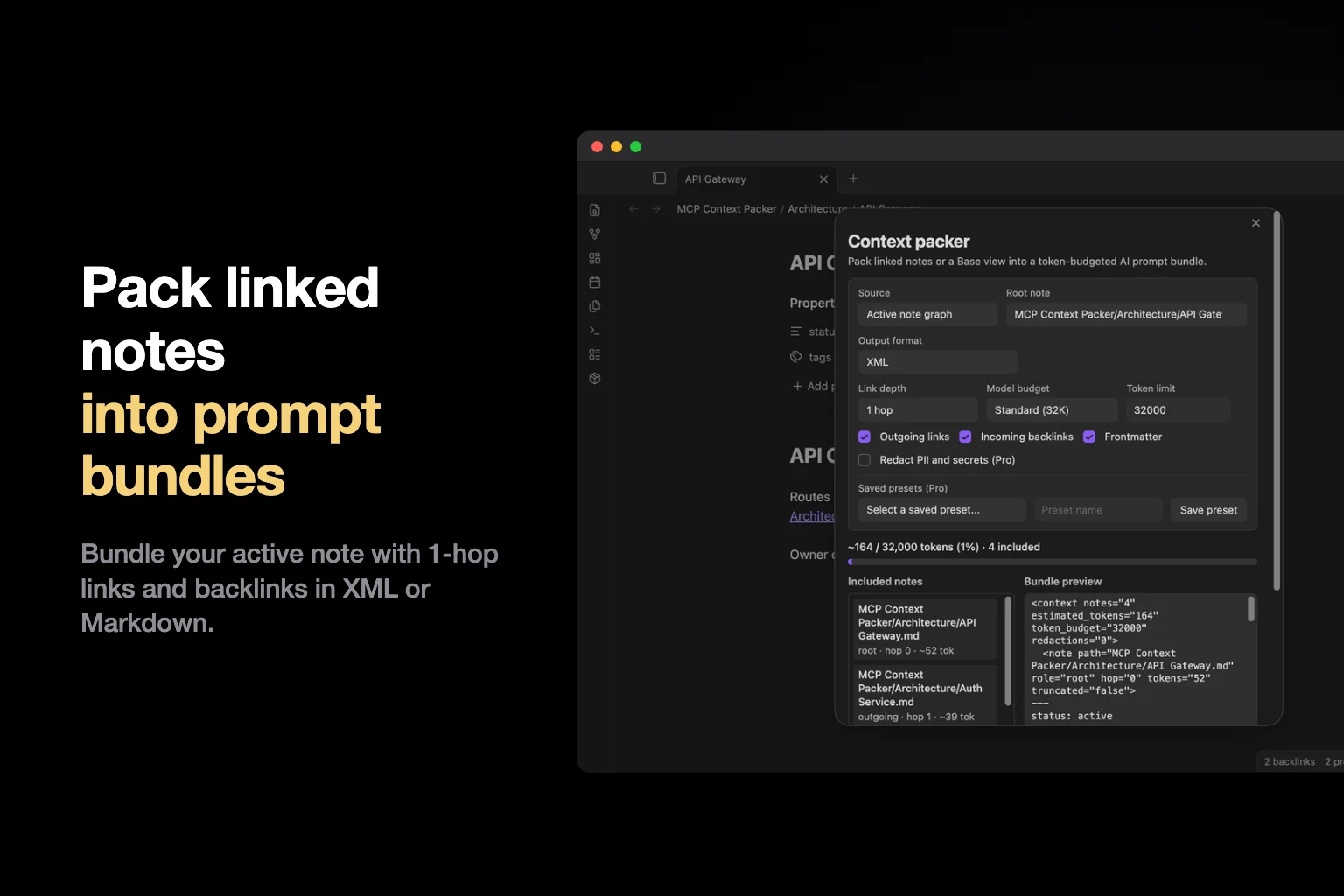
MCP Context Packer builds clean, token-budgeted AI prompt bundles from your active note, its linked neighborhood, or a .base view query. Instead of copying files one by one into Claude, ChatGPT, Codex or Gemini, open the packer modal to inspect per-note token estimates, watch a live model budget bar, switch between XML and Markdown output, and copy the whole bundle in one click.
Payment is required for full access. Pro costs $15 one time or $5 a month: Sponsor or $15 one-time offer.
Version 1.0.0. Requires Obsidian 1.13.4 or later. Works on desktop and mobile.
1 Installation
- Open "Settings -> Community plugins", select "Browse" and search for "MCP Context Packer".
- Select "Install" and "Enable".
For manual installation, copy main.js, manifest.json and styles.css into <vault>/.obsidian/plugins/mcp-context-packer/ and enable the plugin. You need Obsidian 1.13.4 or later.
2 Getting started
Open any note in your vault and run "Open context packer" from the command palette or left ribbon. Review the included 1-hop outgoing links and incoming backlinks, check the live token budget meter, choose XML or Markdown, and select "Copy bundle". For an even faster workflow, run "Copy active note bundle" to pack and copy your current note using your default settings.
- Open a Markdown note and run "Open context packer" from the command palette or click the package icon in the left ribbon.
- Select XML or Markdown output, adjust the model token budget, and toggle outgoing links, incoming backlinks, or YAML frontmatter.
- Review the included notes and live token bar, then select "Copy bundle" to copy the formatted prompt to your clipboard.
- For instant copying without opening the modal, run "Copy active note bundle" from the command palette.
- With Pro active, increase link depth to 2 or 3 hops, switch the source to "Base view query" to pack matching
.baserows, save named presets, enable PII and secret redaction, or select "Export MCP JSON" to save a local resource file inside your vault.
3 Features
1-hop linked note packing in XML or Markdown
Pack the active note together with its 1-hop outgoing links and 1-hop incoming backlinks in deterministic order. Root notes always appear first, followed by sorted outgoing links and backlinks. Toggle outgoing links, incoming backlinks, or YAML frontmatter on or off, and switch between structured XML tags (<context><note ...>) or clean Markdown headings with hop labels.
Live token count estimation and model budget bar
Watch the live token meter update as you change link depth, toggles, or output format. Pick a built-in model budget preset (8K, 32K, 128K, or 200K tokens) or type a custom token limit. Each note shows its individual token estimate, and when a bundle exceeds the budget, outer-hop notes are dropped cleanly with a clear dropped list so your prompt always fits.
Multi-hop packing, Base views, presets, redaction and MCP export (Pro)
Upgrade to Pro to traverse 2 to 3 link hops with a strict cycle guard so circular links never loop or duplicate notes. Pack notes matching the first view of a .base file using folder, tag, and frontmatter filters. Save named packing presets for recurring workflows, automatically redact emails, API keys, bearer tokens, private keys, and custom regex patterns before copying, and export local MCP-style resource JSON files directly into your vault.
4 Commands
Open the command palette and type the plugin name to see these commands. You can give each one a hotkey in Settings, Hotkeys.
| Command | Command id |
|---|---|
| Open context packer | mcp-context-packer:open-context-packer |
| Copy active note bundle | mcp-context-packer:copy-active-context |
| Pack active base view | mcp-context-packer:pack-base-view |
| Export active note as local resource JSON | mcp-context-packer:export-mcp-resource |
5 Settings
After a minor or major update, this plugin opens one What's new tab in the background. The tab and settings card suggest other NoteMods plugins and Zovo Chat and link to notemods.com for feedback (privacy). The tab sends no data. Turn the tab off in Settings.
| Setting | Default | What it does |
|---|---|---|
| Default output format | XML prompt bundle | Sets the initial format when opening the packer or copying the active note bundle. |
| Default token budget | 32,000 tokens | Sets the preset limit for the live model budget bar (custom limits from 256 to 1,000,000 are available in the packer modal). |
| Default link depth | 1 hop | Sets the number of link hops around the active note (2 to 3 hops require Pro). |
| Include outgoing links | On | Includes notes linked from the active note. |
| Include incoming backlinks | On | Includes notes that link back to the active note. |
| Include YAML frontmatter | On | Keeps YAML frontmatter at the top of each packed note. |
| Redact PII and secrets by default | Off | Enables built-in email, API key, and bearer token redaction automatically (Pro). |
| Redact phone numbers | Off | Also redacts US and international phone numbers when PII redaction is active (Pro). |
| Custom redaction regex rules | Empty | One rule per line as LABEL=regex or a plain regular expression (Pro). |
| Local MCP export folder | MCP Exports | Vault folder where exported .mcp.json resource files are saved (Pro). |
6 Pro
The command "What Pro adds" shows each Pro feature with an interactive demo on sample notes.
- Pack 2 to 3 hops of linked notes with a cycle guard and hop-distance ordering.
- Pack all notes matching a .base view query with folder, tag and property filters.
- Save and reuse named packing presets for different AI models and workflows.
- Redact emails, API keys, bearer tokens and custom regex patterns before copying.
- Export packed bundles as local MCP resource JSON files directly into your vault.
Sponsor $5 a month, or $15 once. When you have paid $15 in total, Pro stays on.
To activate Pro:
- Sponsor through GitHub Sponsors. A total payment of $15 meets the payment requirement for Pro without further payment. Sign-in and the checks below still apply.
- In Obsidian, open the settings of MCP Context Packer and select "Sign in with GitHub".
- Paste the copied code at github.com/login/device and approve.
7 Privacy, payment and network
The core features are free. Pro features need a GitHub Sponsors sponsorship of theluckystrike: $5 a month or more, or $15 once. A total payment of $15 meets the payment requirement for Pro without further payment. Sign-in and the checks below still apply. Your notes stay readable and editable with or without Pro.
One payment turns on Pro in every NoteMods plugin.
GitHub handles the payment. Sponsor at https://github.com/sponsors/theluckystrike/sponsorships?tier_id=666162&frequency=one-time&metadata_source=mcp-context-packer. You need no account for the free features. Pro needs the GitHub account that sponsors.
Until you select "Sign in with GitHub" in the settings, MCP Context Packer makes no network requests. Sign in uses the GitHub device flow. MCP Context Packer sends its public client ID and the scope read:user to https://github.com/login/device/code and shows you a code. While you enter the code at https://github.com/login/device, it asks https://github.com/login/oauth/access_token every few seconds to check the sign-in status. The scope permits profile reads only. GitHub needs this access to show the sponsorship tier. It grants no repository scope and no write access.
After sign in, MCP Context Packer sends one query to https://api.github.com/graphql. It checks if the signed-in account sponsors theluckystrike. It asks for the tier and the total payment to theluckystrike. The plugin reuses a successful check for 7 days. Failed checks can retry after 6 hours. Select Refresh to request an earlier check. It sends no note content, file names or other vault data, and it has no telemetry.
After a successful check, Pro can work offline for up to 14 days. Sign out or a negative sponsorship answer turns Pro off. The plugin stores the GitHub token through the secret storage API of Obsidian. It does not put the token in its saved settings or its local sponsorship data. The local storage of this device keeps your GitHub login, the tier and the time of the last check. Sign out clears the token. You can also revoke the access in your GitHub settings, under Applications.
8 Questions and answers
Does MCP Context Packer send my notes to an AI provider or external server?
No. All link traversal, token estimation, .base filtering, PII redaction, clipboard copying, and MCP JSON file export run locally on your device. Your note content never leaves your vault.
How accurate is the live token count estimation?
The token estimator uses a deterministic character-weighted heuristic for English prose, Markdown syntax, code blocks, and CJK text, including wrapper framing overhead. It runs locally with zero external tokenizer downloads and updates in real time as you toggle options.
How does multi-hop packing avoid infinite loops when notes link to each other?
The graph packer uses breadth-first search with a visited-path guard. Even when notes form cycles (A -> B -> C -> A), each note is packed at most once at its shortest hop distance from the root note.
What happens if a custom redaction regex is invalid?
Invalid custom regular expressions are skipped safely without crashing the packer, while all valid built-in and custom redaction rules continue to run normally.
9 Support
Plugin page: mcp-context-packer.
Report bugs in the issues, with your Obsidian version and a sample note or .base file if you can.