Memory Decay Auditor · Obsidian plugin documentation
Memory Decay Auditor documentation
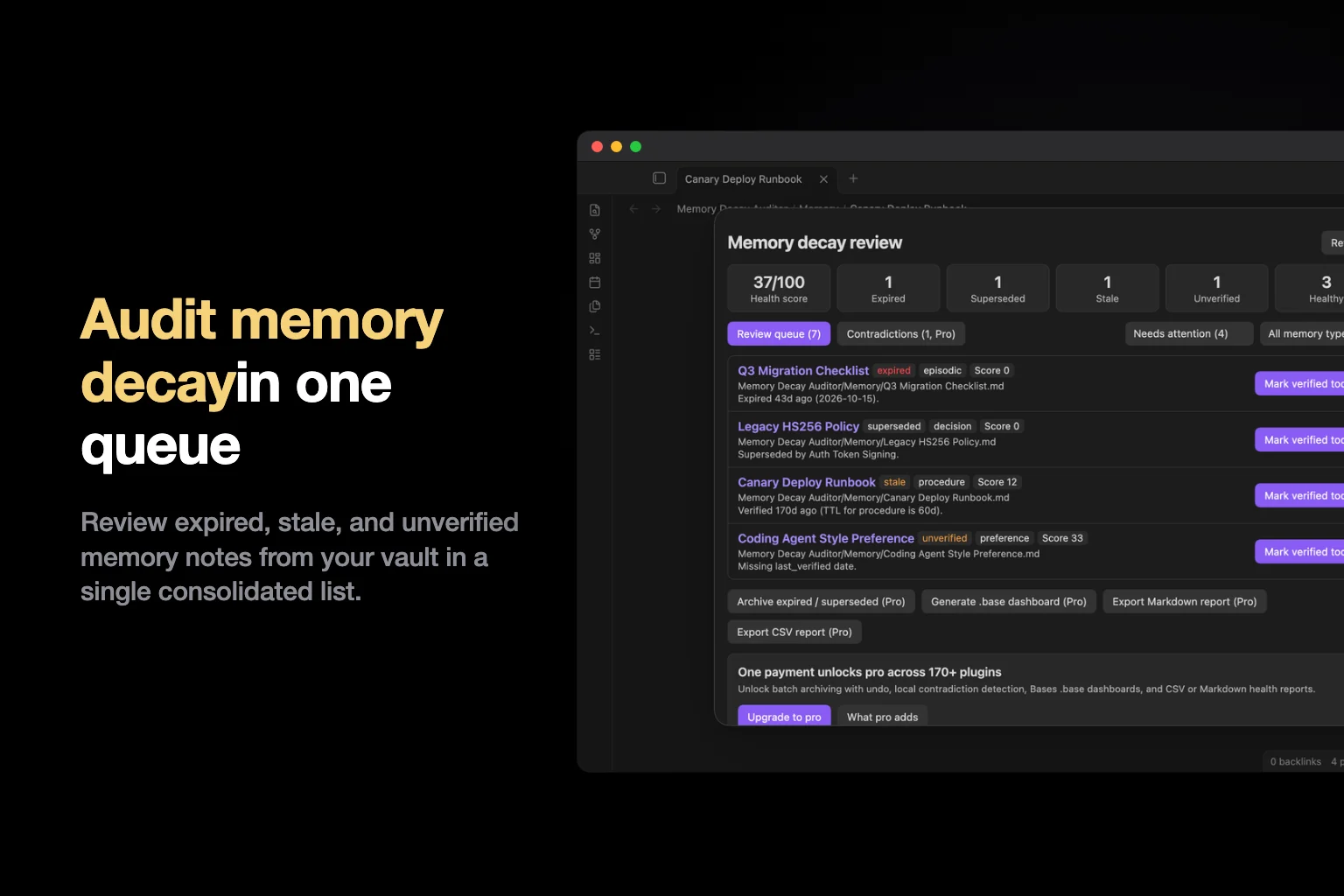
Memory Decay Auditor audits Obsidian memory notes for expired dates, stale verification windows, superseded decisions, and unverified facts. You can review decayed notes in one queue and stamp last_verified to today in one click without changing YAML comments or line endings.
When you connect Claude Code, Cursor, Codex, or an MCP server to an Obsidian vault, outdated decisions and temporary checklists remain active unless you review them. Memory Decay Auditor reads structured frontmatter properties locally and computes a clear decay score from 0 to 100 for each note.
Version 1.0.0. Requires Obsidian 1.13.4 or later. Works on desktop and mobile.
1 Installation
From Obsidian Community Plugins
- Open Settings and go to Community plugins in Obsidian.
- Select Browse and search for Memory Decay Auditor.
- Select Install, then select Enable.
Manual installation
- Download
main.js,manifest.json, andstyles.cssfrom the latest GitHub release. - Create the folder
.obsidian/plugins/memory-decay-auditor/inside your vault. - Copy the three files into that folder, reload Obsidian, and enable Memory Decay Auditor under Community plugins.
2 Getting started
Frontmatter schema
Add any combination of these YAML properties to notes that form your AI or personal memory layer:
---
memory_type: decision   # fact | decision | preference | procedure | episodic
confidence: high        # 0..1, percentage, or low | med | high
last_verified: 2026-11-20
expires: 2027-06-01
superseded_by: "[[Memory/New Decision]]"
subject: auth-signing   # or entity / memory_key for Pro contradiction checks
---
Common aliases such as semantic (mapped to fact), procedural (mapped to procedure), and adr (mapped to decision) are recognized automatically.
Commands
| Command | Tier | Action |
|---|---|---|
| Open memory decay review | Free | Audit the vault and open the review modal. |
| Mark active note verified today | Free | Stamp last_verified on the current Markdown note atomically. |
| Archive expired and superseded notes | Pro | Move expired and superseded notes into the archive folder and record an undo batch. |
| Undo last memory archive batch | Pro | Restore every note moved by the previous archive batch to its original path. |
| Generate bases memory health dashboard | Pro | Write a .base file with Attention queue, Expired and superseded, and Unverified notes views. |
| Export memory health report (Markdown) | Pro | Write a Markdown summary table with decay scores and contradiction findings. |
| Export memory health report (CSV) | Pro | Write an RFC-4180 CSV file with per-note decay metrics for spreadsheets or scripts. |
| What pro adds | Free | Open the interactive Pro demo modal. |
| Upgrade to pro | Free | Open the NoteMods Pro overview page in your browser. |
3 Features
Memory decay review queue
Run Memory Decay Auditor: Open memory decay review from the command palette to scan vault notes that contain memory frontmatter (memory_type, confidence, last_verified, expires, or superseded_by). The modal displays summary counts for Expired, Superseded, Stale, Unverified, and Healthy notes together with an average vault health score.
Each note uses a deterministic half-life decay formula based on its memory_type TTL and its confidence value (0 to 1, percentage, or low, med, high). Expired notes (expires strictly before today) and superseded notes receive a score of 0 so they stay at the top of the attention queue. You can filter the queue by status or by memory type, and click any title to open the note directly.
Atomic one-click verification
Select "Mark verified today" on any row in the review modal, or run Memory Decay Auditor: Mark active note verified today from the command palette. The plugin updates last_verified to today (YYYY-MM-DD) through vault.process so YAML comments, key order, inline comments, and CRLF or LF line endings stay intact.
If a note does not have a last_verified line yet, the plugin inserts one at the end of the frontmatter block. If a note has no frontmatter at all, the plugin adds a minimal YAML block without altering the body text.
Configurable TTL thresholds and Pro controls
Open Settings and select Memory Decay Auditor to set an optional scope folder and configure staleness TTL days for each memory type (episodic, procedure, preference, decision, and fact). Default TTL thresholds are 14 days for episodic notes, 60 days for procedures, 90 days for preferences, 120 days for decisions, and 180 days for facts.
The settings tab also configures Pro output paths for the archive folder, the Obsidian Bases .base health dashboard, the Markdown health report, and the CSV decay-score export.
Interactive Pro demos and local governance
Pro adds four local maintenance tools for larger AI memory vaults: batch archiving of expired and superseded notes with a one-command undo log, offline contradiction and duplicate-claim detection across shared subject, entity, or memory_key properties, an Obsidian Bases .base memory health dashboard generator, and CSV or Markdown health reports.
Run Memory Decay Auditor: What pro adds to test every Pro feature on sample memory notes directly inside Obsidian before you sponsor.
4 Commands
Open the command palette and type the plugin name to see these commands. You can give each one a hotkey in Settings, Hotkeys.
| Command | Command id |
|---|---|
| Open memory decay review | memory-decay-auditor:open-memory-decay-review |
| Mark active note verified today | memory-decay-auditor:mark-active-note-verified-today |
| Archive expired and superseded notes | memory-decay-auditor:archive-expired-and-superseded |
| Undo last memory archive batch | memory-decay-auditor:undo-last-archive-batch |
| Generate bases memory health dashboard | memory-decay-auditor:generate-bases-health-dashboard |
| Export memory health report (Markdown) | memory-decay-auditor:export-memory-health-markdown |
| Export memory health report (CSV) | memory-decay-auditor:export-memory-health-csv |
| What pro adds | memory-decay-auditor:what-pro-adds |
5 Settings
| Setting | Default | Description |
|---|---|---|
| Memory scope folder | Empty | Optional folder to audit; empty audits all notes with memory frontmatter in the vault. |
| Include untyped notes in scope folder | Off | Treat Markdown notes inside the scope folder without memory frontmatter as unverified facts. |
| Episodic TTL (days) | 14 | Days before episodic notes are flagged as stale. |
| Procedure TTL (days) | 60 | Days before procedure notes are flagged as stale. |
| Preference TTL (days) | 90 | Days before preference notes are flagged as stale. |
| Decision TTL (days) | 120 | Days before decision notes are flagged as stale. |
| Fact TTL (days) | 180 | Days before fact notes are flagged as stale. |
| Archive folder (Pro) | Archive/Memory |
Destination folder for archived expired and superseded notes. |
| Contradiction confidence spread (Pro) | 0.35 |
Minimum confidence difference between active notes on the same subject to flag a conflict. |
| Bases dashboard path (Pro) | Memory Health.base |
Output path for the generated Bases dashboard. |
| Markdown health report path (Pro) | Memory Health Report.md |
Output path for the Markdown health report. |
| CSV health report path (Pro) | memory-health-report.csv |
Output path for the CSV decay-score export. |
6 Privacy, payment and network
The core features are free. Pro features need a GitHub Sponsors sponsorship of theluckystrike: $5 a month or more, or $15 once. A total payment of $15 meets the payment requirement for Pro without further payment. Sign-in and the checks below still apply. Your notes stay readable and editable with or without Pro.
GitHub handles the payment. Sponsor at https://github.com/sponsors/theluckystrike. You need no account for the free features. Pro needs the GitHub account that sponsors.
Until you select "Sign in with GitHub" in the settings, Memory Decay Auditor makes no network requests. Sign in uses the GitHub device flow. Memory Decay Auditor sends its public client ID and the scope read:user to https://github.com/login/device/code and shows you a code. While you enter the code at https://github.com/login/device, it asks https://github.com/login/oauth/access_token every few seconds to check the sign-in status. The scope permits profile reads only. GitHub needs this access to show the sponsorship tier. It grants no repository scope and no write access.
After sign in, Memory Decay Auditor sends one query to https://api.github.com/graphql. It checks if the signed-in account sponsors theluckystrike. It asks for the tier and the total payment to theluckystrike. The plugin reuses a successful check for 7 days. Failed checks can retry after 6 hours. Select Refresh to request an earlier check. It sends no note content, file names or other vault data, and it has no telemetry.
After a successful check, Pro can work offline for up to 14 days. Sign out or a negative sponsorship answer turns Pro off. The plugin stores the GitHub token through the secret storage API of Obsidian. It does not put the token in its saved settings or its local sponsorship data. The local storage of this device keeps your GitHub login, the tier and the time of the last check. Sign out clears the token. You can also revoke the access in your GitHub settings, under Applications.
7 Questions and answers
Does Memory Decay Auditor send my notes to an LLM or cloud API?
No. Every audit, decay calculation, contradiction check, archive move, and report export runs locally inside Obsidian on desktop and mobile.
How is the decay score calculated?
Expired and superseded notes score 0. Unverified notes score round(35 * confidence). Verified notes use exponential half-life decay where the half-life equals the TTL of their memory_type: round(100 * confidence * 0.5^(ageDays / ttlDays)).
Will clicking Mark verified today break my YAML comments or formatting?
No. The plugin updates only the last_verified line via vault.process and preserves surrounding comments, inline comments, key order, and CRLF or LF line endings.
What happens if a note is already inside the archive folder?
Notes located inside the configured archive folder are excluded from active decay audits and from archive plans so archived history never pollutes your attention queue.
8 Support
Report bugs or request features on the GitHub repository issue tracker. Include your Obsidian version, plugin version, and a minimal sample note frontmatter block so the issue can be reproduced quickly.