Vault RAG Chunker · Obsidian plugin documentation
Vault RAG Chunker documentation
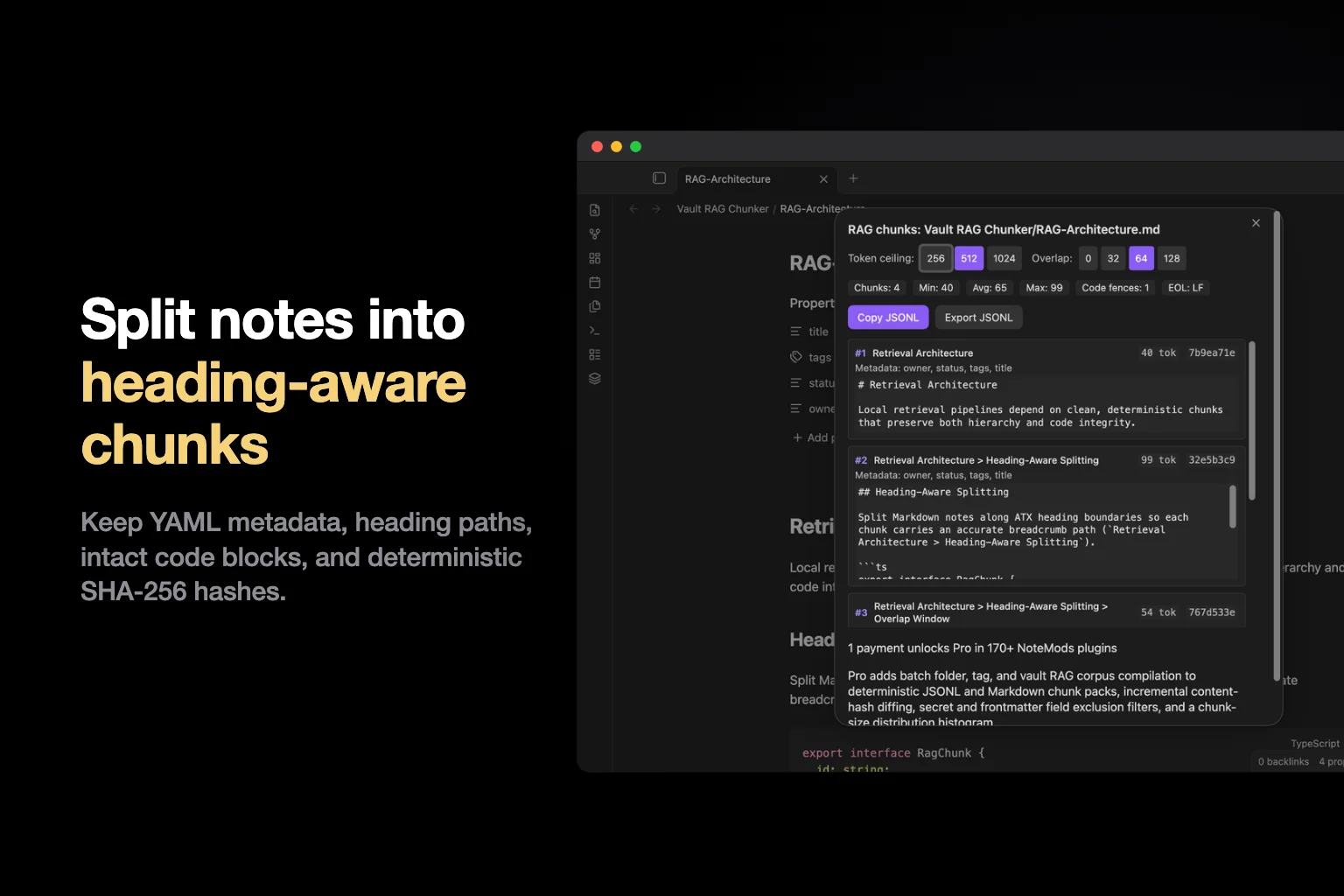
Vault RAG Chunker splits Markdown notes into deterministic, heading-aware, token-bounded chunks for local retrieval pipelines. It runs locally in Obsidian with zero external services required for chunking or export. Each chunk keeps YAML frontmatter metadata, a heading breadcrumb path (Doc > H2 > H3), intact fenced code blocks, original CRLF or LF line endings, and a deterministic SHA-256 hash.
Version 1.0.0. Requires Obsidian 1.13.4 or later. Works on desktop and mobile.
1 Installation
From Obsidian Community Plugins
- Open Settings and go to Community plugins.
- Turn off Restricted mode if needed.
- Select Browse, search for Vault RAG Chunker, and select Install.
- Select Enable to turn the plugin on.
Manual installation
- Download
main.js,manifest.json, andstyles.cssfrom the latest GitHub release. - Create the folder
<vault>/.obsidian/plugins/vault-rag-chunker/. - Copy the three files into that folder.
- Reload Obsidian and enable Vault RAG Chunker under Settings > Community plugins.
2 Getting started
Preview and export the active note (Free)
- Open any Markdown note in Obsidian.
- Run "Vault RAG Chunker: Preview RAG chunks for active note" from the command palette or click the ribbon icon.
- Adjust the token ceiling (
256,512,1024) or overlap (0,32,64,128) to inspect chunk boundaries and token counts. - Select "Copy JSONL" to copy the deterministic JSONL lines to your clipboard, or select "Export JSONL" to write
<exportFolder>/<note>.chunks.jsonlinside your vault.
You can also run "Copy active note RAG chunks as JSONL" or "Export active note RAG chunks as JSONL" directly from the command palette without opening the preview window.
Compile a batch vault RAG corpus (Pro)
- Open Settings > Vault RAG Chunker and set optional Included folders and Included tags.
- Review Excluded frontmatter keys (such as
api_key,secret,token,password) and enable "Redact secrets before export" if your notes contain credentials. - Run "Vault RAG Chunker: Compile batch RAG corpus (Pro)" from the command palette.
- Inspect the summary modal showing notes scanned, total chunks, added, modified, unchanged, and removed counts, secrets redacted, and the 5-bucket chunk-size distribution histogram.
The compiler writes corpus.jsonl (or corpus-delta.jsonl on incremental runs), corpus-manifest.json, and optional standalone Markdown files under <exportFolder>/chunks/. The export folder is always excluded from batch scans so re-runs never re-chunk exported files.
3 Features
Heading-aware semantic chunking and JSONL export
Open the "Preview RAG chunks for active note" command or select the ribbon icon to inspect how the active note splits before you export. The preview window displays the total chunk count, minimum, average, and maximum token counts, preserved code fences, and detected line endings. Each card shows its heading breadcrumb path (Doc > H2 > H3), token count, short SHA-256 hash, metadata keys, and body preview. Copy the active note chunks to the clipboard with one click or export them to a .chunks.jsonl file inside your configured export folder. Every JSONL line uses a fixed field order (id, source_path, heading_path, tokens, sha256, metadata, text) with strict JSON escaping, and repeated runs on the same note produce identical chunk IDs and SHA-256 hashes.
Configurable token ceiling and overlap presets
Switch token ceilings (256, 512, or 1024 tokens) and overlap windows (0, 32, 64, or 128 tokens) live inside the preview modal or set defaults in Settings. When a prose section exceeds the token ceiling, the chunker splits at sentence or word boundaries and carries trailing prose words into the next chunk within the same heading section. Fenced code blocks (``` and ~~~) stay whole and are never split across chunks, and # comment lines inside code fences are never treated as headings.
Settings and Pro batch corpus compiler
Configure default token ceilings, overlap, export folder, and Pro corpus compilation rules in Settings. Pro adds batch folder, tag, and vault corpus compilation to deterministic JSONL and Markdown chunk packs, incremental content-hash diffing (corpus-manifest.json and corpus-delta.jsonl), secret redaction and frontmatter field exclusion filters, and a chunk-size distribution histogram.
Interactive What Pro adds demos
Open "What Pro adds" from Settings or the command palette to test each Pro feature on sample notes inside the modal. Each demo runs locally in memory and never reads or modifies your vault files.
4 Settings
| Setting | Default | Description |
|---|---|---|
| Token ceiling | 512 |
Maximum estimated tokens per chunk (64 to 8192). |
| Overlap tokens | 64 |
Trailing prose tokens carried into the next chunk within the same heading section (0 to 512). |
| Export folder | RAG-Exports |
Vault folder for JSONL exports, manifests, and Markdown chunk packs. Always excluded from batch scans. |
| Show confirmation notices | On | Show a short status notice after copying or exporting chunks. |
| Included folders (Pro) | Empty | Comma-separated folders to compile in batch mode. Leave blank to scan the entire vault. |
| Included tags (Pro) | Empty | Comma-separated tags to filter notes in batch mode. Leave blank to include all tags. |
| Export Markdown chunk packs (Pro) | On | Write standalone .md chunk files with frontmatter alongside the JSONL output. |
| Incremental content-hash diffing (Pro) | On | Compare SHA-256 hashes against corpus-manifest.json and only re-emit added or modified chunks. |
| Excluded frontmatter keys (Pro) | api_key, secret, token, password, private_notes |
YAML frontmatter keys stripped from chunk metadata before export. |
| Redact secrets before export (Pro) | On | Replace API keys, GitHub tokens, AWS keys, Bearer tokens, and private keys with [REDACTED]. |
| Custom secret patterns (Pro) | Empty | Optional newline-separated regular expressions redacted as [REDACTED]. |
5 Privacy, payment and network
The core features are free. Pro features need a GitHub Sponsors sponsorship of theluckystrike: $5 a month or more, or $15 once. A total payment of $15 meets the payment requirement for Pro without further payment. Sign-in and the checks below still apply. Your notes stay readable and editable with or without Pro.
One payment turns on Pro in every NoteMods plugin.
GitHub handles the payment. Sponsor at https://notemods.com/pro/go?p=vault-rag-chunker&s=readme. You need no account for the free features. Pro needs the GitHub account that sponsors.
Until you select "Sign in with GitHub" in the settings, Vault RAG Chunker makes no network requests. Sign in uses the GitHub device flow. Vault RAG Chunker sends its public client ID and the scope read:user to https://github.com/login/device/code and shows you a code. While you enter the code at https://github.com/login/device, it asks https://github.com/login/oauth/access_token every few seconds to check the sign-in status. The scope permits profile reads only. GitHub needs this access to show the sponsorship tier. It grants no repository scope and no write access.
After sign in, Vault RAG Chunker sends one query to https://api.github.com/graphql. It checks if the signed-in account sponsors theluckystrike. It asks for the tier and the total payment to theluckystrike. The plugin reuses a successful check for 7 days. Failed checks can retry after 6 hours. Select Refresh to request an earlier check. It sends no note content, file names or other vault data, and it has no telemetry.
After a successful check, Pro can work offline for up to 14 days. Sign out or a negative sponsorship answer turns Pro off. The plugin stores the GitHub token through the secret storage API of Obsidian. It does not put the token in its saved settings or its local sponsorship data. The local storage of this device keeps your GitHub login, the tier and the time of the last check. Sign out clears the token. You can also revoke the access in your GitHub settings, under Applications.
6 Questions and answers
Does Vault RAG Chunker send my notes to an external API?
No. All Markdown parsing, token estimation, SHA-256 hashing, secret redaction, diffing, and JSONL export run locally in pure TypeScript inside Obsidian.
What happens if a single fenced code block is larger than the token ceiling?
Vault RAG Chunker keeps the entire fenced code block intact in one chunk rather than cutting syntax in half. The chunk stats report any oversized chunks so you can adjust your token ceiling if needed.
Are Windows CRLF line endings preserved?
Yes. If a source note uses \r\n line endings, the emitted chunk text preserves \r\n instead of converting to \n.
Does incremental diffing skip unchanged chunks reliably?
Yes. Each chunk hash is computed deterministically from source_path, heading_path, filtered metadata, and text. When a note or section has not changed, its SHA-256 hash matches corpus-manifest.json and the compiler marks it unchanged.
Does Vault RAG Chunker work on Obsidian mobile?
Yes. The plugin uses pure TypeScript with no Node-only modules (isDesktopOnly: false), so it works on desktop and mobile vaults.
7 Support
If you find a bug or have a feature request, open an issue on the GitHub repository with your Obsidian version, plugin version, and a short sample note that reproduces the problem.