Without a plugin, put a Markdown link to a shortcuts://run-shortcut address in a note, and it runs a shortcut with fixed text. To send the selection or the whole note, use Shortcuts Bridge, or the Shell commands plugin on a Mac. Obsidian URI works in the other direction, and its help page lists no action that runs a shortcut, as of October 2026.
Updated · 4 ways compared · 21 sources
Background
A plugin for this job, Shortcut Launcher by MacStories, came out in January 2022. Its repository has 219 stars, and its last release, 1.1.0, is from April 2024. The download file of Obsidian counted 17,413 downloads for it on 11 May 2026. The plugin list that Obsidian mirrors on GitHub had no entry for it on 11 October 2026.
Two requests on that repository are still open, each with 4 comments. One from January 2022 asks how to receive the result of a shortcut. One from May 2022 asks to replace the selected text with the output. A forum topic from January 2022, with 4 posts and 6 likes, shows a workaround. A button opens a shortcuts:// link, and the shortcut writes back through the Advanced URI plugin.
4 ways to do it
A shortcuts link in a note
Apple documents the address shortcuts://run-shortcut?name=[name]&input=[input]&text=[text]. The input is the word text or the word clipboard, and the text must be URL-encoded. Obsidian Help shows an external link as link text in brackets and a URL in parentheses.
Put such a link in a note and select it. A member of the MacStories team wrote on GitHub in January 2022 that a link with this scheme runs a shortcut. To get text back, the shortcut can open an Obsidian URI as its last action, for example new with append.
limits
The text in the link is fixed, so the link can't hold the current selection. Obsidian Help shows such links with web and Obsidian addresses only, and this guide did not test one.
On a Mac, Apple has a command line tool for Shortcuts. The command shortcuts run runs a shortcut by name. The flag -i gives it an input file, and -o writes the output to a file.
The Shell commands plugin runs a command line from the command palette or a hotkey. Its docs list a variable for the selected text, and output channels such as the current file and the clipboard. The directory shows 97k downloads for it.
limits
The directory lists Shell commands as desktop only, so this way does not exist on iPhone or iPad. The Apple page shows the input as a file, and this guide did not test the two together.
Shortcut Launcher makes an Obsidian command for each launcher that you define, with a shortcut name and an input type. Its README lists inputs such as the selected text, the current paragraph, the entire document and the document path. It says the plugin uses the URL scheme on iPhone and iPad, and shell commands on a Mac.
Its directory page still loads and lists desktop and mobile. The page shows no download count, the health label Needs work and the review label Not scanned. An open report from September 2024 says the plugin stopped on macOS 15.
limits
Its README names no way to get the output back, and two requests for that are open since 2022. The Obsidian plugin list on GitHub had no entry for it on 11 October 2026.
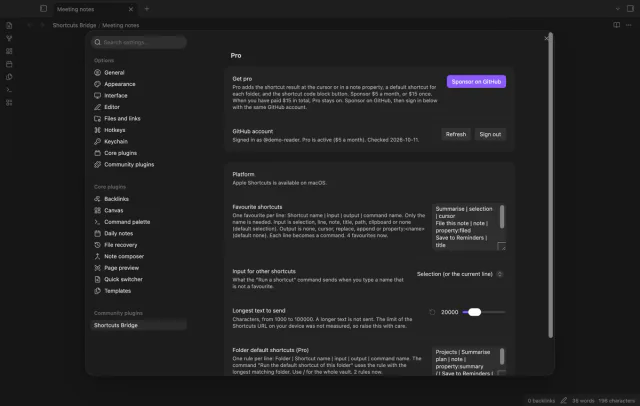
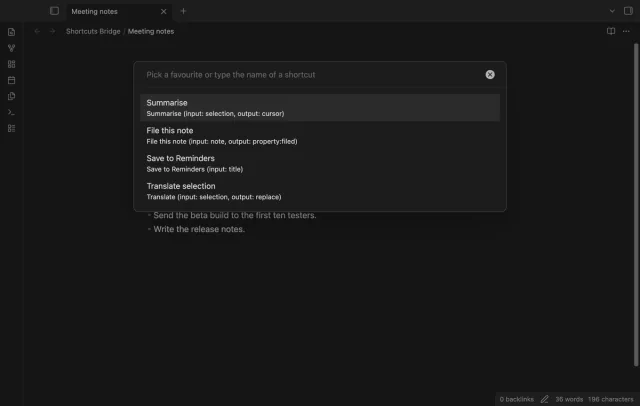
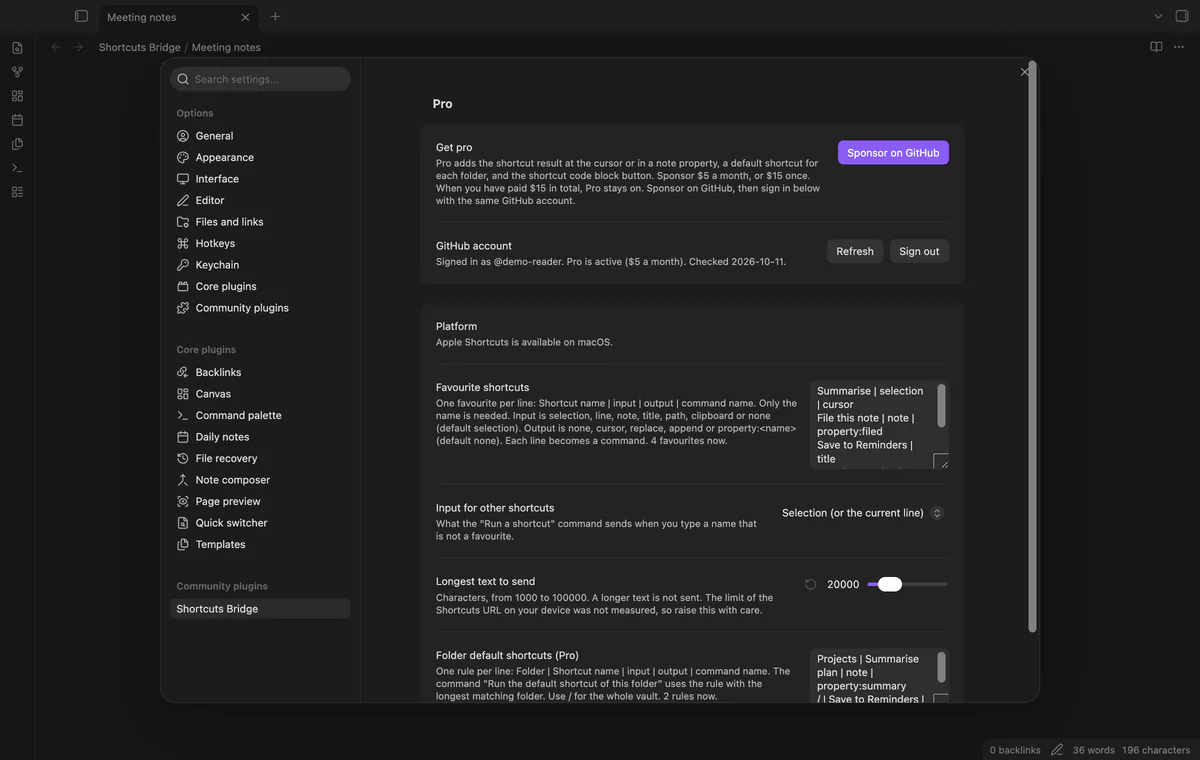
Shortcuts Bridge makes a command for each favourite and opens the shortcuts:// link with your text. The input is the selection, the line, the note, the title, the path, the clipboard or none. A text over the limit in the settings, 20,000 characters by default, is not sent.
Running a shortcut with text is free. With Pro, the x-callback-url form brings the output back to the cursor, over the selection, to the end or into a property. Pro is $5 a month or $15 once through GitHub Sponsors.
limits
The code runs a shortcut on iPhone, iPad and Mac only, and no test started the Shortcuts app or ran on a phone. It can't list your shortcuts, so you type each name.
Install Shortcuts Bridge from Community plugins and enable it. It needs Obsidian 1.13.4 or later.
In the Shortcuts app, read the exact name of the shortcut that you want to run.
In Obsidian, open Settings, then Shortcuts Bridge. Add a line such as Summarise | selection to Favourite shortcuts.
Open a note and select the text to send. With no selection, the plugin sends the current line.
Open the command palette and run your favourite. Its command name is Run and the shortcut name in quotes.
The plugin opens the link with the name and your text. On Windows, Linux or Android it shows a notice and sends nothing.
Common questions
Can a shortcut send its output back to my Obsidian note?
Yes, in two ways. Apple documents an x-success address that Shortcuts opens with the output in a parameter named result. Shortcuts Bridge reads that parameter with Pro, and without a plugin your shortcut can open an Obsidian URI that appends text to a note.
How do I run an Obsidian command from the Shortcuts app?
The direction is then from Shortcuts to Obsidian, and other plugins do it. Advanced URI documents an address with a commandid or commandname parameter that runs an Obsidian command. Actions URI adds x-callback-url addresses for notes, daily notes and search results. The directory lists both for desktop and mobile.
Does the Shortcuts app come to the front when a link runs a shortcut?
The Apple page on the URL scheme does not say. The README of Shortcut Launcher says that on iOS and iPadOS 15 it must leave Obsidian and open the Shortcuts app. It says that on a Mac it runs shortcuts in the background, through shell commands. This guide did not test either case.
Why do I have to type the name of the shortcut?
The URL scheme takes the shortcut by its name, and the Apple page on it names no address that lists your shortcuts. On a Mac the command shortcuts list prints them. Shortcuts Bridge can't check that a name exists, so a wrong name goes to the Shortcuts app as it is.
The free Toggl Track phone app already starts and stops your timer on a phone, with a widget and offline tracking. Obsidian has no Toggl feature of its own, and the free Toggl Track plugin is desktop only, as of October 2026. Mobile Timer for Toggl Track is listed for mobile in the directory, and it is tested on desktop only.
Obsidian has no Hypothesis import of its own, and the older Hypothes.is plugin is no longer available in the directory, as of October 2026. Without a plugin, Hypothesis exports the annotations of one document to a text, CSV, HTML or JSON file. For a sync, use the free Annotation Inbox, a free Templater script, or the paid Readwise service.