How to search notes by date in Obsidian
Core search has no operator for the created or modified date, as of October 2026.
As of October 2026, the core Search and Backlinks panes can show more text around a match. Their help pages list no option for the headings or parent list items above it. The free plugin Better Search Views adds them inside the core panes, so try it first, then Context Trees if it fails.
Context Trees has Pro, and $15 one time turns it on in all 134 plugins.
The main forum request was opened on 26 October 2022. It asks Backlinks and Search to show the parent list item or the heading breadcrumbs of each entry. It has 78 likes and 28 posts, and the newest post is from December 2025.
An older request, Super FR on the Backlinks and Search pane, dates from January 2022 and has 29 likes. Its first point is that the Backlinks pane does not show the parent item. In the 2022 topic, posters point to two free plugins, Influx and Better Search Views.
The Search pane has two settings for this. Collapse results toggles the search context, and Show more context expands a result to show more text around the match.
The Backlinks pane has the same two options. There, Show more context shows the full paragraph that holds the mention. The pane also lists unlinked mentions, and Search takes a regular expression between slashes.
Better Search Views is free and has about 50,000 downloads in the community directory. Its README says it patches the core search, the Backlinks view, backlinks in the document and embedded queries. Each match gets breadcrumbs from the ancestor headings and list items above it.
So it does this job in full, inside the panes you already use, and it covers embedded queries too. If it runs well on your setup, you need nothing else.
Influx shows backlinks at the bottom of a note as excerpts, and its guide lists an option to show the bullet structure. It has about 31,000 downloads, and its last release is from January 2026.
Better Backlinks shows the whole block around each link as a card, under the note or in a sidebar. For a link in a list item, the card shows the whole top-level item with everything nested under it. It also lists unlinked mentions.
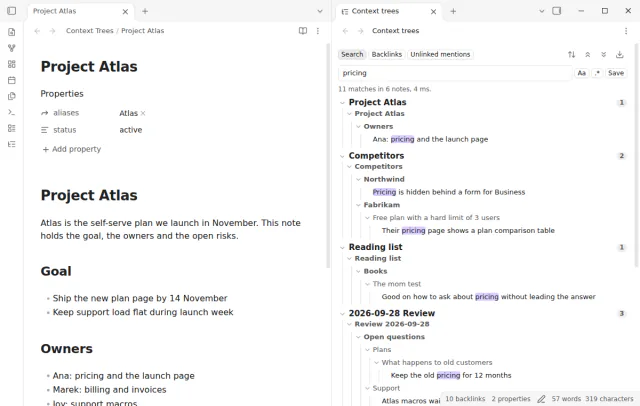
Context Trees is a separate side view with a Search tab and a Backlinks tab. Each hit sits under the headings and parent list items above it, and hits that share a parent show it once. It reads notes through the public Obsidian API and leaves the core panes as they are.
Search, backlinks, unlinked mentions, sorting, folding and open at the line are free. Regular expressions, saved queries, export and a view state for each note need Pro, at $5 a month or $15 once through GitHub Sponsors.
path: and tag: don't work in it. Its tests run on the desktop app only.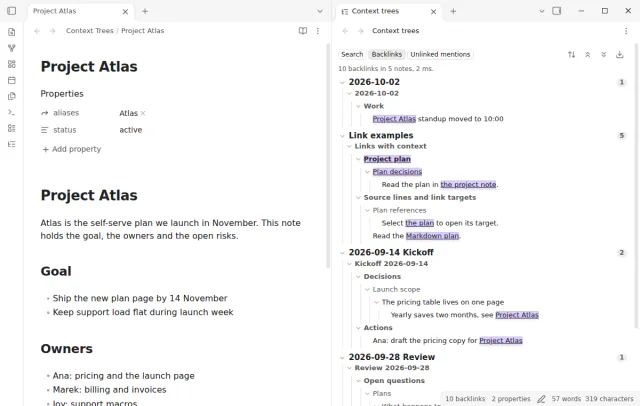
MIT · no telemetry · core features free
Install Context Trees from Community plugins and enable it. It needs Obsidian 1.13.4 or later.
Select the tree icon in the ribbon, or run the command Open the side view. The view opens in the right sidebar.
Type a word or a quoted phrase in the search box. Every word must be on the same line of a note.
Read each match under its headings and parent list items. Select a line to open the note with the cursor on that line.
Open a note and select the Backlinks tab. Each linking line shows with the same kind of tree.
Select the arrow of a note or of a branch to fold it.
The plugin changes the core panes through private parts of Obsidian, and its README warns that an update may break it. Issue 66 reports the error on Obsidian 1.12.7 and has been open since May 2026. One user wrote in June 2026 that the error was gone on the Mac and stayed on iOS. The author wrote that he could not reproduce it and asked for steps.
Context Trees has had free unlinked mentions since version 1.4.0, and regular expressions need Pro there. The core panes cover both without trees. Core Search takes a regular expression between slashes, and the core Backlinks pane lists unlinked mentions. Core Bookmarks keeps a search term, and Search has Copy search results.
Yes. The operators section:, block: and line: find words in the same section, block or line. They change which notes match, not how a result is drawn.
No. It searches the body text of Markdown notes line by line, and it skips the properties block. For file names, core Search has the file: operator. For properties, core Search takes a property name in brackets, such as [aliases].
 That's every step, start to finish.
This guide uses Context Trees. Pro adds "Regular expressions and saved queries" and "View state for each note". One payment of $15 turns on Pro in 134 plugins.
This guide uses Context Trees. Pro adds "Regular expressions and saved queries" and "View state for each note". One payment of $15 turns on Pro in 134 plugins.
$15 once. Pro tools in 134 NoteMods plugins with one GitHub sponsorship. Nothing renews.
Pro turns on right after payment. Select Sign in with GitHub in the settings of each plugin you use. Free features stay free.
Secure checkout by GitHub Sponsors - needs a GitHub login.
Show parent headings and lists in search results.
One sponsorship turns on the Pro features in 134 NoteMods plugins. Free features stay free.
$15 one time: Pro stays on, nothing renews. $5 a month: Pro is on while you sponsor, and stays on after you have paid $15 in total. You pay on GitHub (a GitHub login is needed), then select Sign in with GitHub in the plugin settings. All sponsor tiers