How to show headings from embedded notes in the Obsidian outline
The core Outline can't show them, as of October 2026.
Core search has no operator for the created or modified date, as of October 2026. It can sort results by either time, and it can match a date written in a file name, the text or a property. For a real date filter you use a base, a Dataview query or a search plugin.
Search Operators has Pro, and $15 one time turns it on in all 134 plugins.
"Search operators for Note Creation/Modification Date" was opened on 2020-09-04. It has 139 likes and 43 posts, and the latest post is from January 2026. People there want to find what they wrote last week, or between two dates.
A sister request from 2021-01-17 asks for link operators and has 120 likes and 36 posts. The same four ways answer it, so each one below covers links too.
Run a search, then set the sort order to Modified time or Created time. For a hard filter, the date has to be text. The help page shows a path search for one month of daily notes and a regular expression for ISO dates.
For links, type the link in quotes, with its double square brackets. A poster confirmed in March 2025 that this returns only the links. The Backlinks pane lists the links to one note and has its own search filter.
Bases is a core plugin, and its filters can read file dates. The help page gives the filter file.mtime > now() - "1 week" for files modified within the last week. The created time is file.ctime.
For links, file.hasLink tests whether a file links to another one. The help page adds that file.hasLink(this.file), in a base in the sidebar, replicates the Backlinks pane.
file.backlinks is heavy on performance and doesn't refresh on its own.Dataview is a community plugin that lists notes from a query. Its docs give file.ctime and file.mtime as the created and modified times, and show a query for files modified in the last 24 hours.
Links work as a source. FROM with a link in double square brackets returns the pages that link to that note. The outgoing() source returns the pages that note links to.
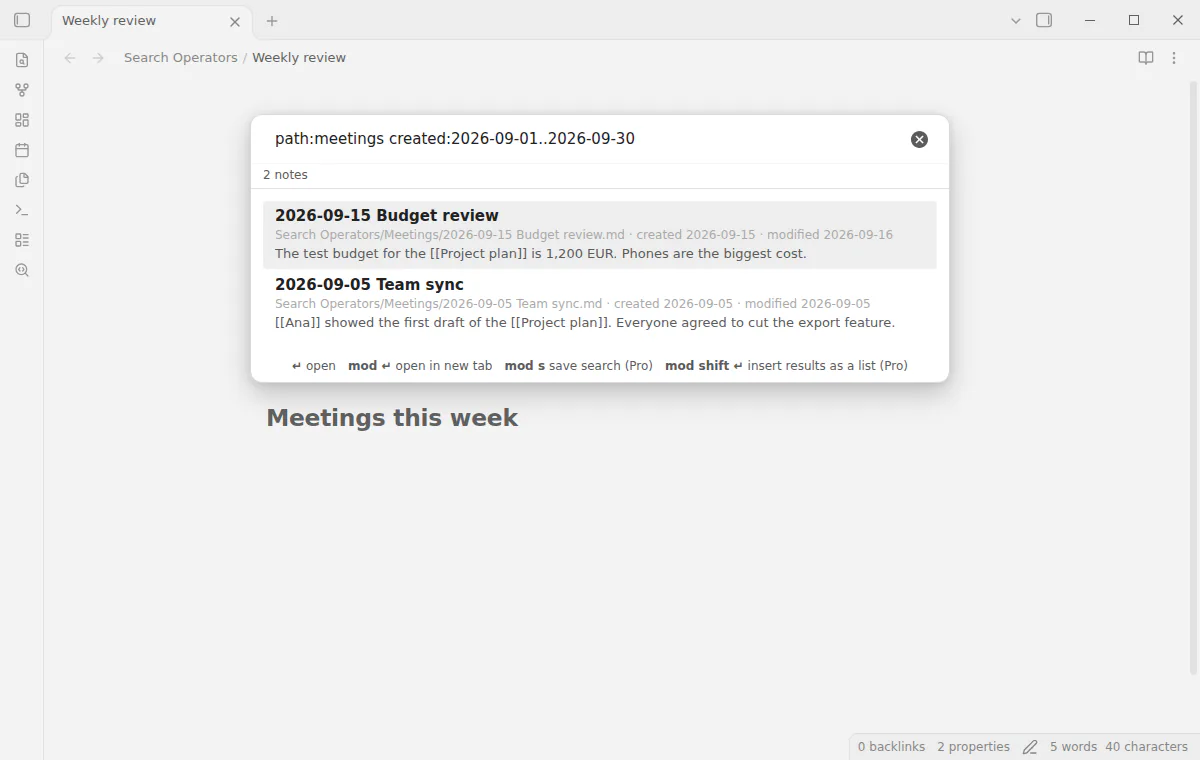
Search Operators adds its own search window with date and link operators. The operators created: and modified: take a day, a month, a year or a range. Values such as last-7d count back from now.
The operator linksto: lists the notes that link to a note, and linkedfrom: lists the notes it links to. You can mix them with words, tag:, path: and file:. All of these are free, and the window lists at most 500 notes, 100 by default.
OR, exclusion with a minus sign, property operators, saved searches and the Markdown list need Pro.
MIT · no telemetry · core features free
Install Search Operators from Community plugins and enable it.
Open the command palette and run Search notes with operators, or select the search icon in the ribbon.
Type a date operator. The query modified:last-7d lists the notes you changed in the last 7 days, and created:2026-09 lists the notes made in September.
Add words or other operators after a space. Every part must match.
Use the arrow keys to pick a note, then press Enter to open it.
Queries with OR or with a minus sign need Pro. Without Pro such a query lists nothing, and the status line names the Pro part.
It can match a property value. The help page gives the form [property:value], and it shows less than and greater than on a number property. It gives no example with a date. Test it on your own notes before you rely on it.
No. A poster noted in October 2024 that the file system keeps only the last modified time. A find and replace across the vault resets it on every file it touches. A date property that you set yourself avoids that, and Search Operators can read one.
Not with core search, since it has no date operator. Several posters asked for exactly this. Search Operators doesn't add it either, because its operators live in its own window. A base embedded in a note can filter on file.mtime or file.ctime.
Open that note and look at the core Backlinks pane, which lists linked mentions. To search across the vault, quote the link in core search or use file.hasLink in a base. In Search Operators the operator is linksto: followed by the note name.
 You can now search notes by date.
This guide uses Search Operators. Pro adds "OR, NOT and property operators" and "Results as a Markdown list". One payment of $15 turns on Pro in 134 plugins.
This guide uses Search Operators. Pro adds "OR, NOT and property operators" and "Results as a Markdown list". One payment of $15 turns on Pro in 134 plugins.
$15 once. Pro tools in 134 NoteMods plugins with one GitHub sponsorship. Nothing renews.
Pro turns on right after payment. Select Sign in with GitHub in the settings of each plugin you use. Free features stay free.
Secure checkout by GitHub Sponsors - needs a GitHub login.
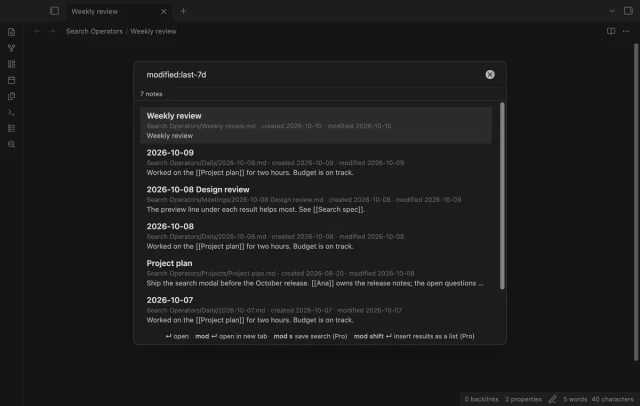
Find notes by date and links, with a preview for each result.
One sponsorship turns on the Pro features in 134 NoteMods plugins. Free features stay free.
$15 one time: Pro stays on, nothing renews. $5 a month: Pro is on while you sponsor, and stays on after you have paid $15 in total. You pay on GitHub (a GitHub login is needed), then select Sign in with GitHub in the plugin settings. All sponsor tiers