Agent Diff Gate · Obsidian plugin documentation
Agent Diff Gate documentation
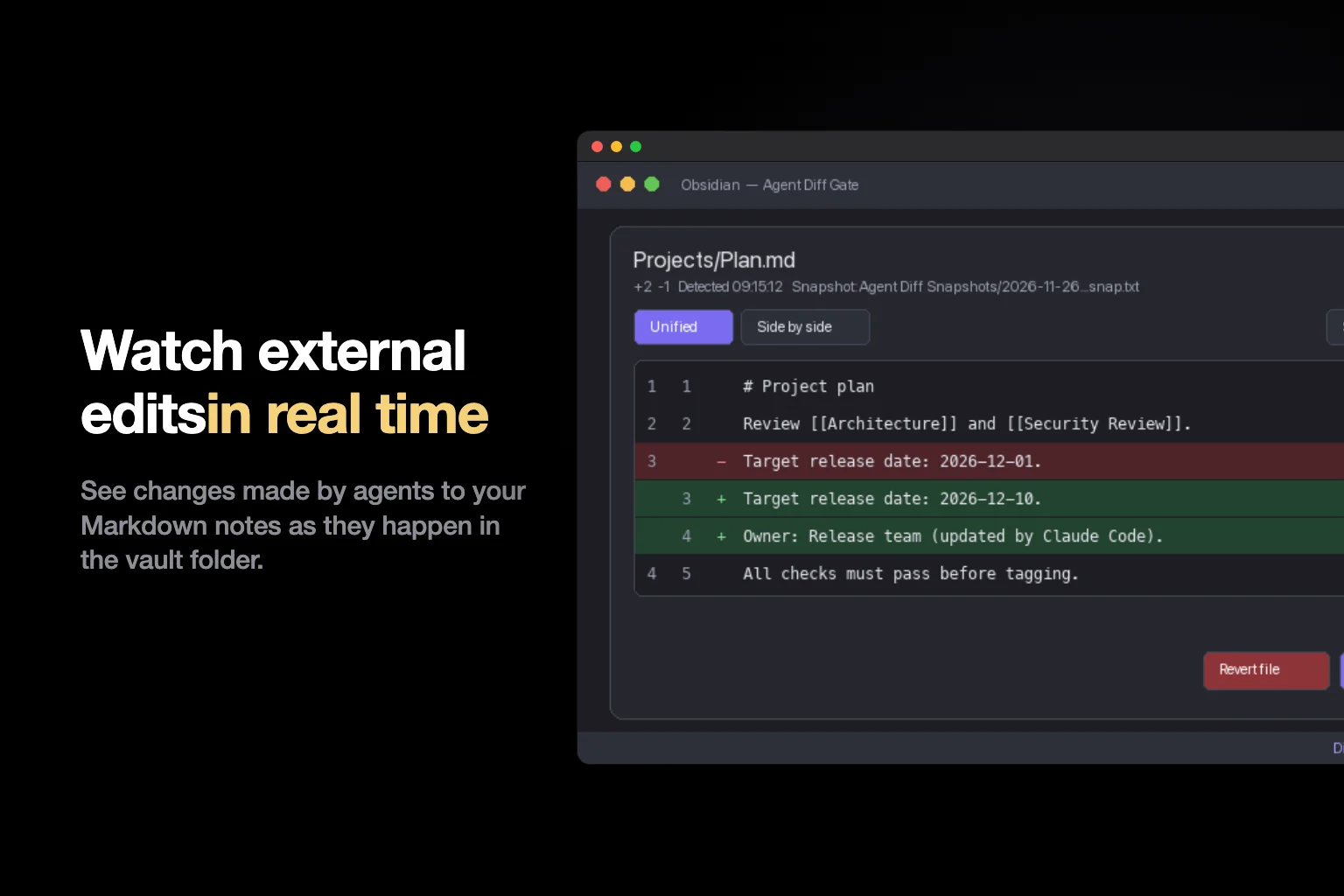
Agent Diff Gate watches your vault for external edits to Markdown notes by Claude Code, Codex, Cursor, or MCP tools. Inspect line changes in a unified or side-by-side diff view and accept or revert files with one click.
All diffing, watching, locks, snapshots, and audit logs run locally on desktop and mobile with no API key or cloud account required for free features.
Version 1.0.0. Requires Obsidian 1.13.4 or later. Works on desktop and mobile.
1 Installation
Open Settings, then Community plugins, then Browse, and search for "Agent Diff Gate". Select Install, then Enable.
To install by hand, download main.js, manifest.json, and styles.css from the latest release. Place the three files in <vault>/.obsidian/plugins/agent-diff-gate/. Reload the list of community plugins, then enable Agent Diff Gate.
Agent Diff Gate requires Obsidian 1.13.4 or newer and works on both desktop and mobile.
2 Getting started
- Open a Markdown note, or run "Capture baseline for active file" to lock its current text.
- Run Claude Code, Codex, Cursor, or an MCP server while Obsidian is open (edits made while Obsidian is closed are not detected).
- Click the status bar badge on desktop, or use the ribbon icon or "Review latest external diff" on mobile and desktop.
- Toggle Side by side, Unified, or Changes only views, then choose Accept change or Revert file. You can also run "Revert active file to baseline" or "Restore last deleted note".
For Pro workflows, add protected folders and locked frontmatter keys in Settings, then run "Open multi-file approval queue" or "Export change audit log".
3 Features
External edit watcher and status badge
Keep working in Obsidian while external agents edit files in your vault folder. The watcher records a clean in-memory baseline when you open a note or type inside the Obsidian editor, so your own typing updates the baseline quietly. When an outside process rewrites a Markdown file, Agent Diff Gate queues the change, updates the status bar badge with the pending count, and shows an optional notice.
Unified and side-by-side diff review
Open the review window from the command palette, the ribbon button, or the status bar badge. Switch between Unified and Side by side layouts at any time. Every line displays before and after line numbers alongside clear addition and deletion counts. Click Accept change to update the baseline, or click Revert file to restore the exact pre-edit text without triggering a second alert.
Multi-file approval queue (Pro)
When an agent refactors ten notes in a single run, review them all from one queue window. Filter the list to all pending notes or only notes that triggered a policy warning. Open any single diff from the queue, accept or revert individual files, or run Accept all and Revert all in one step.
Protected folders, YAML locks, and link guard (Pro)
Mark sensitive folders such as Private or Finance as protected so external edits trigger a policy warning or an automatic revert. Lock specific YAML frontmatter keys such as id, created, or publish so any external change to those keys is flagged immediately for review. The wiki-link deletion guard also compares outgoing links and embeds before and after each edit, flagging any removed [[wikilinks]] outside fenced code blocks.
Pre-agent snapshots and audit logs (Pro)
Enable automatic pre-agent snapshots to save a timestamped .snap.txt recovery copy (up to 100 snapshots retained, never indexed as Markdown) in a dedicated snapshot folder. Every detected edit, policy violation, accept, and revert is logged locally for Markdown or JSON export. In-memory baselines hold up to 2,000 notes (16 MB total, 2 MB per note).
4 Commands
Open the command palette and type the plugin name to see these commands. You can give each one a hotkey in Settings, Hotkeys.
| Command | Command id |
|---|---|
| Review latest external diff | agent-diff-gate:review-latest-diff |
| Open multi-file approval queue | agent-diff-gate:open-approval-queue |
| Revert active file to baseline | agent-diff-gate:revert-active-file |
| Restore last deleted note | agent-diff-gate:restore-last-deleted |
| Capture baseline for active file | agent-diff-gate:capture-baseline |
| Export change audit log | agent-diff-gate:export-audit-log |
5 Settings
After a minor or major update, this plugin opens one What's new tab in the background. The tab and settings card suggest other NoteMods plugins and Zovo Chat and link to notemods.com for feedback (privacy). The tab sends no data. Turn the tab off in Settings.
| Setting | Default | Allowed values |
|---|---|---|
| Watch external edits | On | On or off. |
| Default diff view | Side by side | Side by side or Unified. |
| Notify on external edit | On | On or off. |
| Protected folders (Pro) | Private |
Comma-separated vault folder prefixes. |
| Locked frontmatter keys (Pro) | id, publish |
Comma-separated YAML frontmatter key names. |
| Auto-revert protected folders (Pro) | Off | On or off. |
| Auto-save pre-agent snapshots (Pro) | On | On or off. |
| Snapshot folder (Pro) | Agent Diff Snapshots |
Any relative vault folder path. |
6 Pro
The command "What Pro adds" shows each paid feature with an interactive demo on sample data.
- Review, filter, and batch accept or revert multiple pending external edits in one approval queue.
- Protect folders and lock YAML frontmatter keys against unauthorized external agent edits.
- Save automatic pre-agent recovery snapshots in your vault before accepting external changes.
- Detect deleted wiki-links and embeds during external edits so silent link loss never slips through.
- Export a local Markdown or JSON audit log of every detected edit, policy violation, and revert decision.
Sponsor $5 a month, or $15 once. When you have paid $15 in total, Pro stays on.
Sponsor through the links above, then sign in from the plugin settings.
7 Privacy, payment and network
The core features are free. Pro features need a GitHub Sponsors sponsorship of theluckystrike: $5 a month or more, or $15 once. A total payment of $15 meets the payment requirement for Pro without further payment. Sign-in and the checks below still apply. Your notes stay readable and editable with or without Pro.
One payment turns on Pro in every NoteMods plugin.
GitHub handles the payment. Sponsor at https://github.com/sponsors/theluckystrike/sponsorships?tier_id=666162&frequency=one-time&metadata_source=agent-diff-gate. You need no account for the free features. Pro needs the GitHub account that sponsors.
Until you select "Sign in with GitHub" in the settings, Agent Diff Gate makes no network requests. Sign in uses the GitHub device flow. Agent Diff Gate sends its public client ID and the scope read:user to https://github.com/login/device/code and shows you a code. While you enter the code at https://github.com/login/device, it asks https://github.com/login/oauth/access_token every few seconds to check the sign-in status. The scope permits profile reads only. GitHub needs this access to show the sponsorship tier. It grants no repository scope and no write access.
After sign in, Agent Diff Gate sends one query to https://api.github.com/graphql. It checks if the signed-in account sponsors theluckystrike. It asks for the tier and the total payment to theluckystrike. The plugin reuses a successful check for 7 days. Failed checks can retry after 6 hours. Select Refresh to request an earlier check. It sends no note content, file names or other vault data, and it has no telemetry.
After a successful check, Pro can work offline for up to 14 days. Sign out or a negative sponsorship answer turns Pro off. The plugin stores the GitHub token through the secret storage API of Obsidian. It does not put the token in its saved settings or its local sponsorship data. The local storage of this device keeps your GitHub login, the tier and the time of the last check. Sign out clears the token. You can also revoke the access in your GitHub settings, under Applications.
8 Questions and answers
Does typing inside Obsidian trigger false diff alerts?
No. Agent Diff Gate listens to Obsidian editor changes and marks the active note as internally edited for a short grace window, updating its baseline quietly instead of flagging your own keystrokes.
Will reverting a file trigger another external edit alert?
No. When you click Revert file or when auto-revert restores a protected note, the plugin marks its own write as internal before modifying the file, so the queue clears cleanly.
What happens if an agent only changes line endings between LF and CRLF?
Line endings are normalized during diff comparison, so CRLF-only rewrites are ignored and do not clutter your review queue.
Does it work on mobile?
Yes. All free and Pro features run in pure JavaScript inside Obsidian without native binaries or Node dependencies. Mobile phones have no status bar, so open reviews on mobile from the ribbon icon or the command palette.
What about Obsidian Sync or other vault plugins?
Writes from Obsidian Sync or other plugins outside the active editor can trigger the watcher. Leave Auto-revert protected folders off when syncing across devices so synced edits are not reverted. Pre-agent snapshots copy original text into your snapshot folder.
9 Support
Plugin page: agent-diff-gate.
Report a bug or ask for a feature in the issue tracker of this repository. Include your Obsidian version and a minimal sample note.
To build from source:
npm ci
npm run build
npm test
10 License
MIT