Agent MCP Inspector · Obsidian plugin documentation
Agent MCP Inspector documentation
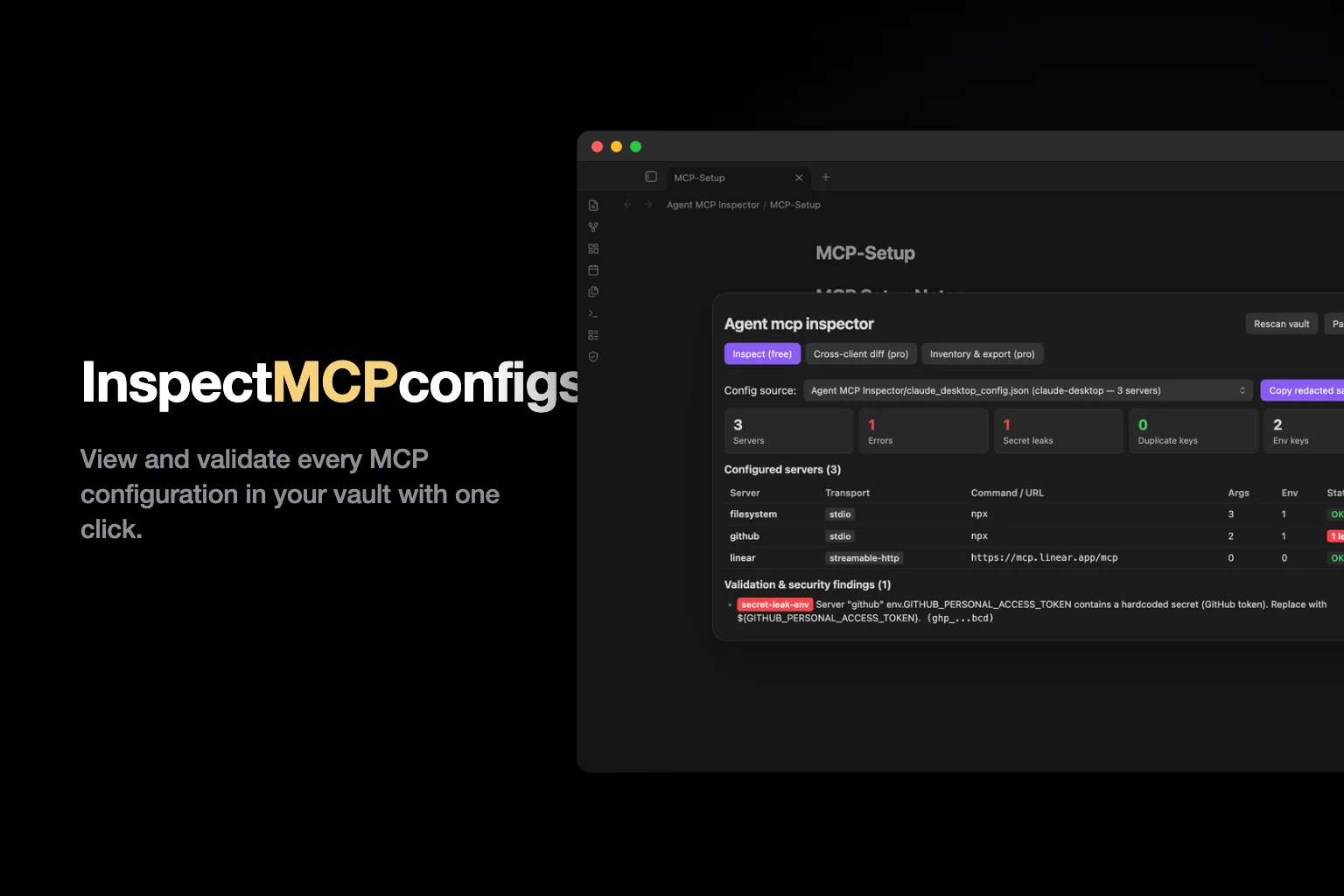
Agent MCP Inspector is a local Model Context Protocol (MCP) configuration inspector and validator for Obsidian. It parses .mcp.json, claude_desktop_config.json, .cursor/mcp.json, and fenced JSON snippets inside Markdown notes, lists every configured MCP server (command, args, transport, env key count), catches JSON syntax errors, duplicate server keys, missing commands, and hardcoded API-key leaks in env or args, and copies a redacted safe config with ${ENV_VAR} template tokens in one click.
Version 1.0.0. Requires Obsidian 1.13.4 or later. Works on desktop and mobile.
1 Installation
- Open Settings, then Community plugins in Obsidian.
- Search for Agent MCP Inspector.
- Select Install, then Enable.
2 Getting started
- Place
.mcp.json,claude_desktop_config.json,.cursor/mcp.json, or a Markdown note with a fencedjsonMCP snippet in your vault. - Run Agent MCP Inspector: Open mcp config inspector from the command palette, or select the shield ribbon icon.
- Choose any discovered config from the dropdown (or select Paste JSON to inspect an external snippet).
- Review the server table and validation findings, then select Copy redacted safe config to copy a safe
${ENV_VAR}version to your clipboard.
3 Features
MCP config parser, validator, and secret redactor (Free)
Run Open mcp config inspector from the command palette (or select the shield ribbon icon) to inspect every MCP config in your vault or paste any JSON config directly:
- Automatic vault discovery: reads
.mcp.json,claude_desktop_config.json,.cursor/mcp.json, other vault.jsonfiles containingmcpServersorservers, and fenced JSON blocks inside Markdown notes. - Server breakdown: displays each server's
commandor remoteurl, inferredtransport(stdio,sse,streamable-http), argument count,envkey count, and issue status. - Schema and security checks: flags invalid JSON syntax, duplicate server keys before
JSON.parsehides them, missingcommandor invalidurlfields, malformedargsorenvobjects, and hardcoded secrets inenvvalues orargs. - Copy redacted safe config: replaces hardcoded secret
envvalues with${ENV_VAR}template tokens and redacts inline secret arguments in one click while keeping non-secret fields intact.
Cross-client diff, Obsidian inventory, Bases catalog, merge export, and audits (Pro)
Upgrade to Pro to manage MCP configurations across multiple AI clients inside your vault:
- Multi-config cross-client diff: compare two configs (such as Claude Desktop vs Cursor or project
.mcp.json) side-by-side to see added, removed, modified, and unchanged servers plus secret-leak deltas. - Managed-block Obsidian inventory and Bases
.basecatalog notes: generate structuredMCP-Server-Inventory.mdand per-server catalog notes viavault.processmanaged blocks (preserving user notes and CRLF/LF line endings) alongside a ready-to-openMCP-Servers.basetable view. - Server merge and sync exporter: merge servers from multiple clients with deterministic conflict resolution (
prefer-right,prefer-left, orunion-rename) and export either a redacted or fully templated${ENV_VAR}JSON config. - Compliance audit reports: export Markdown or JSON compliance audit reports covering every schema finding, masked secret preview, and cross-client drift with zero raw secret values.
4 Commands
Open the command palette and type the plugin name to see these commands. You can give each one a hotkey in Settings, Hotkeys.
| Command | Command id |
|---|---|
| Open mcp config inspector | agent-mcp-inspector:open-mcp-inspector |
| Copy redacted safe mcp config from active file | agent-mcp-inspector:copy-redacted-active-config |
| Compare mcp configs across clients | agent-mcp-inspector:open-cross-client-diff |
| Generate mcp server inventory and bases catalog | agent-mcp-inspector:generate-mcp-inventory |
| Export mcp compliance audit report | agent-mcp-inspector:export-compliance-audit |
| See what pro adds | agent-mcp-inspector:open-what-pro |
5 Settings
| Setting | Tier | Default | Purpose |
|---|---|---|---|
| Scan Markdown JSON snippets | Free | On | Scan vault Markdown notes for fenced JSON blocks containing mcpServers or servers. |
| Config file names | Free | .mcp.json, claude_desktop_config.json, .cursor/mcp.json |
Comma-separated MCP config paths prioritized during vault discovery. |
| Inventory folder | Pro | MCP-Inventory |
Vault folder for managed-block inventory notes, server notes, and Bases .base catalog. |
Generate Bases .base catalog |
Pro | On | Write an Obsidian Bases .base table view for cataloged MCP servers. |
| Audit export folder | Pro | MCP-Audits |
Vault folder for exported compliance audits and merged safe configs. |
| Default merge strategy | Pro | Prefer right config |
Conflict rule when merging duplicate server names across clients. |
| Default merge export mode | Pro | Redacted |
Redact detected secrets only or template every env value as ${ENV_VAR}. |
6 Privacy, payment and network
The core features are free. Pro features need a GitHub Sponsors sponsorship of theluckystrike: $5 a month or more, or $15 once. A total payment of $15 meets the payment requirement for Pro without further payment. Sign-in and the checks below still apply. Your notes stay readable and editable with or without Pro.
GitHub handles the payment. Sponsor at https://github.com/sponsors/theluckystrike. You need no account for the free features. Pro needs the GitHub account that sponsors.
Until you select "Sign in with GitHub" in the settings, Agent MCP Inspector makes no network requests. Sign in uses the GitHub device flow. Agent MCP Inspector sends its public client ID and the scope read:user to https://github.com/login/device/code and shows you a code. While you enter the code at https://github.com/login/device, it asks https://github.com/login/oauth/access_token every few seconds to check the sign-in status. The scope permits profile reads only. GitHub needs this access to show the sponsorship tier. It grants no repository scope and no write access.
After sign in, Agent MCP Inspector sends one query to https://api.github.com/graphql. It checks if the signed-in account sponsors theluckystrike. It asks for the tier and the total payment to theluckystrike. The plugin reuses a successful check for 7 days. Failed checks can retry after 6 hours. Select Refresh to request an earlier check. It sends no note content, file names or other vault data, and it has no telemetry.
After a successful check, Pro can work offline for up to 14 days. Sign out or a negative sponsorship answer turns Pro off. The plugin stores the GitHub token through the secret storage API of Obsidian. It does not put the token in its saved settings or its local sponsorship data. The local storage of this device keeps your GitHub login, the tier and the time of the last check. Sign out clears the token. You can also revoke the access in your GitHub settings, under Applications.
7 Questions and answers
Does Agent MCP Inspector connect to my MCP servers or send configs to a server?
No. All parsing, duplicate-key scanning, secret detection, redaction, diffing, and inventory generation run locally in pure TypeScript with zero network requests.
How are duplicate server keys detected?
Standard JSON.parse silently drops earlier duplicate keys. Agent MCP Inspector scans the raw JSON text with a dedicated parser before JSON.parse so duplicate server keys are reported with their line number.
Does it work on Obsidian mobile?
Yes. isDesktopOnly is false and the plugin uses standard Obsidian modals and vault APIs.
8 Support
Report bugs or request features in the GitHub repository issue tracker. Include your Obsidian version, plugin version, and a redacted sample MCP config with all secrets removed.