Agent Sandbox Guard · Obsidian plugin documentation
Agent Sandbox Guard documentation
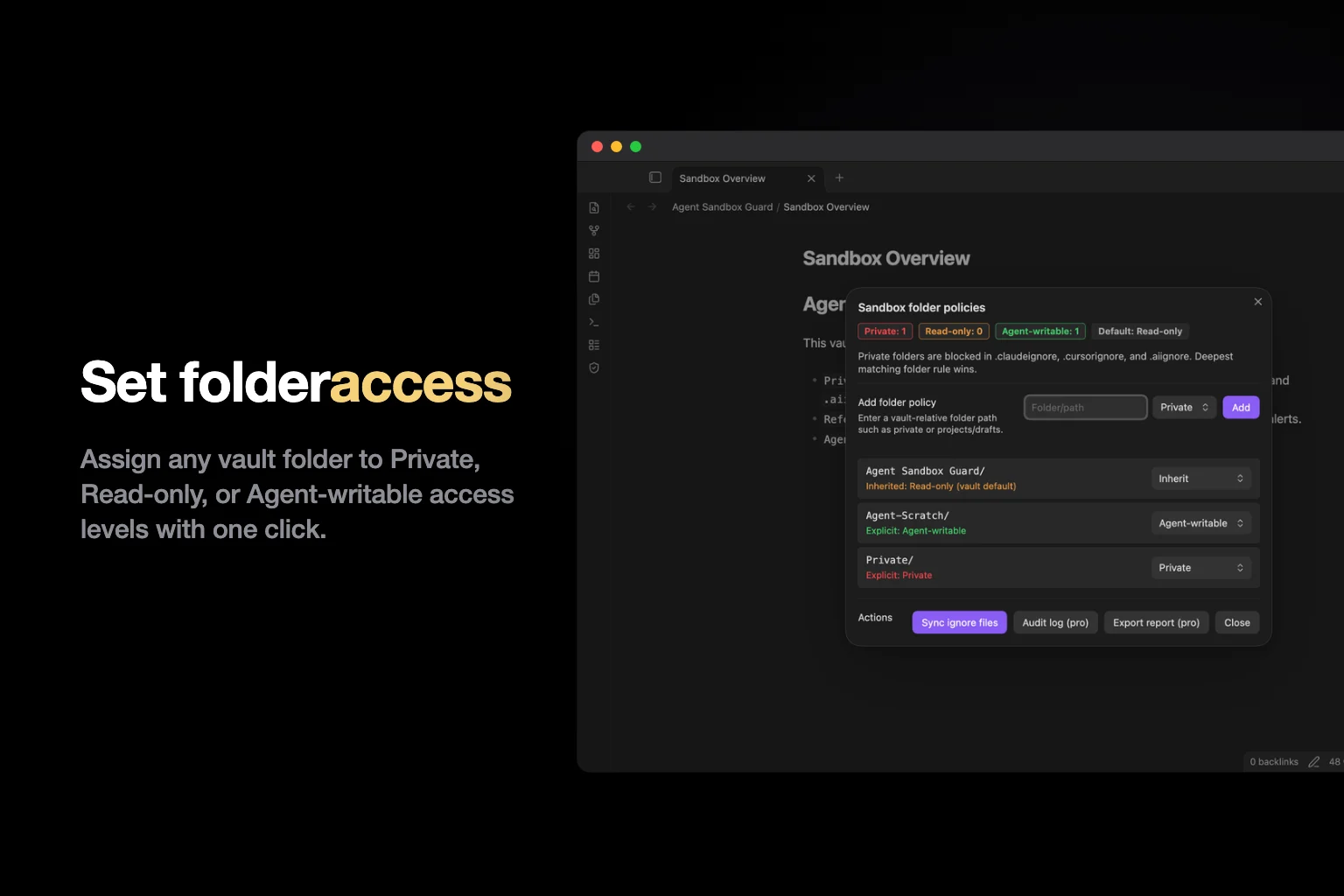
Agent Sandbox Guard lets you define folder access boundaries for local AI coding agents inside your Obsidian vault. Assign each folder as Private, Read-only, or Agent-writable, generate clean managed ignore files for Claude Code, Cursor, and Codex, monitor unexpected external writes in protected zones, and roll back unauthorized edits with one click.
Version 1.0.0. Requires Obsidian 1.13.4 or later. Works on desktop and mobile.
1 Installation
- Open Settings in Obsidian and go to Community plugins.
- Turn off Restricted mode if enabled.
- Select Browse, search for Agent Sandbox Guard, and select Install.
- Select Enable to turn on the plugin.
2 Getting started
- Run "Agent Sandbox Guard: Open sandbox policy manager" or select the shield icon in the left ribbon.
- Set your sensitive folders (such as
Private/) toPrivate, reference folders toRead-only, and working folders (such asAgent-Scratch/) toAgent-writable. - Select "Sync ignore files" to write managed blocks into
.claudeignore,.cursorignore, and.aiignore. - With Pro active, run "Open external write audit log (pro)" to inspect unexpected external writes, restore pre-write snapshots in one click, or export a Markdown or JSON compliance report.
3 Features
Three-tier folder policies and managed ignore files
Open the Sandbox folder policies modal from the command palette or select the shield icon in the left ribbon. Assign any vault folder to one of three access tiers:
Private: Blocked from AI agent reads via generated ignore files. Unexpected external writes raise a critical alert.Read-only: Agents can read notes for context, while unexpected external modifications raise a warning alert.Agent-writable: Designated working folders (such asAgent-Scratch/) where local agents can create and edit files freely.
Subfolders inherit their nearest parent rule, and an explicit rule on a nested folder overrides its parent. Folders without a rule inherit your configured default vault policy (Read-only by default).
Run "Generate and sync AI ignore files" or enable automatic sync on policy changes. Agent Sandbox Guard writes deterministic glob patterns for every Private folder into .claudeignore, .cursorignore, and .aiignore. Rules sit inside # BEGIN agent-sandbox-guard and # END agent-sandbox-guard delimiters so repeated syncs are idempotent, user-authored rules above and below the managed block stay intact, and existing CRLF or LF line endings are preserved.
External-write audit log, pre-write snapshots, and one-click rollback (Pro)
Pro monitors vault modify, create, and delete events inside Private and Read-only folders while ignoring recent in-Obsidian editor edits and self-triggered rollbacks. Each external violation records the timestamp, severity (CRITICAL or WARNING), file path, policy tier, and character delta.
When pre-write snapshots are enabled, Agent Sandbox Guard caches protected note contents locally (up to 200 files, 512 KB each). Open the External write audit log modal and select "Roll back" to restore the pre-write snapshot atomically through vault.process, preserving the original line endings.
Per-agent ignore profiles, compliance reports, and interactive demos (Pro)
Pro unlocks the Windsurf (.codeiumignore) profile, optional per-agent credential defaults (such as .env and plugin data.json patterns), and custom ignore patterns. Export deterministic Markdown or JSON policy compliance reports summarizing all folder rules, generated ignore targets, and audit violations without embedding private note bodies. Open "What pro adds" in Settings to preview these workflows on sample data before sponsoring.
4 Commands
Open the command palette and type the plugin name to see these commands. You can give each one a hotkey in Settings, Hotkeys.
| Command | Command id |
|---|---|
| Open sandbox policy manager | agent-sandbox-guard:open-sandbox-policy |
| Generate and sync AI ignore files | agent-sandbox-guard:sync-ignore-files |
| Open external write audit log (pro) | agent-sandbox-guard:open-audit-log |
| Capture protected folder snapshots (pro) | agent-sandbox-guard:capture-snapshots |
| Export compliance report as Markdown (pro) | agent-sandbox-guard:export-compliance-markdown |
| Export compliance report as JSON (pro) | agent-sandbox-guard:export-compliance-json |
| See what pro adds | agent-sandbox-guard:open-what-pro |
5 Settings
Open Settings and select Agent Sandbox Guard to configure the default vault policy, ignore file syncing, and Pro features.
| Setting | Tier | Default | Description |
|---|---|---|---|
| Default vault access policy | Free | Read-only |
Fallback access tier for folders without an explicit rule. |
| Auto-sync ignore files on policy change | Free | On | Update managed ignore blocks whenever you save folder policies. |
| Watch external writes in protected folders | Pro | On | Flag unexpected external edits in Private and Read-only folders. |
| Capture pre-write local snapshots | Pro | On | Cache protected note contents locally for one-click rollback. |
Include Windsurf (.codeiumignore) profile |
Pro | Off | Generate and sync .codeiumignore alongside the three standard ignore files. |
| Include per-agent default credential guards | Pro | On | Append agent-specific defaults such as .env and plugin data.json to managed blocks. |
| Custom ignore patterns | Pro | Empty | Extra glob patterns (one per line) appended to managed ignore blocks. |
| Compliance report folder | Pro | Empty | Destination vault folder for exported Markdown and JSON reports (empty uses vault root). |
6 Privacy, payment and network
The core features are free. Pro features need a GitHub Sponsors sponsorship of theluckystrike: $5 a month or more, or $15 once. A total payment of $15 meets the payment requirement for Pro without further payment. Sign-in and the checks below still apply. Your notes stay readable and editable with or without Pro.
GitHub handles the payment. Sponsor at https://github.com/sponsors/theluckystrike. You need no account for the free features. Pro needs the GitHub account that sponsors.
Until you select "Sign in with GitHub" in the settings, Agent Sandbox Guard makes no network requests. Sign in uses the GitHub device flow. Agent Sandbox Guard sends its public client ID and the scope read:user to https://github.com/login/device/code and shows you a code. While you enter the code at https://github.com/login/device, it asks https://github.com/login/oauth/access_token every few seconds to check the sign-in status. The scope permits profile reads only. GitHub needs this access to show the sponsorship tier. It grants no repository scope and no write access.
After sign in, Agent Sandbox Guard sends one query to https://api.github.com/graphql. It checks if the signed-in account sponsors theluckystrike. It asks for the tier and the total payment to theluckystrike. The plugin reuses a successful check for 7 days. Failed checks can retry after 6 hours. Select Refresh to request an earlier check. It sends no note content, file names or other vault data, and it has no telemetry.
After a successful check, Pro can work offline for up to 14 days. Sign out or a negative sponsorship answer turns Pro off. The plugin stores the GitHub token through the secret storage API of Obsidian. It does not put the token in its saved settings or its local sponsorship data. The local storage of this device keeps your GitHub login, the tier and the time of the last check. Sign out clears the token. You can also revoke the access in your GitHub settings, under Applications.
7 Questions and answers
Does Agent Sandbox Guard overwrite my existing .claudeignore rules?
No. The plugin updates only the lines between # BEGIN agent-sandbox-guard and # END agent-sandbox-guard. Any rules you wrote outside that block and your file line endings (LF or CRLF) remain unchanged.
Does the plugin flag my own edits inside Obsidian?
No. Agent Sandbox Guard tracks recent editor-change events and in-app UI interactions (such as creating or deleting notes, editing Properties, or toggling checkboxes in Reading view) within the internal-edit grace window, as well as plugin-initiated rollbacks and compliance report exports.
Does Agent Sandbox Guard send my notes over the network?
No. Policy resolution, ignore generation, snapshot caching, rollback, and compliance report export run locally in TypeScript inside Obsidian.
Can I test Pro features before sponsoring?
Yes. Select "Open interactive demos" under "What pro adds" in Settings (or run the "See what pro adds" command) to preview external-write alerts, per-agent ignore profiles, and compliance reports on sample data.
8 Support
Report bugs, policy edge cases, or agent ignore template requests on the GitHub issue tracker for this repository.