Agent Skills Bridge · Obsidian plugin documentation
Agent Skills Bridge documentation
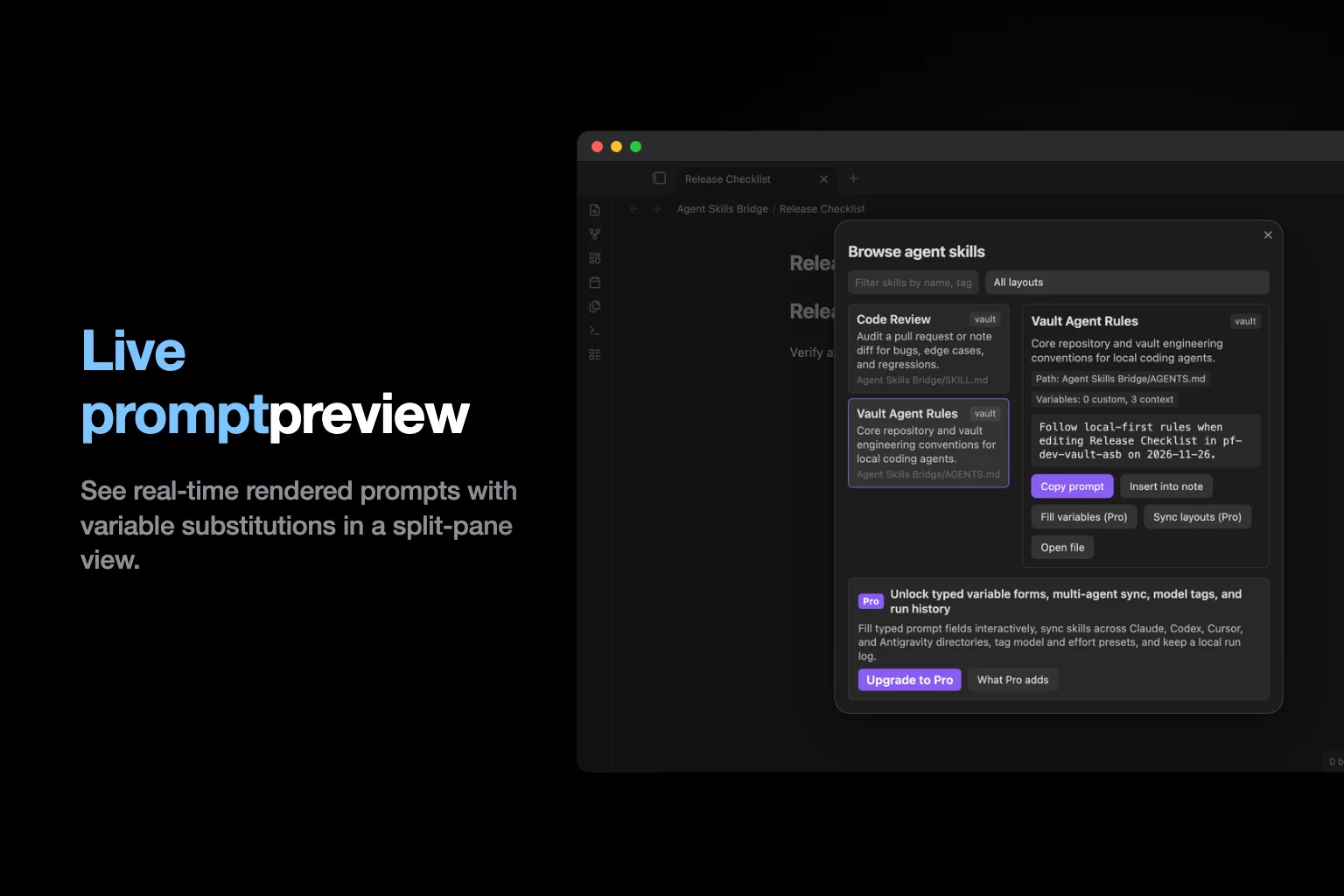
Agent Skills Bridge discovers local SKILL.md, .claude/skills, .agents/skills, .cursor/skills, .antigravity/skills, and AGENTS.md files inside your Obsidian vault. It lets you search them from the command palette, substitute template and active-note variables, and copy or insert ready-to-run prompts without sending vault content over the network.
Version 1.0.0. Requires Obsidian 1.13.4 or later. Works on desktop and mobile.
1 Installation
- Open Obsidian Settings, then open Community plugins and select Browse.
- Search for Agent Skills Bridge and select Install.
- Select Enable to turn on the plugin.
- For manual installation, copy
main.js,manifest.json, andstyles.cssfrom the latest GitHub release into<vault>/.obsidian/plugins/agent-skills-bridge/, then reload Obsidian and enable the plugin.
2 Getting started
Place skill files in .claude/skills/<slug>/SKILL.md, .agents/skills/<slug>/SKILL.md, .cursor/skills/<slug>/SKILL.md, .antigravity/skills/<slug>/SKILL.md, as SKILL.md or AGENTS.md anywhere in the vault, or inside a custom folder configured in Settings.
- Open the command palette and run
Browse and run local skills. - Type to filter by skill name, tag, or layout, select a skill, and review the rendered prompt preview.
- Select Copy prompt to place the prompt on your clipboard, Insert into note to insert it into the active Markdown editor, or Open file to edit the skill source.
- Run
Copy active note as rendered skill promptto render and copy the currently open skill note directly, orRefresh local skill indexafter adding new dot-folder skills outside Obsidian.
With Pro active, run Fill skill variables and render prompt (Pro), Sync and export skills across agent layouts (Pro), Configure model and effort presets (Pro), or Open local skill run history (Pro) from the command palette or from the browser modal.
3 Features
Local skill discovery across agent directories
Obsidian ignores dot-prefixed folders such as .claude and .agents in standard file indexes. Agent Skills Bridge scans .claude/skills, .agents/skills, .cursor/skills, .antigravity/skills, any SKILL.md or AGENTS.md file, and custom folders you configure in settings. It parses YAML frontmatter for name, description, tags, model, and effort, and detects both custom template template tokens and built-in note context variables.
Command palette search and live prompt rendering
Run the Browse and run local skills command to open a split-pane browser modal. Filter skills by name, tag, directory layout, or path, inspect the rendered prompt payload in real time, and substitute built-in context values ({{active_note}}, {{active_path}}, {{selection}}, {{vault_name}}, {{date}}) plus template defaults. Copy the rendered prompt to your clipboard or insert it at the cursor in the active Markdown note in one click.
Typed variable forms, multi-agent layout sync, metadata presets, and local run history (Pro)
When a skill defines typed template tokens such as {{target_file:text=src/main.ts}}, {{focus:select(bugs|security|perf)=bugs}}, {{strict:boolean=true}}, {{retries:number=3}}, or {{notes:multiline}}, the interactive variable form modal renders the matching inputs, lets you switch between any discovered skill, validates values before output, and lets you select a saved model and reasoning-effort preset to prepend as a structured YAML metadata block. You can also mirror a canonical skill across .claude/skills, .agents/skills, .cursor/skills, and .antigravity/skills with a dry-run plan that classifies every target as create, update, unchanged, or conflict, and browse or re-copy past runs from a bounded local run-history log stored only in your plugin data.
4 Commands
Open the command palette and type the plugin name to see these commands. You can give each one a hotkey in Settings, Hotkeys.
| Command | Command id |
|---|---|
| Browse and run local skills | agent-skills-bridge:browse-skills |
| Copy active note as rendered skill prompt | agent-skills-bridge:copy-active-skill |
| Refresh local skill index | agent-skills-bridge:refresh-skills |
| Fill skill variables and render prompt (Pro) | agent-skills-bridge:fill-skill-variables |
| Sync and export skills across agent layouts (Pro) | agent-skills-bridge:sync-agent-layouts |
| Configure model and effort presets (Pro) | agent-skills-bridge:model-effort-presets |
| Open local skill run history (Pro) | agent-skills-bridge:open-run-history |
5 Settings
| Setting | Description | Default |
|---|---|---|
| Custom skill folders | Comma-separated vault folders scanned alongside standard agent directories. | Skills, Prompts |
| Default run action | Primary action when running a skill from the browser modal (copy or insert). |
Copy prompt to clipboard |
| Prepend model and effort metadata header (Pro) | Include a YAML header with skill, preset, model, and reasoning_effort at the top of rendered prompts. |
On |
| Default model tag (Pro) | Fallback model identifier used when no preset overrides it. | claude-sonnet-4 |
| Default reasoning effort (Pro) | Fallback reasoning effort level (low, medium, high, or max). |
medium |
| Default sync target layouts (Pro) | Comma-separated target layouts pre-selected in the multi-agent sync modal. | claude, codex, cursor, antigravity |
| Overwrite conflicting sync files (Pro) | When off, differing target files are reported as conflicts and skipped. | Off |
| Maximum run-history entries (Pro) | Cap on local run-history records stored in plugin data (5 to 200 entries). | 50 |
6 Pro
The core skill discovery, search modal, built-in context substitution, and clipboard or note insertion work free with no account. Pro adds four workflow tools for teams and multi-agent users:
- Fill typed prompt variable forms (text, multiline, select, boolean, and number) with validation before copying or inserting.
- Sync and export skills across Claude, Codex, Cursor, and Antigravity directory layouts with conflict detection.
- Tag rendered prompts with pre-run model and reasoning-effort metadata headers using saved presets.
- Browse, re-copy, and clear a local skill run-history log stored only in your vault plugin data.
Sponsor $5 a month, or $15 once. When you have paid $15 in total, Pro stays on.
Run the What Pro adds command to try interactive in-memory demos of every Pro feature before sponsoring.
7 Privacy, payment and network
The core features are free. Pro features need a GitHub Sponsors sponsorship of theluckystrike: $5 a month or more, or $15 once. A total payment of $15 meets the payment requirement for Pro without further payment. Sign-in and the checks below still apply. Your notes stay readable and editable with or without Pro.
One payment turns on Pro in every NoteMods plugin.
GitHub handles the payment. Sponsor at https://github.com/sponsors/theluckystrike/sponsorships?tier_id=666162&frequency=one-time&metadata_source=agent-skills-bridge. You need no account for the free features. Pro needs the GitHub account that sponsors.
Until you select "Sign in with GitHub" in the settings, Agent Skills Bridge makes no network requests. Sign in uses the GitHub device flow. Agent Skills Bridge sends its public client ID and the scope read:user to https://github.com/login/device/code and shows you a code. While you enter the code at https://github.com/login/device, it asks https://github.com/login/oauth/access_token every few seconds to check the sign-in status. The scope permits profile reads only. GitHub needs this access to show the sponsorship tier. It grants no repository scope and no write access.
After sign in, Agent Skills Bridge sends one query to https://api.github.com/graphql. It checks if the signed-in account sponsors theluckystrike. It asks for the tier and the total payment to theluckystrike. The plugin reuses a successful check for 7 days. Failed checks can retry after 6 hours. Select Refresh to request an earlier check. It sends no note content, file names or other vault data, and it has no telemetry.
After a successful check, Pro can work offline for up to 14 days. Sign out or a negative sponsorship answer turns Pro off. The plugin stores the GitHub token through the secret storage API of Obsidian. It does not put the token in its saved settings or its local sponsorship data. The local storage of this device keeps your GitHub login, the tier and the time of the last check. Sign out clears the token. You can also revoke the access in your GitHub settings, under Applications.
8 Questions and answers
Does Agent Skills Bridge send my skill files or notes to an AI provider?
No. Skill discovery, frontmatter parsing, variable substitution, multi-agent layout sync, and run history run locally inside Obsidian with zero network requests. The only optional network request is the GitHub Sponsors Pro check after you explicitly select "Sign in with GitHub" in Settings.
Why are .claude/skills and .agents/skills discovered even when Obsidian hides dot-folders?
Obsidian omits dot-prefixed folders from vault.getMarkdownFiles(). Agent Skills Bridge reads the standard dot-folder roots directly through the local vault adapter while enforcing relative-path safety and depth limits, so you do not need to duplicate skills outside hidden agent directories.
What template token syntax does the template engine support?
Use {{name}} for a plain text variable, {{name:text=default}} for a text field with a default, {{name:multiline}} for a multi-line textarea, {{name:select(a|b|c)=a}} for a dropdown, {{name:boolean=true}} for a boolean selector, and {{name:number=3}} for a numeric field. Built-in context template tokens ({{active_note}}, {{active_path}}, {{selection}}, {{vault_name}}, and {{date}}) are populated automatically from your active Obsidian workspace.
Does multi-agent sync overwrite modified skill files?
Not by default. The sync planner compares normalized line endings and marks differing targets as conflict, leaving them untouched unless you enable overwrite in the sync modal or in Settings.
9 Support
Report bugs or request improvements on GitHub Issues.