Agent Tool Recipes · Obsidian plugin documentation
Agent Tool Recipes documentation
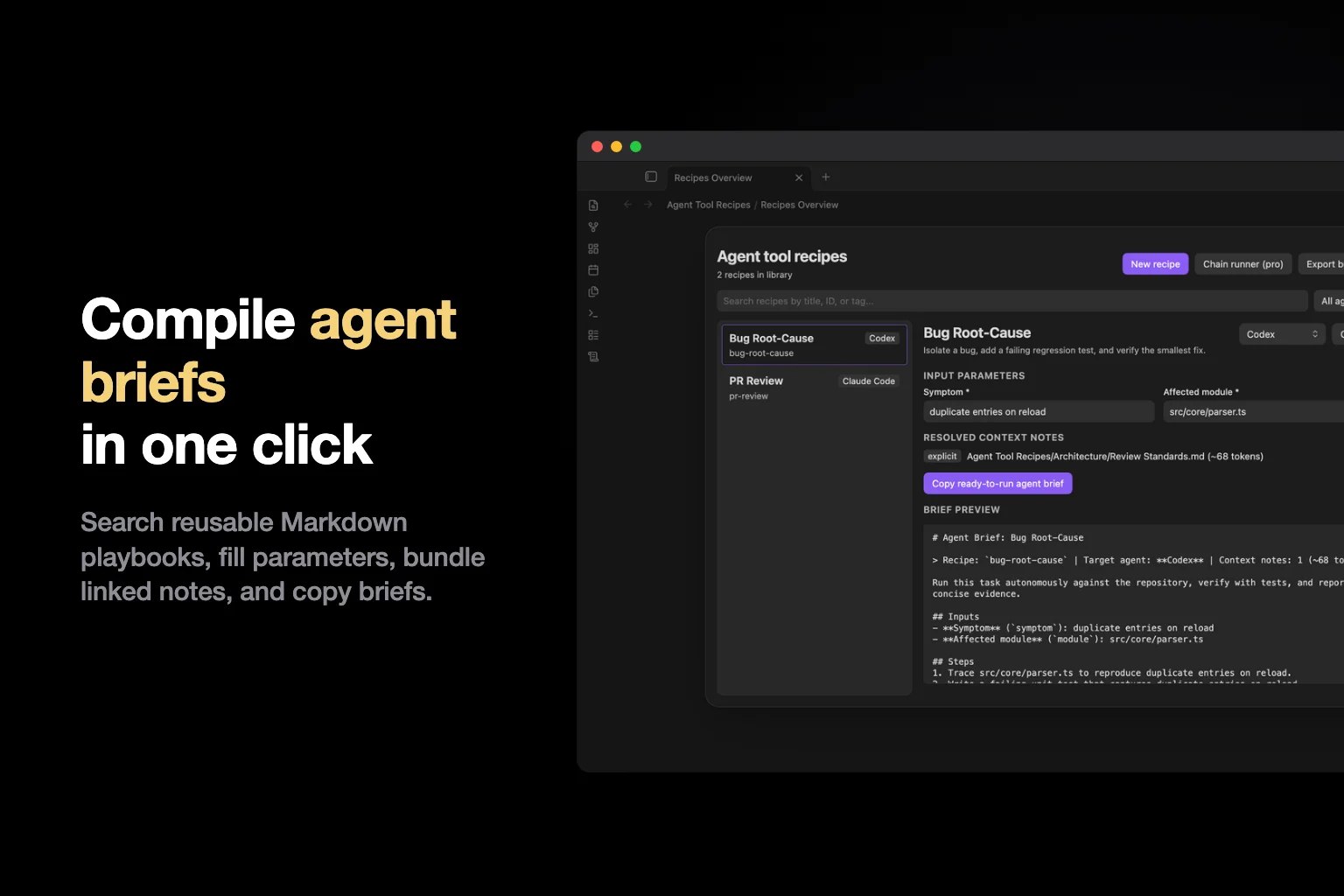
Agent Tool Recipes turns a folder of plain Markdown notes in Obsidian into a zero-network playbook library for AI coding agents. Author reusable Markdown and YAML recipes, fill input parameters in a clean form, bundle linked vault context notes automatically, and copy a ready-to-run agent brief in one click for Claude Code, Cursor, Codex, or Antigravity.
Version 1.0.0. Requires Obsidian 1.13.4 or later. Works on desktop and mobile.
1 Installation
- Open Settings in Obsidian and go to Community plugins.
- Turn off Restricted mode if it is enabled.
- Select Browse, search for Agent Tool Recipes, and select Install.
- Select Enable to activate the plugin.
You can also install a release manually by downloading main.js, manifest.json, and styles.css from the latest GitHub release into <vault>/.obsidian/plugins/agent-tool-recipes/ and enabling the plugin in Community plugins.
2 Getting started
Create your first recipe
- Run "Agent Tool Recipes: Create new agent recipe" from the command palette.
- Enter a title (for example,
PR Review), pick a target agent (Claude Code,Cursor,Codex, orAntigravity), and list input parameters one per line (branch=main,scope). - Add explicit context notes such as
[[Architecture/Review Standards]], write numbered steps using{{branch}}or{{scope}}, and specify the expected output. - Select "Create recipe" to save the Markdown file into your recipes folder.
Run a recipe and copy the brief
- Select the scroll icon in the left ribbon or run "Agent Tool Recipes: Open agent recipe library".
- Filter by target agent or search by title, ID, or tag, then select a recipe.
- Fill the input parameter fields and optionally override the target agent for this run.
- Review the resolved context notes and live brief preview, then select "Copy ready-to-run agent brief".
- Paste the brief directly into Claude Code, Cursor, Codex, or Antigravity.
Copy from the active recipe note
When you already have a recipe note open in the editor, run "Agent Tool Recipes: Copy ready-to-run brief from active recipe" to compile the recipe with its default inputs and copy the brief immediately.
Chain recipes and track runs (Pro)
- Run "Agent Tool Recipes: Open recipe chain runner (pro)" or select "Chain runner (pro)" in the library modal.
- Check one or more recipes to chain, name the run, and select "Start chain & save run log".
- Check off steps as your agent completes them. Every change updates your configured Run Log note safely through
vault.process.
Install starter recipes or export a bundle (Pro)
Run "Agent Tool Recipes: Install 8 built-in starter recipes (pro)" to write all 8 starter playbooks into your recipes folder as editable Markdown files. Run "Agent Tool Recipes: Export recipe bundle (pro)" to write recipes-bundle.md and recipes-bundle.json inside your recipes folder.
3 Features
Recipe library and one-click brief compiler
Open the recipe library from the ribbon icon or the command palette to search recipes by title, recipe ID, or tag and filter by target agent. Select a recipe to fill its input fields with live variable interpolation ({{variable}}). Explicit context_notes wikilinks resolve against your vault automatically, and the live preview updates as you type. Select "Copy ready-to-run agent brief" to copy a structured brief formatted for Claude Code, Cursor, Codex, or Antigravity without leaving Obsidian.
Author reusable Markdown and YAML recipes
Every recipe is a plain Markdown note with YAML frontmatter (recipe_id, title, summary, target_agent, inputs, context_notes, steps, and expected_output). Use the "Create new agent recipe" command to generate a properly formatted recipe file inside your configured recipes folder, or write recipe files directly in Obsidian with any editor. Because recipes live as ordinary Markdown files, they sync with Obsidian Sync, version cleanly in Git, and remain readable outside the plugin.
Pro automation, chains, auto-bundling, and starter pack
Optional Pro adds four workflow accelerators on top of the free library. Multi-step recipe chains combine several recipes into an interactive checklist and append progress to a vault Run Log note using vault.process while preserving CRLF or LF line endings. Context-note glob and tag auto-bundling resolves context_globs and context_tags up to a configurable token ceiling so prompts never overflow. A built-in starter pack adds 8 practical agentic recipes (PR Review, Bug Root-Cause, ADR Writer, Memory Triage, Release Checklist, Refactor Plan, Research Brief, and Test Gap Audit). Bundle export writes your library into portable Markdown and JSON files.
Configurable settings and Pro controls
Configure the recipes folder, default target agent, brief header toggle, Pro auto-bundling token ceiling, starter pack visibility, and Run Log note path from one settings tab. You can also launch the interactive "What pro adds" demos directly from Settings to preview Pro features before sponsoring.
4 Commands
Open the command palette and type the plugin name to see these commands. You can give each one a hotkey in Settings, Hotkeys.
| Command | Command id |
|---|---|
| Open agent recipe library | agent-tool-recipes:open-recipe-library |
| Create new agent recipe | agent-tool-recipes:create-agent-recipe |
| Copy ready-to-run brief from active recipe | agent-tool-recipes:copy-active-recipe-brief |
| Open recipe chain runner (pro) | agent-tool-recipes:open-chain-runner |
| Install 8 built-in starter recipes (pro) | agent-tool-recipes:install-starter-recipes |
| Export recipe bundle (pro) | agent-tool-recipes:export-recipe-bundle |
| See what pro adds | agent-tool-recipes:open-what-pro |
5 Settings
| Setting | Default | Description |
|---|---|---|
| Recipes folder | Agent-Recipes |
Vault folder scanned for Markdown recipes. Notes outside this folder are also discovered when frontmatter defines recipe_id. |
| Default target agent | Claude Code |
Agent selected by default for new recipes and recipes that omit target_agent. |
| Include agent brief header | On | Adds recipe metadata, context token estimate, and an agent-specific preamble at the top of copied briefs. |
| Enable glob and tag context auto-bundling (Pro) | Off | Resolves context_globs and context_tags in addition to explicit context_notes. |
| Context token ceiling (Pro) | 6000 |
Caps bundled context notes between 500 and 32000 estimated tokens. Notes beyond the ceiling are truncated or omitted cleanly. |
| Show 8 built-in starter recipes (Pro) | Off | Displays all 8 starter recipes in the library modal even before installing them as vault files. |
| Run log note path (Pro) | Agent-Recipes/Run-Log.md |
Vault path where recipe chain run checklists are appended through vault.process. |
| What pro adds | Interactive demos | Opens the interactive Pro feature demo modal or the Pro overview page. |
6 Privacy, payment and network
The core features are free. Pro features need a GitHub Sponsors sponsorship of theluckystrike: $5 a month or more, or $15 once. A total payment of $15 meets the payment requirement for Pro without further payment. Sign-in and the checks below still apply. Your notes stay readable and editable with or without Pro.
GitHub handles the payment. Sponsor at https://github.com/sponsors/theluckystrike. You need no account for the free features. Pro needs the GitHub account that sponsors.
Until you select "Sign in with GitHub" in the settings, Agent Tool Recipes makes no network requests. Sign in uses the GitHub device flow. Agent Tool Recipes sends its public client ID and the scope read:user to https://github.com/login/device/code and shows you a code. While you enter the code at https://github.com/login/device, it asks https://github.com/login/oauth/access_token every few seconds to check the sign-in status. The scope permits profile reads only. GitHub needs this access to show the sponsorship tier. It grants no repository scope and no write access.
After sign in, Agent Tool Recipes sends one query to https://api.github.com/graphql. It checks if the signed-in account sponsors theluckystrike. It asks for the tier and the total payment to theluckystrike. The plugin reuses a successful check for 7 days. Failed checks can retry after 6 hours. Select Refresh to request an earlier check. It sends no note content, file names or other vault data, and it has no telemetry.
After a successful check, Pro can work offline for up to 14 days. Sign out or a negative sponsorship answer turns Pro off. The plugin stores the GitHub token through the secret storage API of Obsidian. It does not put the token in its saved settings or its local sponsorship data. The local storage of this device keeps your GitHub login, the tier and the time of the last check. Sign out clears the token. You can also revoke the access in your GitHub settings, under Applications.
7 Questions and answers
Does this plugin send my notes or prompts to any AI API?
No. Agent Tool Recipes compiles prompts locally in TypeScript and copies the result to your clipboard. It never calls an LLM endpoint and never transmits vault content over the network.
What YAML fields does a recipe note support?
A recipe note supports recipe_id, title, summary, target_agent, inputs, context_notes, context_globs (Pro), context_tags (Pro), steps, expected_output, and tags. If steps or expected_output are omitted from frontmatter, the parser reads ## Steps and ## Expected output sections from the Markdown body.
Are CRLF line endings preserved when updating the Run Log?
Yes. When appending a chain run or toggling checklist items in your Run Log note, the plugin detects existing \r\n or \n line endings and preserves them through vault.process.
Does the plugin work on Obsidian mobile?
Yes. All parsing, variable interpolation, context bundling, and modals use standard Obsidian APIs with no Node-only runtime dependencies (isDesktopOnly: false).
8 Support
If you find a bug, have a recipe schema suggestion, or need help with settings, open an issue in the plugin repository on GitHub with your Obsidian version, plugin version, and a minimal sample recipe note.