Annotation Inbox · Obsidian plugin documentation
Annotation Inbox documentation
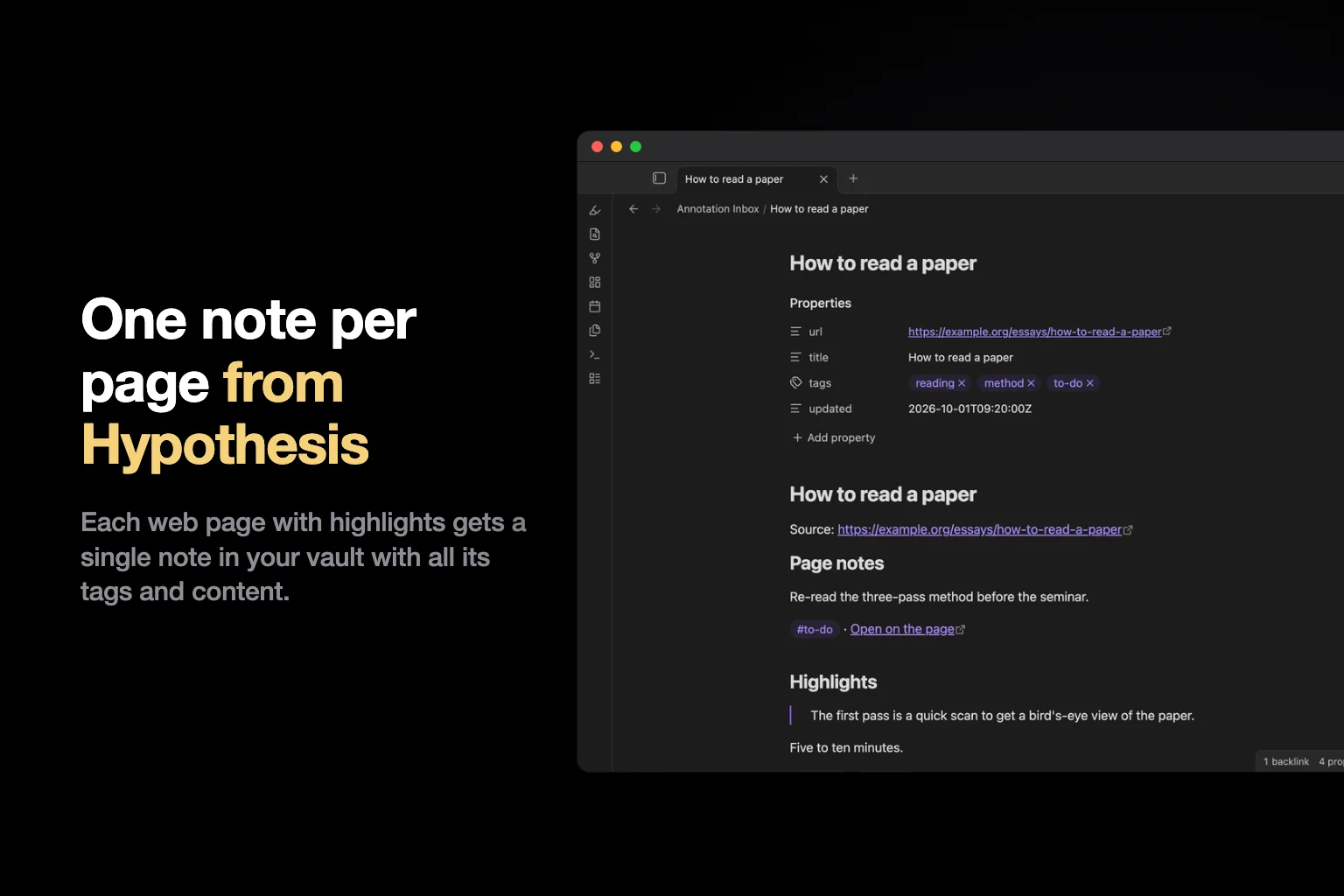
Annotation Inbox pulls your Hypothesis web highlights, page notes and tags into your vault as one note per page. It resyncs from where it stopped, skips what it already has, and does not make a note again after you delete it.
Unofficial. Not made by or affiliated with Hypothesis. Hypothesis is a trademark of its owner. This plugin only reads your own annotations through the public Hypothesis API, with a developer token that you make yourself.
Version 1.2.1. Requires Obsidian 1.13.4 or later. Works on desktop and mobile.
1 Installation
Open Settings, then Community plugins, then Browse. Search for "Annotation Inbox", then select Install and Enable.
To install by hand, download main.js, manifest.json and styles.css from the latest release. Put the three files in <vault>/.obsidian/plugins/annotation-inbox/. Reload the community plugins, then turn on Annotation Inbox.
2 Getting started
- Log in to Hypothesis in your browser and open hypothes.is/account/developer. Select Generate your API token and copy it.
- In Obsidian, open Settings, then Annotation Inbox. Select the token field and paste the token.
- Select Check connection. Hypothesis answers with your account name, and the plugin fills in the user name. You can also type it, for example
janeforacct:jane [at] hypothes.is. - Run Sync now.
It reads public and private annotations. Replies and hidden annotations are skipped. It never creates, changes or deletes an annotation on Hypothesis.
If a sync stops because of an error, the notes that were made stay, and the cursor moves only as far as the annotations that were read. If one note cannot be written (for example, bad YAML), the other pages are written and the next sync tries that note again. HTTP 429 (too many requests) makes the plugin wait for the Retry-After time (30 seconds when there is none) and try again, at most two times. Hypothesis does not publish a rate limit for this call.
3 Features
Sync now, from a command or the ribbon
Select the highlighter ribbon icon, or run "Annotation Inbox: Sync now". The plugin asks Hypothesis for your annotations, oldest change first, in pages of 200, with one second between requests. A notice then tells you what happened, for example "Imported 7 annotations: 3 new notes, 0 updated."
Each run reads up to 10,000 annotations. Run Sync now again to continue larger accounts.
One note per page
Each annotated page gets one note in the folder that you choose. The tags are the tags of the annotations on that page, in the form that Obsidian accepts: Reading List becomes Reading-List, and 2026 becomes tag-2026.
Under the title, page notes come first, then highlights in page order when the note is made. Later highlights go at the end of the list. Each highlight is a quote, then your comment, then its tags and a link that opens the highlight on the page. Each block starts with a comment line, <!-- ai:ID time -->, that the next sync uses to find the block. Reading view hides it.
Resync without duplicates
The plugin keeps a cursor: the latest update time that it has read. The next sync starts one second before it, so an annotation with the cursor time is not missed. These rules handle the overlap:
- A block is found by the id in its marker. It is replaced only when the annotation is newer than the marker.
- A new annotation goes to the end of its section.
- If nothing changed, the note is not written, and its modified time stays the same.
- Text that you write outside the two marker comments (
annotation-inbox:startandannotation-inbox:end) is never touched. - If you edit a block and the annotation does not change on Hypothesis, your edit stays. If the annotation does change, the block is replaced with the new text.
Notes that you delete stay deleted
When you delete a note that the plugin made, the plugin remembers the page. Later annotations on that page do not bring the note back. This also works when you delete the note while Obsidian is closed. If you only moved a note, the plugin finds it by its url property and its marker comments. A web clipping with the same url but no markers is not changed.
The notice says how many pages it skipped, for example "1 skipped because you deleted it". To get a note back, run "Forget deleted notes" and sync again.
Folder and file name
Choose the folder in the settings. The file name comes from a template with four tokens: {title}, {site-domain}, {date} (the day of the first annotation on the page) and {id} (eight characters from the address). The default is {title}. Characters that break file names or links (\ / : * ? " < > | # ^ [ ]) are replaced, and names are cut at 100 characters. When two pages have one title, the second note is Title (2). A new template does not rename old notes.
Note properties
New notes get four properties: url, title, tags and updated. The setting "Note properties" adds more, one name: value on each line:
created: {created}
daily: [[{created}]]
tags: article, inbox
status: unread
The tokens are {title}, {url}, {site-domain}, {created} (the day of the oldest annotation that the sync read for the page) and {created:FORMAT}. A format uses YYYY, YY, MM, DD, HH, mm and ss, in UTC. An unknown token gives no text.
- A date, a number,
trueorfalseis saved as plain YAML, socreated: {created}is a date property. Other values are quoted, so[[{created}]]links to the YYYY-MM-DD daily note. - A
tagsline adds tags to the page tags, each once. - Lines for
url,titleandupdatedare ignored. At most 20 lines count. - New notes only. A note that exists keeps its properties.
4 Commands
Open the command palette and type the plugin name to see these commands. You can give each one a hotkey in Settings, Hotkeys.
| Command | Command id |
|---|---|
| Sync now | annotation-inbox:sync-now |
| Forget deleted notes | annotation-inbox:forget-deleted |
5 Settings
After a minor or major update, this plugin opens one What's new tab in the background. The tab and settings card suggest other NoteMods plugins and Zovo Chat and link to notemods.com for feedback (privacy). The tab sends no data. Turn the tab off in Settings.
| Setting | What it does |
|---|---|
| Hypothesis developer token | Kept in Obsidian secret storage. |
| Hypothesis user name | Your account name. 3 to 30 characters: letters, digits, . or _. |
| Check connection | Sends one request and fills an empty user name. |
| Folder | Where the notes go. Made when needed. Empty means the vault root. |
| File name | The template for the note name. |
| Note properties | Extra properties for new notes, one name: value on each line. Empty by default. |
| Forget deleted notes | Clears the list of notes that are not made again. |
| Status | Time of the last sync, the number of notes, the number of deleted notes. |
6 Privacy, payment and network
Annotation Inbox is free. It has no paid features, no license key, no trial and no sign in of its own. It needs a Hypothesis account, which is free, because the token comes from that account.
The plugin makes network requests to one host, api.hypothes.is, and only when you run Sync now or Check connection. Each request is a read (HTTP GET). It sends your developer token in the Authorization header, and your Hypothesis user name and the sync cursor in the address of the search request. It sends no note text and no vault data. It has no analytics, no telemetry and no ads.
The token stays in Obsidian secret storage on this device. It is not written to data.json or to any note, so it does not sync with your vault or reach a git repository. It is not put in an error message. To revoke it, make a new token on hypothes.is/account/developer.
The plugin writes the notes in your folder and its own data.json, which holds the settings, the cursor and the lists of notes made and deleted.
7 Questions and answers
Disabling stops new operations. Notes stay. Re-enabling waits for pending writes and saves, retrying a failed final save. Keep the vault open, check storage, then enable again.
Does it work on a phone or a tablet?
It is not marked desktop only and uses no Node module. The tests run on a desktop only.
What happens to an annotation that I delete on Hypothesis?
Nothing. The search API does not list deleted annotations, so the plugin cannot see them. The block stays in your note until you delete it.
Does it import groups, replies or PDFs?
It imports the annotations of yours that the search API returns for your user name, including annotations in your groups. A PDF with no web address gets a note under the identifier that Hypothesis gives it.
Which older plugin is this?
The older plugin "Hypothesis" by weichenw is no longer in the community directory. This plugin does the same job, shares no code with it, and does not read its notes.
8 Support
Report a bug in the issue tracker of this repository. Include your Obsidian version and the notice text, but not your token. To support the work, use GitHub Sponsors.
To build from source:
npm ci
npm run build
npm test
9 License
MIT