Agent Prompt Bench · Obsidian plugin documentation
Agent Prompt Bench documentation
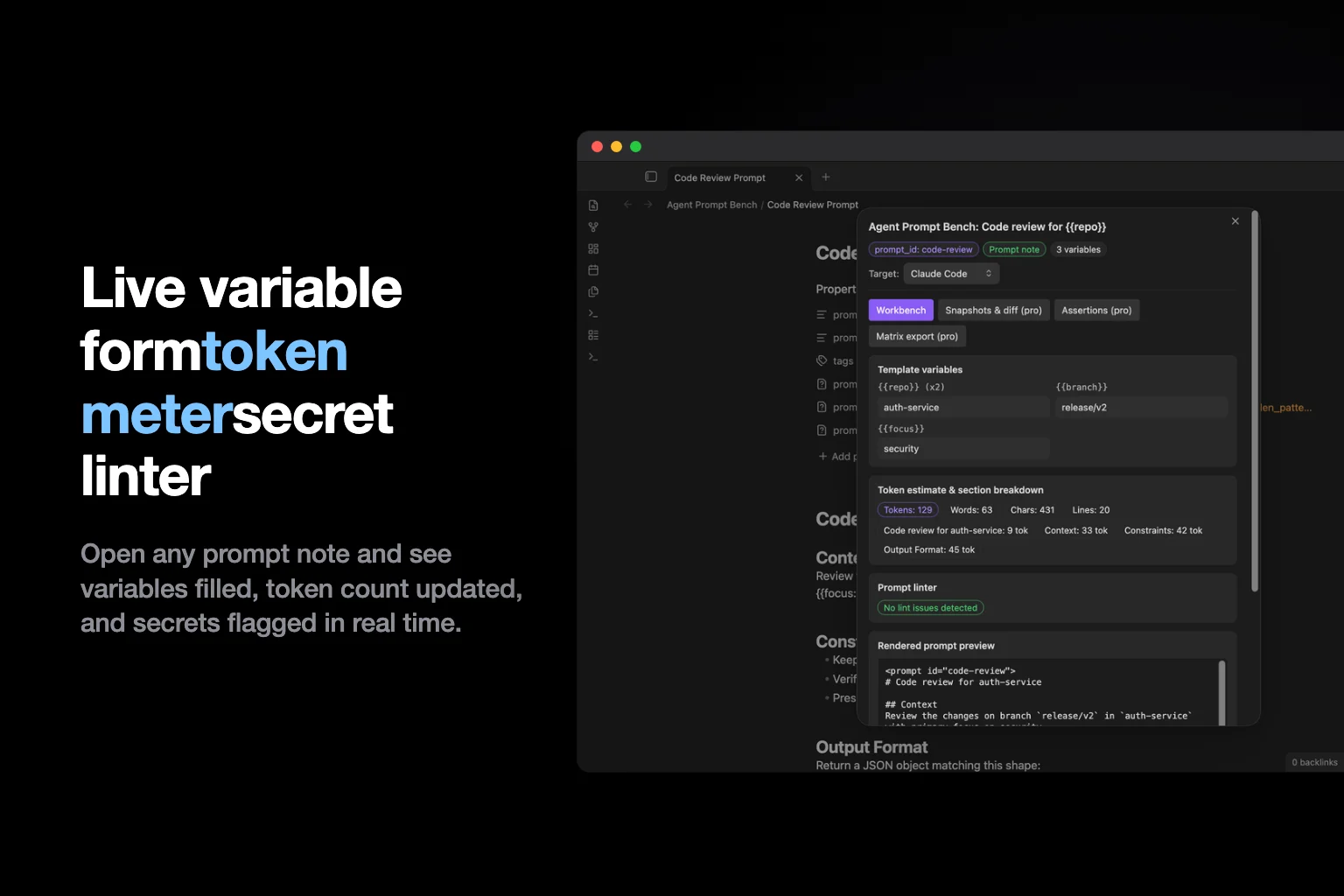
Agent Prompt Bench is a local prompt and memory-pack workbench for Obsidian. It parses {{variable}} template tokens in your Markdown prompt notes (prompt_id or #agent-prompt), computes deterministic token estimates per section, lints for unresolved variables, secret leaks, and oversized sections, and copies the rendered prompt in one click for Claude Code, Cursor, Codex, or Antigravity.
Version 1.0.0. Requires Obsidian 1.13.4 or later. Works on desktop and mobile.
1 Installation
- Open Settings in Obsidian and select Community plugins.
- Turn off Restricted mode if it is active.
- Select Browse, search for Agent Prompt Bench, and select Install.
- Select Enable to load the plugin.
For manual installation from a release:
- Download
main.js,manifest.json, andstyles.cssfrom the latest GitHub release. - Copy the three files into
<vault>/.obsidian/plugins/agent-prompt-bench/. - Reload Obsidian and enable Agent Prompt Bench in Settings -> Community plugins.
2 Getting started
- Open a Markdown prompt note that contains
prompt_idin frontmatter,#agent-prompt, or any{{variable}}template tokens. - Select the terminal ribbon icon or run Open prompt workbench for current note from the command palette.
- Fill in the generated variable inputs and review the live token count, per-section breakdown, and linter output.
- Choose your target format (
Claude Code,Cursor,Codex,Antigravity, orRaw Markdown) and select Copy rendered prompt. You can also run Copy rendered prompt from current note directly from the command palette using frontmatter defaults. - With Pro enabled, open the Snapshots and diff tab to save
v1,v2, ... snapshots and inspect side-by-side line diffs, open Assertions to verify local guardrails, or open Matrix export to generate JSON or Markdown variant tables.
Example prompt note:
---
prompt_id: code-review
prompt_target: claude-code
tags:
  - agent-prompt
prompt_vars:
  repo: auth-service
  branch: main
prompt_assertions:
  required_headings:
    - Context
    - Constraints
  forbidden_patterns:
    - To-Do
  max_tokens: 400
  required_json_keys:
    - verdict
    - summary
prompt_matrix:
  repo: [auth-service, billing-api]
  focus: [security, performance]
---
# Code review for {{repo}}
3 Features
Live variable form, token meter, and secret linter
Open any Markdown prompt note and run the Open prompt workbench for current note command (or select the terminal ribbon icon). Agent Prompt Bench reads YAML frontmatter (prompt_id, prompt_target, prompt_vars, and #agent-prompt tags) and extracts every {{variable}} and {{variable:default}} template token in the body while respecting escaped \{{literal}} tokens.
Typing into any variable field updates four live panels without losing focus:
- Token estimate and section breakdown: displays total tokens, words, characters, lines, and a per-heading token count for every Markdown section.
- Prompt linter: warns on unresolved
{{variable}}template tokens, flags sections that exceed your section token ceiling, warns when the full prompt crosses your total token budget, and catches leaked API keys, GitHub tokens, AWS keys, Slack tokens, bearer tokens, or private key headers with redacted previews. - Rendered prompt preview: formats the prompt for Claude Code, Cursor, Codex, Antigravity, or raw Markdown while preserving original LF or Windows CRLF line endings.
- One-click copy: copies the rendered prompt to your clipboard and blocks copy automatically when secret leaks are present and the safety toggle is enabled.
Local assertion checklists (Pro)
Pro adds a local assertion runner that checks your rendered prompt before you send it to an external coding agent. Assertions can be defined per note in YAML frontmatter under prompt_assertions or set globally as defaults in plugin settings:
- Required Markdown headings (case-insensitive check across
#through######sections). - Forbidden regex patterns (such as
To-Do,Fix-Me, or internal staging hostnames). - Secret-free guard that fails if any credential pattern appears in the rendered text.
- Max-token ceiling to keep prompts within a strict context budget.
- Required JSON keys (including dot-separated nested paths such as
meta.confidence) verified inside fencedjsoncode blocks.
Version snapshots, side-by-side diff, and batch matrix export (Pro)
Pro stores immutable prompt snapshots (v1.md, v2.md, and so on) directly inside your vault under your configured snapshots folder, preserving original CRLF or LF line endings. You can compare any two snapshots or compare an earlier snapshot against the current note in a side-by-side line diff table showing added, removed, modified, and unchanged line counts.
Pro also includes a batch matrix exporter. Enter comma-separated values for each {{variable}} (or define prompt_matrix in frontmatter), expand the Cartesian product of variants with per-variant token counts and assertion results, and export the full matrix to your vault or clipboard as JSON or Markdown.
Settings and interactive Pro previews
All workbench defaults, token budgets, secret-copy guards, Pro folders, and assertion rules live in one settings tab. You can open interactive pure-TypeScript demos of every Pro feature directly from Settings before deciding to sponsor.
4 Commands
Open the command palette and type the plugin name to see these commands. You can give each one a hotkey in Settings, Hotkeys.
| Command | Command id |
|---|---|
| Open prompt workbench for current note | agent-prompt-bench:open-prompt-bench |
| Copy rendered prompt from current note | agent-prompt-bench:copy-rendered-prompt |
| Save prompt version snapshot | agent-prompt-bench:save-prompt-snapshot |
| Compare prompt version snapshots | agent-prompt-bench:open-prompt-diff |
| Run local prompt assertions | agent-prompt-bench:open-prompt-assertions |
| Export prompt variant matrix | agent-prompt-bench:export-prompt-matrix |
| See what pro adds | agent-prompt-bench:open-what-pro |
5 Settings
| Setting | Tier | Default | Description |
|---|---|---|---|
| Default copy target | Free | Claude Code |
Default wrapper format used when copying a rendered prompt. |
| Section token ceiling | Free | 1500 |
Warns when a single Markdown section exceeds this token estimate. |
| Total prompt token budget | Free | 8000 |
Warns when the rendered prompt exceeds this token estimate. |
| Block copy when secret leaks are detected | Free | On | Prevents one-click copy if an API key, token, or private key pattern is detected. |
| Snapshots folder | Pro | Prompt-Snapshots |
Vault folder where v1.md, v2.md, ... snapshots are stored by prompt_id. |
| Matrix export folder | Pro | Prompt-Exports |
Vault folder where exported JSON and Markdown variant matrices are written. |
| Default required headings | Pro | Context, Constraints |
Comma-separated headings checked when a note does not override required_headings. |
| Default forbidden patterns | Pro | To-Do, Fix-Me |
Comma-separated regex patterns checked by local assertions. |
| Default required JSON keys | Pro | Empty | Comma-separated JSON keys (supports dot paths) checked in fenced JSON blocks. |
| Assertion max token ceiling | Pro | 4000 |
Maximum rendered tokens allowed by assertions (0 disables). |
| Forbid secrets in assertions | Pro | On | Fails the assertion checklist if any secret leak pattern is detected. |
6 Privacy, payment and network
The core features are free. Pro features need a GitHub Sponsors sponsorship of theluckystrike: $5 a month or more, or $15 once. A total payment of $15 meets the payment requirement for Pro without further payment. Sign-in and the checks below still apply. Your notes stay readable and editable with or without Pro.
GitHub handles the payment. Sponsor at https://github.com/sponsors/theluckystrike. You need no account for the free features. Pro needs the GitHub account that sponsors.
Until you select "Sign in with GitHub" in the settings, Agent Prompt Bench makes no network requests. Sign in uses the GitHub device flow. Agent Prompt Bench sends its public client ID and the scope read:user to https://github.com/login/device/code and shows you a code. While you enter the code at https://github.com/login/device, it asks https://github.com/login/oauth/access_token every few seconds to check the sign-in status. The scope permits profile reads only. GitHub needs this access to show the sponsorship tier. It grants no repository scope and no write access.
After sign in, Agent Prompt Bench sends one query to https://api.github.com/graphql. It checks if the signed-in account sponsors theluckystrike. It asks for the tier and the total payment to theluckystrike. The plugin reuses a successful check for 7 days. Failed checks can retry after 6 hours. Select Refresh to request an earlier check. It sends no note content, file names or other vault data, and it has no telemetry.
After a successful check, Pro can work offline for up to 14 days. Sign out or a negative sponsorship answer turns Pro off. The plugin stores the GitHub token through the secret storage API of Obsidian. It does not put the token in its saved settings or its local sponsorship data. The local storage of this device keeps your GitHub login, the tier and the time of the last check. Sign out clears the token. You can also revoke the access in your GitHub settings, under Applications.
7 Questions and answers
Does Agent Prompt Bench send my prompts or vault notes to an AI API?
No. Variable substitution, token counting, secret linting, snapshot diffing, assertions, and matrix exports run locally inside Obsidian.
Does it work on notes without prompt_id or #agent-prompt?
Yes. You can open the workbench on any Markdown note. Notes with prompt_id or #agent-prompt receive a Prompt note badge and use their frontmatter defaults automatically.
How are literal double braces handled?
Write \{{literal}} in your prompt note. The variable parser skips escaped braces and outputs {{literal}} in the rendered prompt.
Does it work on Obsidian mobile?
Yes. isDesktopOnly is false and the workbench uses standard Obsidian modal controls and vault APIs.
8 Support
Report bugs or request features in the GitHub repository issue tracker. Include your Obsidian version, plugin version, and a minimal Markdown prompt snippet with any secrets removed.