Agent Session Importer · Obsidian plugin documentation
Agent Session Importer documentation
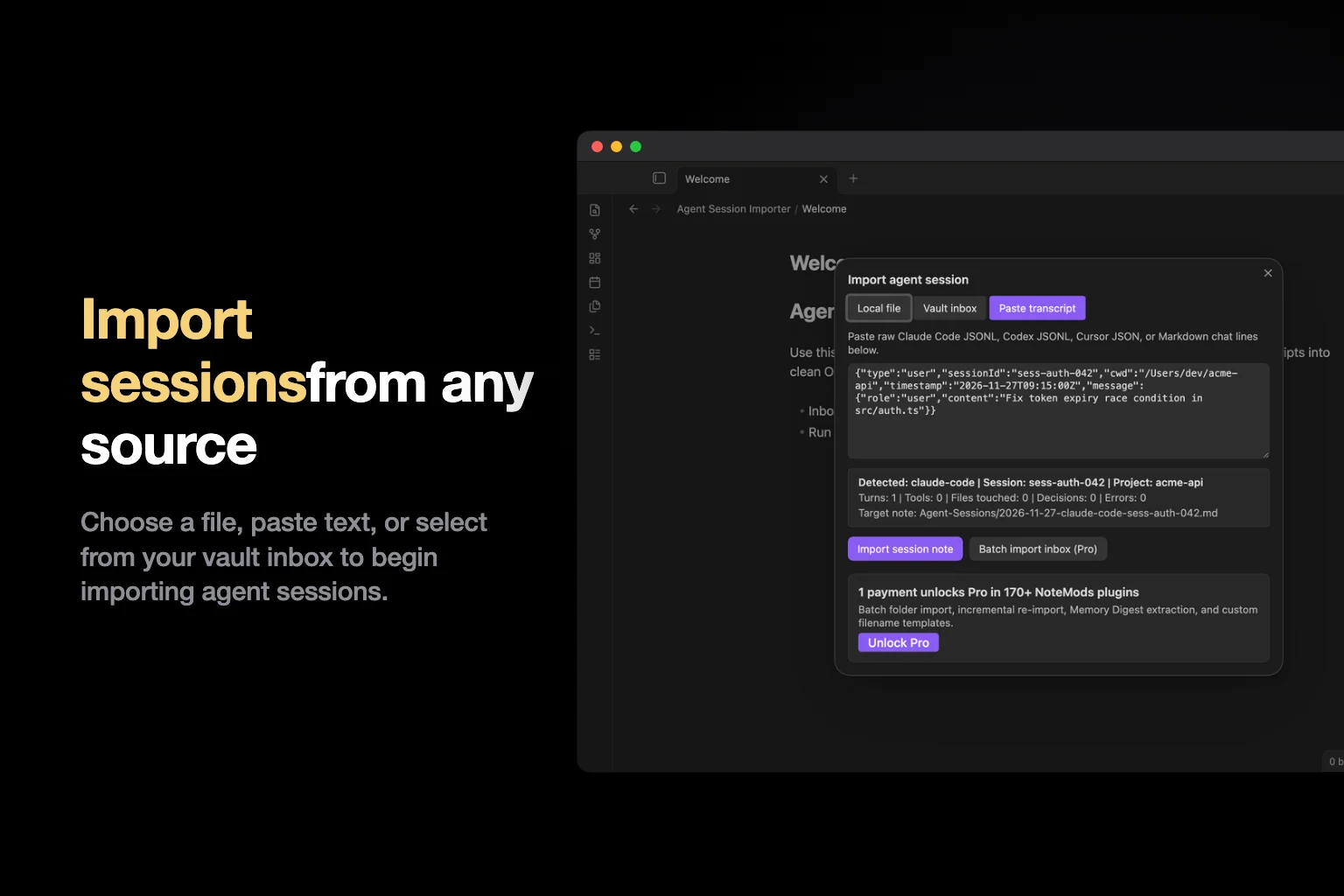
Import local Claude Code, Codex, and Cursor session transcripts into structured Markdown notes in your vault before local CLI logs expire.
Local coding agents write detailed .jsonl and .json transcripts to disk, and Claude Code deletes them after 30 days by default. Architecture choices, root-cause fixes, and lists of edited files disappear unless you copy them into your vault. Agent Session Importer parses those local transcripts in pure TypeScript on desktop and mobile with zero network calls and writes clean, searchable session notes with YAML frontmatter, collapsed tool-call callouts, and extracted highlights.
Version 1.0.0. Requires Obsidian 1.13.4 or later. Works on desktop and mobile.
1 Installation
From Obsidian Community Plugins
- Open Settings and select Community plugins.
- Select Browse and search for Agent Session Importer.
- Select Install, then select Enable.
Manual installation
- Download
main.js,manifest.json, andstyles.cssfrom the latest GitHub release. - Copy the three files into
<your-vault>/.obsidian/plugins/agent-session-importer/. - Restart Obsidian and enable Agent Session Importer under Settings > Community plugins.
2 Getting started
Import a single session (Free)
- Run "Import agent session" from the command palette.
- Pick a local
.jsonl,.json, or.mdfile, select a file from your vault inbox, or paste raw lines. - Check the live preview for the detected agent, session ID, touched files, and target path.
- Select "Import session note" to create and open the note.
Batch import and Memory Digest (Pro)
- Place
.jsonland.jsontranscripts in your Vault inbox folder (default00-Inbox/Agent-Sessions). - Run "Batch import agent sessions (Pro)" to parse all files, deduplicate by
session_id, update existing notes incrementally when enabled, and append#decision,#lesson, and#bugfixentries to your Memory Digest note. - Run "Rebuild memory digest (Pro)" to rescan existing session notes at any time.
Custom hotkeys
No default hotkeys are registered. Open Settings > Hotkeys and search for Agent Session Importer to bind your own shortcut.
3 Features
Local multi-format transcript import
Open "Import agent session" from the command palette to import a session from three local sources: a file picker on desktop or mobile, a transcript file stored inside your vault inbox folder, or pasted raw text. The parser detects Claude Code .jsonl, Codex .jsonl, Cursor .json, generic JSON, and Markdown chat transcripts automatically.
The parser recovers safely from blank lines, UTF-8 byte order marks, and malformed or truncated JSONL lines. It records the count of skipped lines in the preview and in the imported note instead of failing the import. You can inspect the detected agent, session ID, project folder, turn count, touched files, and target note path before writing anything to disk.
Structured session memory notes with YAML frontmatter
Each imported session becomes a standard Markdown note with YAML frontmatter properties (agent, session_id, date, project, files_touched, tools_used, and tags). Tool calls render as collapsed Obsidian callouts (> [!info]- Tool: ...) so long command outputs do not bury the conversation.
Agent Session Importer also extracts key decisions, errors and root-cause fixes, and follow-up To-Do items into a Highlights section at the top of the note. Generated content sits between HTML comment markers (<!-- agent-session-importer:start --> and <!-- agent-session-importer:end -->) so your own notes below the end marker remain clearly separated.
Vault settings, batch deduplication, and Memory Digest (Pro)
Configure your vault inbox folder, output folder, tool-call folding, and stdout truncation limit from the Settings tab. Free features cover full single-session import across all supported formats.
Pro adds four workflow tools for developers who import sessions every day:
- Batch folder import with deduplication: Run "Batch import agent sessions (Pro)" to import every
.jsonl,.json, and.mdfile in your vault inbox folder in one pass, deduplicating bysession_idso repeated runs do not create duplicate notes. - Incremental re-import: When a session note with a matching
session_idalready exists, Agent Session Importer updates the YAML frontmatter and managed transcript block atomically throughvault.processwhile keeping all commentary you wrote below<!-- agent-session-importer:end -->. - Automatic Memory Digest: Extract
#decision,#lesson, and#bugfixlines across imported sessions into a deduplicated vault Memory Digest note (Agent-Memory-Digest.md) with dates and source session wikilinks. Run "Rebuild memory digest (Pro)" at any time to rescan your output folder. - Custom output folder and filename templates: Format output filenames with
{{date}},{{agent}},{{project}},{{session_id}}, and{{title}}tokens, with automatic path sanitization so invalid characters or path traversal sequences never break vault writes.
Run "What Pro adds" from the command palette or Settings to test all four Pro features on in-memory sample transcripts without touching your vault.
4 Settings
| Setting | Tier | Default | Description |
|---|---|---|---|
| Vault inbox folder | Free | 00-Inbox/Agent-Sessions |
Folder scanned for transcript files. |
| Output folder | Free | Agent-Sessions |
Folder where session notes are saved. |
| Collapse tool-call callouts | Free | Enabled | Folds tool calls (> [!info]-) to keep transcripts compact. |
| Strip noisy tool stdout | Free | Enabled | Truncates long tool outputs. |
| Maximum tool output characters | Free | 400 |
Character cap per tool output block (80 to 4000). |
| Show confirmation notices | Free | Enabled | Shows a notice after import or update. |
| Incremental re-import | Pro | Enabled | Updates matching session_id notes via vault.process while keeping your notes below the end marker. |
| Automatic Memory Digest | Pro | Enabled | Appends #decision, #lesson, and #bugfix entries to the Memory Digest note. |
| Memory Digest note path | Pro | Agent-Memory-Digest.md |
Vault path of the Memory Digest note. |
| Filename template | Pro | {{date}}-{{project}}-{{agent}}-{{session_id}} |
Custom filename pattern using {{date}}, {{agent}}, {{project}}, {{session_id}}, and {{title}}. |
5 Privacy, payment and network
The core features are free. Pro features need a GitHub Sponsors sponsorship of theluckystrike: $5 a month or more, or $15 once. A total payment of $15 meets the payment requirement for Pro without further payment. Sign-in and the checks below still apply. Your notes stay readable and editable with or without Pro.
One payment turns on Pro in every NoteMods plugin.
GitHub handles the payment. Sponsor at https://notemods.com/pro/go?p=agent-session-importer&s=readme. You need no account for the free features. Pro needs the GitHub account that sponsors.
Until you select "Sign in with GitHub" in the settings, Agent Session Importer makes no network requests. Sign in uses the GitHub device flow. Agent Session Importer sends its public client ID and the scope read:user to https://github.com/login/device/code and shows you a code. While you enter the code at https://github.com/login/device, it asks https://github.com/login/oauth/access_token every few seconds to check the sign-in status. The scope permits profile reads only. GitHub needs this access to show the sponsorship tier. It grants no repository scope and no write access.
After sign in, Agent Session Importer sends one query to https://api.github.com/graphql. It checks if the signed-in account sponsors theluckystrike. It asks for the tier and the total payment to theluckystrike. The plugin reuses a successful check for 7 days. Failed checks can retry after 6 hours. Select Refresh to request an earlier check. It sends no note content, file names or other vault data, and it has no telemetry.
After a successful check, Pro can work offline for up to 14 days. Sign out or a negative sponsorship answer turns Pro off. The plugin stores the GitHub token through the secret storage API of Obsidian. It does not put the token in its saved settings or its local sponsorship data. The local storage of this device keeps your GitHub login, the tier and the time of the last check. Sign out clears the token. You can also revoke the access in your GitHub settings, under Applications.
6 Questions and answers
Does this plugin send transcripts to any server?
No. Parsing, highlight extraction, rendering, and Memory Digest merging run locally in pure TypeScript.
Does it work on Obsidian Mobile?
Yes. There are zero Node built-in dependencies, so it works on iOS and Android via the file picker, vault inbox, or pasted transcripts.
What if a JSONL file has a truncated last line?
Malformed or incomplete lines are skipped safely, counted in the note header, and never abort the import.
Will re-importing overwrite my own notes?
In Free mode, collisions create a numbered sibling file. In Pro mode with Incremental re-import enabled, only the frontmatter and the block between <!-- agent-session-importer:start --> and <!-- agent-session-importer:end --> are updated.
7 Support
- Report bugs or request new agent transcript formats on GitHub Issues.
- Review interactive demos of Pro features anytime by running "What Pro adds" in Obsidian.