How to turn filters on and off in Obsidian Bases
The Views help page, read in October 2026, describes how to add filters, but no way to switch one off.
As of October 2026, Obsidian can embed a named Base view or render a base code block. Use the file embed to reuse its view, or Bases View Extract to insert a snapshot with shared definitions.
The plugin brief focuses on copying one view from a larger Base into a review or dashboard. Extraction keeps shared definitions instead of asking you to copy each formula separately.
Embed your Base file and add #View to its name, replacing View with the saved view name. Obsidian documents this suffix for choosing the default view of an embedded Base.
Obsidian also supports a base code block written with Bases syntax. Use that route when you prefer to write and review the query yourself.
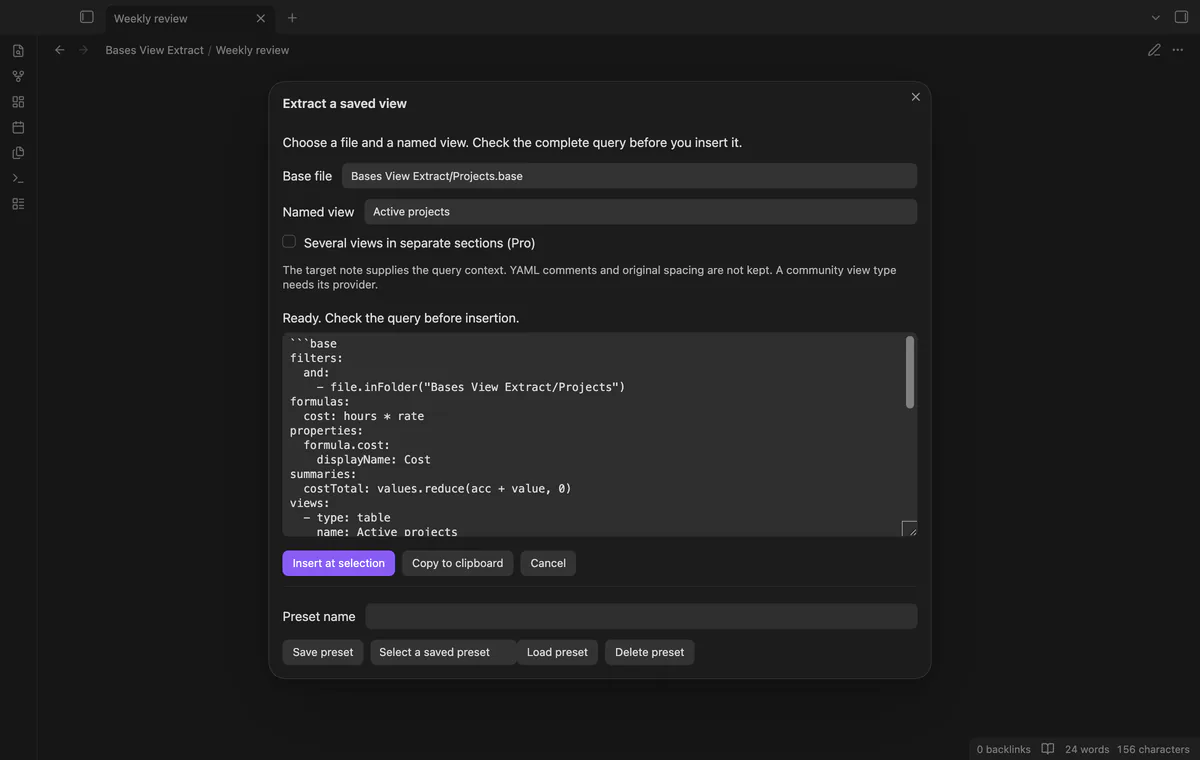
Open your target note, choose a Base and its named view, then inspect the complete query. Insert the block at your cursor or replace the selected text.
MIT · no telemetry · core features free
Open the target Markdown note and place the cursor on an empty line, or select text to replace.
Run Extract a saved view from the command palette.
Select a Base file and its named view.
Read the complete preview and context notice, then select Insert at selection.
Use the named file embed when you want the note to reference your Base. Use extraction when you want an independent copy of the query.
Yes, the target note supplies the embedded query context. The plugin warns about context-sensitive expressions, but it does not verify their results.
Single-view extraction leaves the other views out of the inserted query. The source Base stays unchanged.
 That's every step, start to finish.
You're officially a regular.
Obsidian rewards people who share. NoteMods is just me and a lot of coffee. If this guide saved you a fight with the syntax, buy me a cup.
That's visit . Regulars are the reason I keep NoteMods running. If it's part of your routine now, a coffee says thanks better than anything.
Copy a saved Bases view into a note.