How to import Standard Notes into Obsidian
Export a decrypted JSON backup and convert supported records into Markdown notes.
As of October 2026, the Obsidian help lists import guides for 16 apps and formats, and Joplin is not one of them. Markdown files can go straight into a vault, but Joplin note links and resources then need repair. Joplin Export Import reads a JEX archive and writes linked notes with tags, dates and attachments.
Joplin Export Import has Pro, and $15 one time turns it on in all 129 plugins.
A Joplin user who moves to Obsidian usually has one JEX file from File, Export all, JEX. That user wants notebooks as folders, working links between notes, embedded images and the original created and updated dates.
Joplin links point to an item ID, such as [Other](:/<id>). Obsidian does not know these IDs, so a plain copy of the text leaves broken links.
The Obsidian help says that you can drag files or folders into the File explorer. You can also move them into the vault folder with your system file browser. This works for any app that exports Markdown files.
Obsidian then shows each file as a note, with the text as it was exported.
The Import notes page of the help lists 16 apps and formats, from Notion and Evernote to HTML and CSV files. It also links community guides for nine more apps.
For a missing app, the page asks you to request it in the open source importer repository.
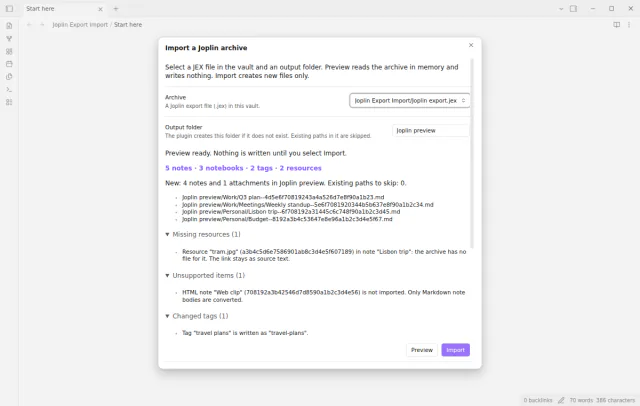
Select a .jex file in your vault and an output folder. A preview shows the counts, the first output paths, missing resources and unsupported items before anything is written.
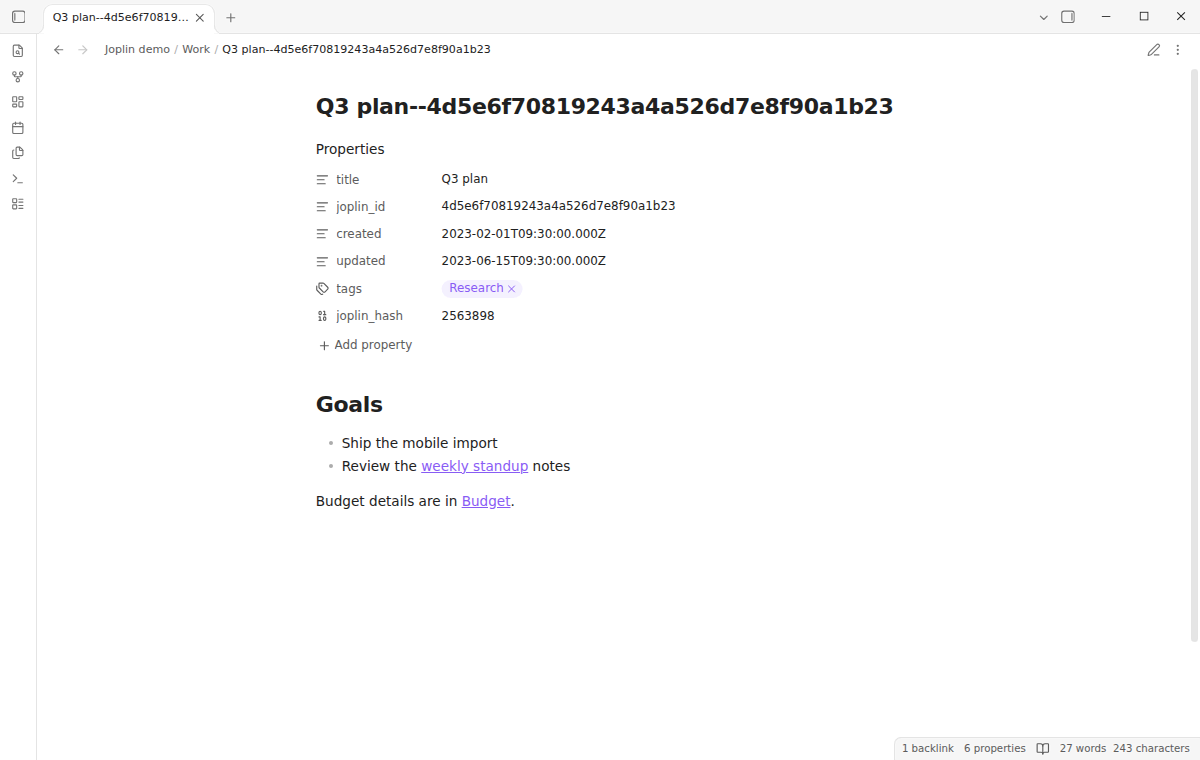
Import then makes a folder for each notebook and turns Joplin note links into vault links. It copies resources to a _resources folder and writes the source ID, tags and dates as properties.
MIT · no telemetry · core features free
In Joplin, select File, Export all, JEX. Copy the .jex file into your vault.
Install Joplin Export Import and enable it. It needs Obsidian 1.13.4 or later.
Run the command Import a Joplin archive of Joplin Export Import, or right-click the .jex file and select Import this Joplin archive.
Select the archive and type the output folder. The default is Joplin import.
Select Preview and read the counts and the report lists.
Select Import. The status line shows the created files, the skipped paths and the errors.
Yes, for links to notes in the same archive. A link such as [Other](:/<note id>) becomes a vault link to the imported note, and the label stays. A heading anchor stays as Joplin wrote it, so the link can miss the heading.
Yes. The import creates new files only and skips each output path that exists. A later import with the same note title and notebook path finds the same file, so your edits stay.
The source link stays in the note, and the report names the missing resource. The other notes import as usual.
 You can now import a Joplin JEX export.
This guide uses Joplin Export Import. Pro adds "Resync changed notes" and "Audit several archives". One payment of $15 turns on Pro in 129 plugins.
This guide uses Joplin Export Import. Pro adds "Resync changed notes" and "Audit several archives". One payment of $15 turns on Pro in 129 plugins.
Import a Joplin JEX file as Markdown notes with folders, vault links and local attachments.