How to query JSON files in Obsidian
Use JMESPath to select fields or filter records in a JSON file.
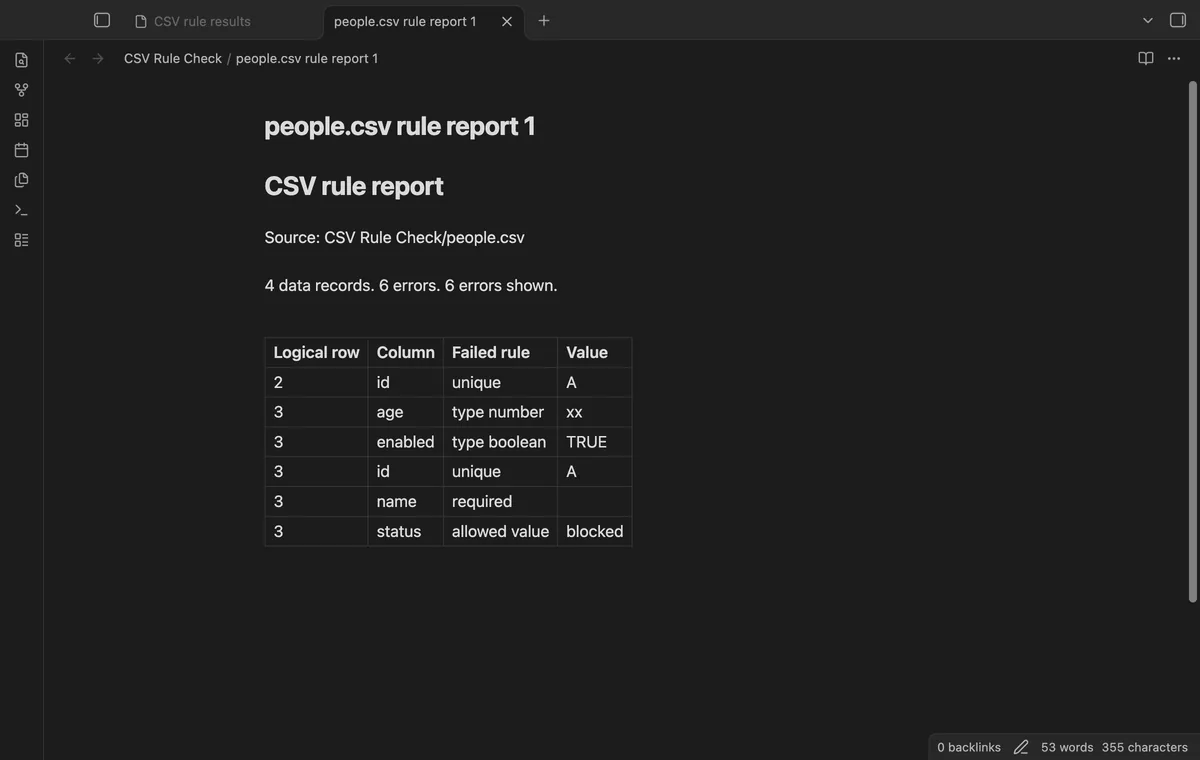
Check parsed CSV fields against rules you choose, then record errors by row and column. As of October 2026, Obsidian can hold Markdown findings; CSV Rule Check runs explicit checks inside your vault.
Decide which columns need values, permitted text or unique identifiers before checking your export. CSV Rule Check uses your rules rather than inferring a schema.
Python’s csv module reads records, including quoted fields. Use csv.DictReader to access fields by header name, opening the file with newline="".
For a required name, flag records whose name field is empty. Keep a set of identifiers to detect repeats, then record findings in Markdown.
Put a JSON rule file beside your CSV, then run the chooser and inspect logical rows. For example, put {"columns":{"name":{"required":true}}} in people.csv.schema.json to require a name.
Use Write report to keep a Markdown snapshot without changing the source. Pro adds trim and default previews plus checks of chosen files with saved rules.
MIT · no telemetry · core features free
Put the CSV and its adjacent JSON rule file in your vault.
Run Choose CSV and check adjacent rules from the command palette.
Select the CSV and inspect the results table.
Correct the source in your CSV editor, then check again.
Select Write report to save the last successful check.
Use people.csv.schema.json in the same folder. The chooser reads that rule file before parsing the CSV.
Quoted fields can contain line breaks without starting a new record. The checker counts logical records, with the header as row 1.
 You can now check CSV column rules.
You're officially a regular.
Obsidian rewards people who share. NoteMods is just me and a lot of coffee. If this guide saved you a fight with the syntax, buy me a cup.
That's visit . Regulars are the reason I keep NoteMods running. If it's part of your routine now, a coffee says thanks better than anything.
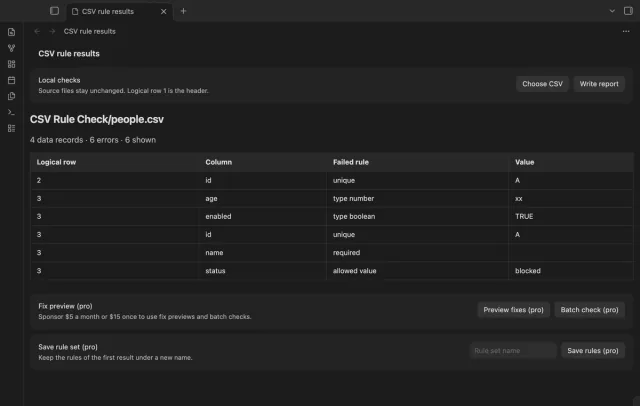
Check CSV values, types and duplicates before you use an export.