How to join saved PDF quote callouts in Obsidian
As of October 2026, Obsidian callouts hold editable Markdown, so you can combine saved quote text by hand.
As of October 2026, you can keep a bilingual glossary in an Obsidian Markdown table and enter the terms yourself. To read supported local TBX v2 records, use TBX Term Import and review the preview before creating a note.
A glossary needs the right language labels as well as the terms. TBX Term Import treats en, en-US and en-GB as separate selections, so you choose the pair explicitly.
Obsidian supports tables with columns separated by vertical bars and a header separator row. Use Insert Table, name two language columns, and enter your terms.
For a small glossary you can inspect each source record and copy the terms into its row. Add concept IDs or definitions as extra columns when needed.
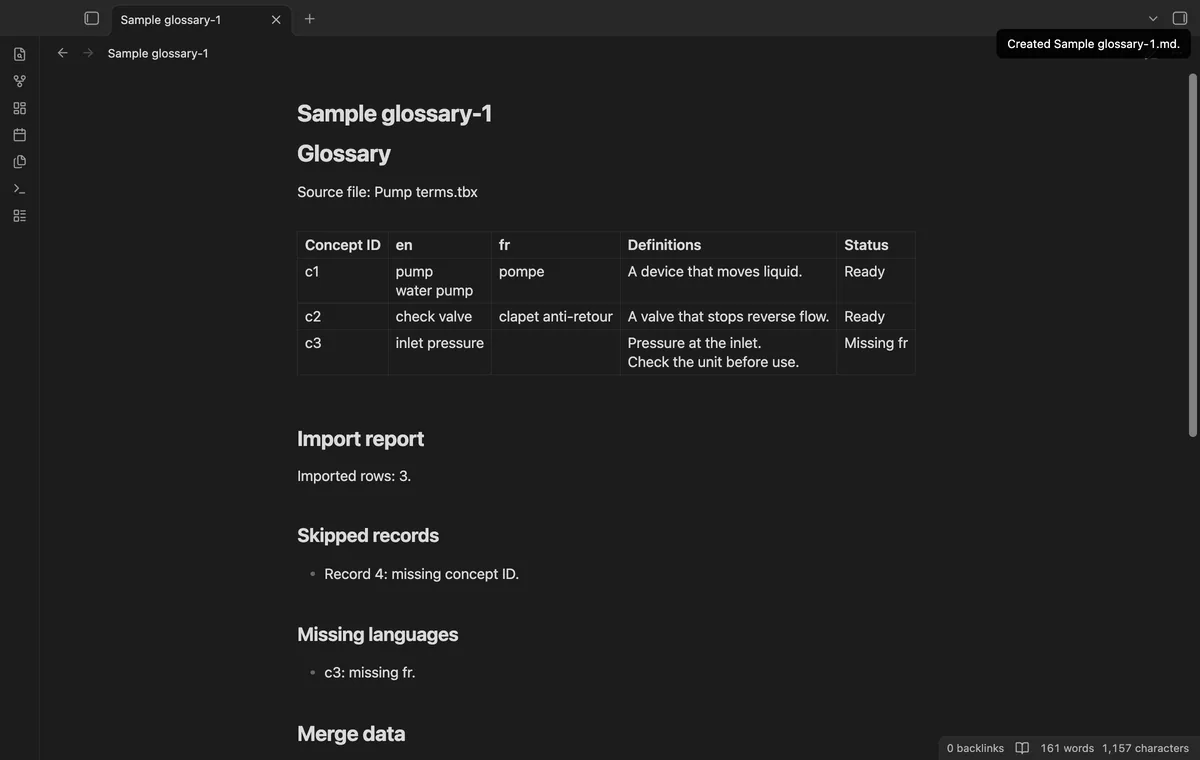
Select a local UTF-8 .tbx or .xml file and choose two exact language labels. Inspect terms, alternate forms, definitions and missing-language warnings before creating the glossary.
The free command creates a new note with a table and report. Pro adds batches of up to 20 files and reviewed merges by concept ID.
MIT · no telemetry · core features free
Enable TBX Term Import and run Import a local term file.
Choose your local .tbx or .xml file.
Select different source and target labels exactly as the file provides them.
Inspect the preview, skipped records and missing-language warnings.
Enter a plain note name and select Create glossary.
Read the table and report in Reading view before using the terms.
Yes, if that exact label occurs in the file. Choosing en-US doesn't select en or en-GB.
The modal shows the first 100 rows. The created note includes supported selected rows beyond that preview limit. Merge reviews have a separate limit of 100 result rows.
 You can now import a TBX glossary.
You're officially a regular.
Obsidian rewards people who share. NoteMods is just me and a lot of coffee. If this guide saved you a fight with the syntax, buy me a cup.
That's visit . Regulars are the reason I keep NoteMods running. If it's part of your routine now, a coffee says thanks better than anything.
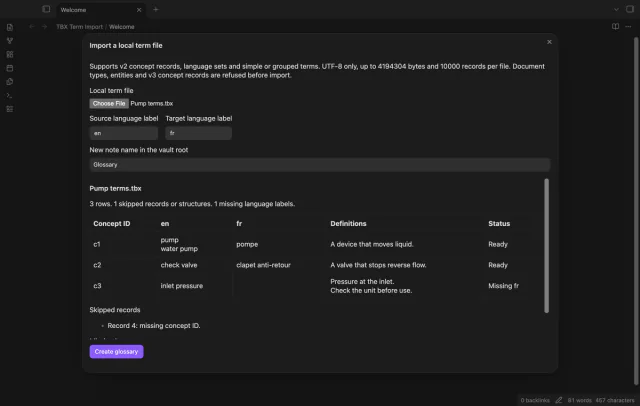
Preview a local term file and create a glossary with two language columns.