How to link completed tasks to the daily note in Obsidian
The Tasks plugin writes the done date as plain text, and its docs say a date can't be a link, as of October 2026. A Tasks or Dataview query in the daily note lists what you finished, with no link and no plugin to buy. For a real link, use the free Checkbox Time Tracker in notes you mark, or Task Date Links with Tasks done dates.
Updated · 4 ways compared · 16 sources
Background
The request is old. A discussion on the Tasks repository from 14 April 2021 asks for the done date as a link. The graph view would then show what was completed on a date. It has 81 upvotes. Issue 3372 tracked the request from March 2025 and has 43 reactions and 17 comments.
A pull request from January 2026 added the option, and it was closed without a merge in February. The maintainer closed the issue as not planned on 9 June 2026, and wrote that this is not a refusal to fix it. A forum topic from April 2023 asks the same question, with 5 posts and 2 likes.
4 ways to do it
A query in the daily note
A query is the free way to see what you finished on a day, with no link at all. The Tasks docs give a daily note template with a query block that holds done on {{date:YYYY-MM-DD}}. The core Daily notes plugin fills in the date when it creates the note.
Dataview can do the same. Its docs show a TASK query with WHERE completion = date("2021-08-22"). That query finds the done date that Tasks writes and the completion field of Dataview.
limits
A query is a view and not a link, so the daily note gets no backlink and the graph gets no line. The list shows only while the plugin that draws it is on.
This way needs no plugin. The Backlinks help page says that Unlinked mentions lists unlinked occurrences of the name of the active note. Daily notes get the name format YYYY-MM-DD by default, and Tasks writes its dates in that format.
So a done date can show under Unlinked mentions of that day. In a forum topic from 2023, one user saw the date there after a few seconds. The person who asked did not see it.
limits
A mention is not a link, so the graph shows no line for it. The match is on the date text, so a due date matches too, and your daily notes must be named YYYY-MM-DD.
A free plugin that writes a link when you check a box
Checkbox Time Tracker inserts a time when you check a checkbox. Its README shows a setting that also inserts a link to the daily note, as in - [x] [[2024-01-01]] 12:00. It works in notes that have the CSS class checkbox-time-tracker in their cssclasses property.
The directory shows 4k downloads, the MIT license and a last update 2 years ago. Task Collector appends a date in a moment format that you set, and its docs show no link format.
limits
Checkbox Time Tracker puts a time at the start of the task, and its README does not mention the Tasks done date. The README names no way to add links to tasks that you finished before.
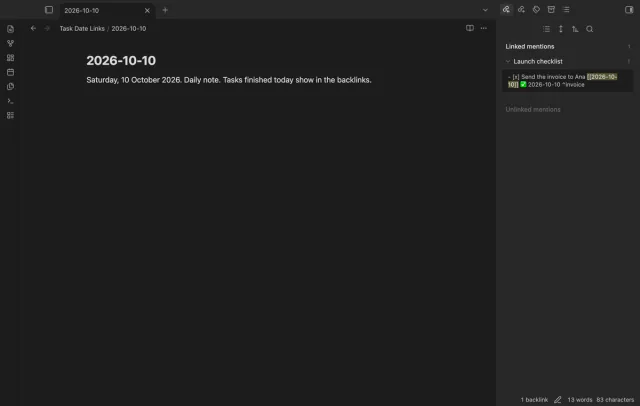
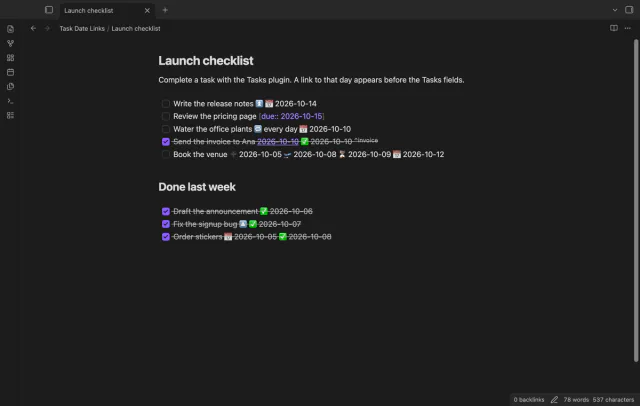
Task Date Links waits for a done date on a checked task, from Tasks or typed by hand. It then adds a link to that day before the Tasks fields, such as [[2026-10-10]]. Tasks still reads the done date, the due date, the priority, the recurrence rule and the block id.
Links on completion, the back-fill of one note or a selection, and the undo are free. The back-fill of the whole vault, links for other dates, week and month links, and folder rules need Pro.
limits
On its own it links only a done date of today or yesterday, and older dates need the back-fill. A checked task with no done date gets no link, and neither does a line with a tag after the done date.
Install Task Date Links from Community plugins and enable it. It needs Obsidian 1.13.4 or later.
Complete a task as you do now, for example with the Tasks command Toggle task done.
Wait for Obsidian to save the note. A link to today then appears before the Tasks fields.
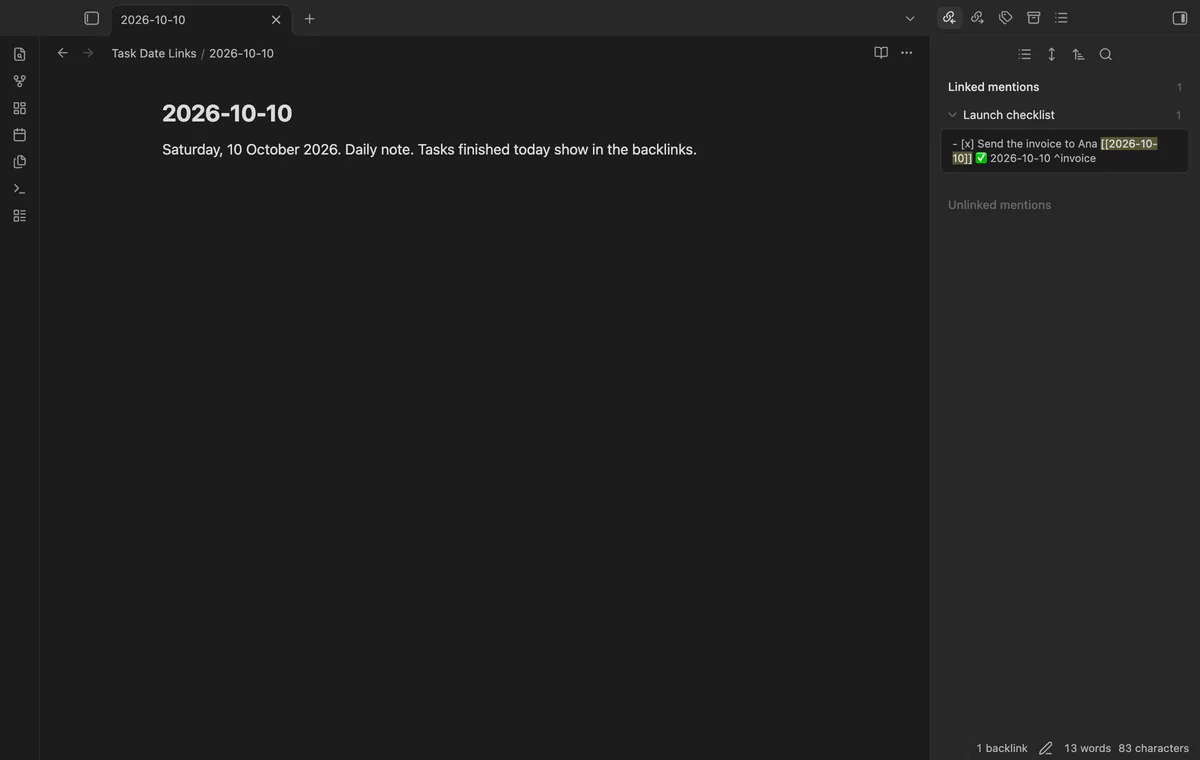
Open the daily note of that day and look at Linked mentions in the Backlinks pane.
For older tasks, open their note and run Link the done dates in the current note.
Check the preview and select Link the dates. The command Undo the last back-fill puts the lines back.
Common questions
Can the Tasks plugin write the done date as a link?
No, as of October 2026. The Tasks docs say that the date format is not configurable and that dates can't be links. The request, issue 3372, was closed as not planned in June 2026.
Do unlinked mentions show completed tasks in the daily note?
They can, when your daily notes are named YYYY-MM-DD. Unlinked mentions lists text that matches the note name, and Tasks writes dates in that format. It also matches a due date and any other text with the same date.
Can Task Collector append a link to the daily note?
Its docs don't say so. Task Collector appends a date in a moment format that you set, with literal text inside square brackets. The docs show [(]YYYY-MM-DD[)] and a Dataview field, and no link format. This guide did not test one.
Will a link on the task line break my Tasks queries?
Not when the link sits before the Tasks fields. Tasks reads its fields from the end of the line, so a link after the done date hides the date. With Task Date Links the description holds the link text, and a query on the description sees it.
Bases can't list the checklist tasks inside your notes on its own, as of October 2026. A base row is a file, and an Obsidian developer wrote in 2025 that Bases doesn't read file contents. You can make each task its own note, or add a community view for Bases that reads the task lines.
As of October 2026, a normal embed of a Kanban plugin board shows plain Markdown, one heading under the other. Obsidian itself can put a Kanban view of a base inside a note since version 1.14, but each card there is a note. To see a Kanban plugin board as side-by-side lanes in a note, you need a plugin that reads the board file.