How to search notes by date in Obsidian
Core search has no operator for the created or modified date, as of October 2026.
As of October 2026, Obsidian has no feature that suggests the tags that often go with a tag you typed. Core Search and Tags view can show which tags your notes use. Tag Pairings opens a box after a tag and a space and lists the tags that share the most notes with it.
Tag Pairings has Pro, and $15 one time turns it on in all 129 plugins.
The forum topic "Tag Suggestions (Quickly add associated tags)" dates from May 2020. Its first post has 11 likes. It asks for a box like the link suggestion box that lists tags commonly used with the tag you just placed.
Type tag:#book in core Search to list every note with that tag. Open a few results and note which other tags they carry. Then type those tags yourself.
The help page says that a search for a parent tag also matches its nested tags.
The core Tags view lists every tag in the vault and the number of notes for each tag. Set the sort order to Frequency to see your most used tags first. Click a tag to search for it.
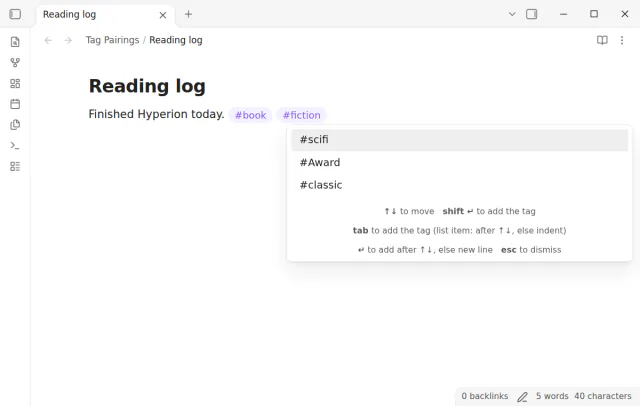
Type a tag and a space on a line, for example #book . A box opens at the cursor and lists the tags that share the most notes with it. Pick one, and the box opens again for the tag you added.
It reads tags from the metadata cache of Obsidian, so body tags and the tags property count the same. A nested tag counts for its parents too.
MIT · no telemetry · core features free
Install Tag Pairings from Community plugins and enable it. It needs Obsidian 1.13.4 or later and has no setup.
Open a note in Live Preview or Source mode.
Type a tag, for example #recipe, then one space.
Press Shift+Enter or Tab to add the highlighted tag, or click a tag in the box.
Press Shift+Enter again to add the next related tag. Press Escape to close the box and keep typing.
The tag that shares the most notes with your tag comes first. On a tie, a tag from the notes that this note links to wins. Next comes the tag that more notes use, and then the name.
The list skips each tag that the note already has, in the body and in the front matter. It also skips each tag on the current line. So the box shows only tags that you can still add.
The plugin reads the tags of each note one time when the vault opens. After that it updates one note at a time when Obsidian indexes a change. In a unit test, the index of 10,000 notes took 130 milliseconds to build.
 You can now get related tag suggestions.
This guide uses Tag Pairings. Pro adds "Counts". One payment of $15 turns on Pro in 129 plugins.
This guide uses Tag Pairings. Pro adds "Counts". One payment of $15 turns on Pro in 129 plugins.
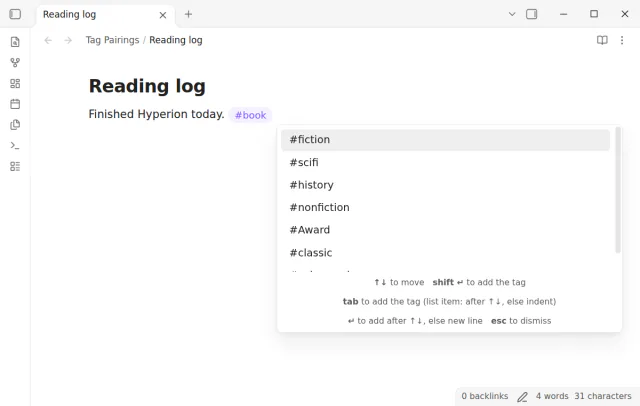
Type a tag and see the tags that your other notes use with it.