Bases Note Templates · Obsidian-Plugin-Dokumentation
Bases Note Templates documentation (Deutsch)
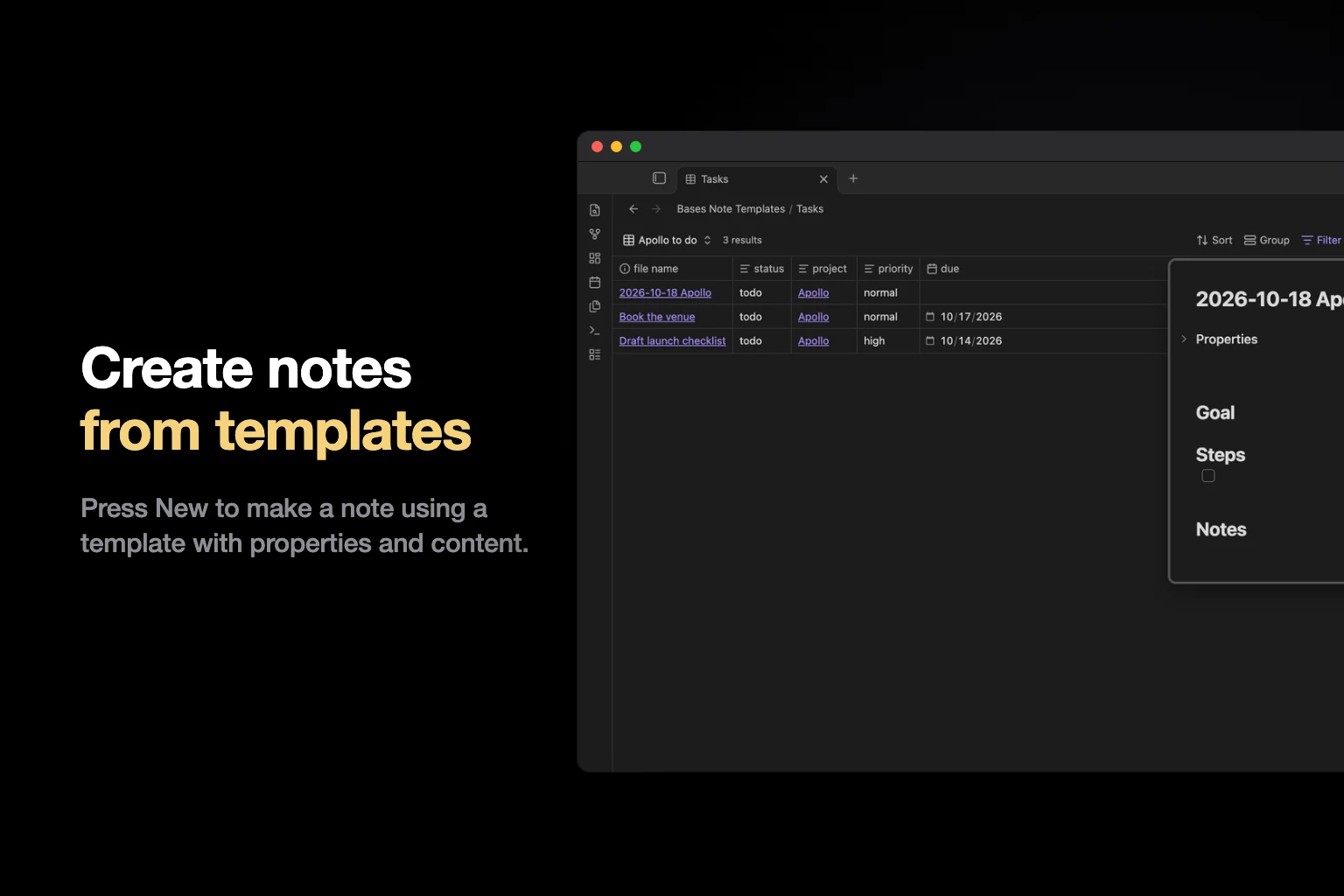
Bases Note Templates macht den New-Button eines Bases so, dass neue Notizen aus einem Vorlage erstellt werden. Du wählst eine Vorlagennote für das Base aus. Wenn du New drückst, erhält die neue Notiz die Eigenschaften und den Text der Vorlage, sowie die Werte der Base-Filter, im richtigen Ordner, mit einem Dateinamen aus einem Muster.
Ein Base, gefiltert nach status == "todo" und project == "[[Apollo]]", gibt Notizen wie 2026-10-10 Apollo.md mit status: todo, project: "[[Apollo]]" und den Überschriften deiner Aufgaben-Vorlage. Du musst die Notiz nicht mehr erstellen, löschen und die Vorlage manuell einfügen.
Eine Vorlage für jedes Base, die Filterwerte, der Ordner und das Namensmuster sind kostenlos. Pro fügt mehr Vorlagen mit einer Liste zum Auswählen hinzu, eine Vorlage für jedes Ansichtsfenster, Templater und Duplizieren als neue Notiz hinzu. Pro kostet 5 Dollar pro Monat oder 15 Dollar einmalig über GitHub Sponsors. Eine Gesammtzahlung von 15 Dollar erfüllt die Zahlungsanforderung für Pro ohne weitere Zahlungen. Anmeldung und die Überprüfungen unten gelten weiterhin.
Version 1.3.4. Erfordert Obsidian 1.13.4 oder neuer. Funktioniert auf Desktop und Mobilgeräten.
1 Installation
In Obsidian, öffne Settings, dann Community plugins, dann Browse, und suche nach "Bases Note Templates". Wähle Install, dann Enable.
Um manuell zu installieren, lade main.js, manifest.json und styles.css aus der neuesten Release herunter. Lege die drei Dateien in <vault>/.obsidian/plugins/bases-note-templates/. Aktualisiere die Liste der Community-Plugins, dann aktiviere Bases Note Templates.
Bases Note Templates benötigt Obsidian 1.13.4 oder neuer und das Bases Core Plugin. Es wurde auf Desktop mit Obsidian 1.13.4 und 1.14.4 getestet.
2 Getting started
- Erstelle eine Notiz
Templates/Task.md. Füge diesen Text hinein:
---
status: todo
---

1. Erstelle eine Vorlagennote, zum Beispiel `Templates/Task.md`, mit den Eigenschaften und Überschriften, die jede neue Notiz benötigt.
2. Öffne eine Base-Datei und führe "Set up templates for this base" aus.
3. Wähle die Vorlage aus. Füge einen Ordner und ein Namensmuster hinzu, wenn du das möchtest. Wähle Save.
4. Drücke New in der Base, oder führe "New note from template in this base" aus.
5. Für Pro, spontere auf GitHub, dann öffne die Einstellungen und wähle "Sign in with GitHub".

Das Plugin setzt keine Standard-Tastenkombinationen. Du kannst jeder Befehl eine Tastenkombination in Settings, dann Hotkeys zuweisen.
3 Features
A template for the New button
Drücke New in einer Base wie gewohnt. Das Programm erstellt die Notiz und schreibt die Filterwerte. Dann fügt das Plugin die Vorlage hinzu: die Eigenschaften kommen zuerst, und der Text der Vorlage wird der Inhalt der Notiz. Das Popover des Programms zeigt das Ergebnis an, sodass du sofort tippen kannst.
Das Plugin wartet, bis das Programm seinen eigenen Schritt beendet hat, dann überschreibt es die Notiz in einer einzigen Bearbeitung und benennt sie, wenn ein Namensmuster oder ein Ordner gesetzt ist. Wenn die Base keine Einrichtung hat, berührt das Plugin die Notiz nicht.
Filter values as properties
Ein Wert aus den Filtern gewinnt über die gleiche Eigenschaft in der Vorlage. Die obige Vorlage sagt status: draft, aber die Ansicht zeigt nur status == "todo", also erhält die neue Notiz todo und erscheint in der Ansicht. Ein leerer Wert versteckt keinen Vorlagenwert: das Programm fügt für jede Spalte einen leeren Eigenschaftswert hinzu, und der Vorlagenwert priority: normal bleibt.
Das Plugin liest die gleichen Filterregeln wie das Programm: ==, >= und <=, contains, containsAll und containsAny, file.hasTag, file.inFolder, file.folder ==, file.hasProperty, und !prop.isEmpty(). Werte können Text, Zahlen, true oder false, Listen, link(), date() und today() sein. Ein Test im Programm vergleicht das Ergebnis mit dem, was der New-Button von Obsidian für die gleiche Base schreibt.
Extra properties
In der Einrichtung der Base füge Namen und Werte unter "Extra properties" hinzu. Eine Notiz, die du mit dem Befehl, dem Header-Button oder dem New-Button dieser Base erstellst, erhält jedes Paar als Eigenschaft. Nutze es für eine source, einen Standard status oder ein Datumsstempel wie {{date:YYYY-MM-DD}}. Das Plugin renderiert {{date}}, {{time}}, {{base}}, {{view}} und {{template}} in einem extra Wert.
Ein Filterwert oder ein Vorlagenwert mit dem gleichen Namen gewinnt über eine extra Eigenschaft, also sind Extras Standards, keine Überschreibungen.
Folder and name pattern
Führe "Set up templates for this base" aus einer geöffneten Base aus. Wähle die Vorlage, einen Ordner und ein Namensmuster aus. Ohne Ordner gehen Notizen in den Ordner der Filter, wie file.inFolder("Tasks"), ansonsten in deinen Standardort für neue Notizen.
Das Namensmuster kann {{date}}, {{date:YYYY-MM-DD}}, {{time}}, {{base}}, {{view}}, {{template}} und jede Filtereigenschaft wie {{project}} verwenden. Ein Link verliert seine Klammern, so dass [[Apollo]] Apollo gibt. Zeichen, die ein Dateiname nicht enthalten kann, werden zu Leerzeichen. Wenn der Name bereits vorhanden ist, fügt das Plugin eine Nummer hinzu, wie das Programm es macht.
Vorlagen können die Variablen des Core Templates-Plugins verwenden: {{title}}, {{date}} und {{time}}, mit oder ohne ein Format. Sie funktionieren im Text und in String-Werten innerhalb von YAML-Listen und eingebetteten Karten. Zum Beispiel, aliases: ["{{title}}"] erhält den Notiztitel. Ein eingebetteter Wert wie details: {name: "{{title}}"} erhält den Titel ebenfalls. Vorlagen-Name, Notiz-Name und Filtereigenschaften-Name können Unicode-Text verwenden, wie 日本語 und Café.
Embedded bases
Drücke New in einer Base, die du in einer Notiz eingebettet hast, wie ![[Tasks.base]] oder ![[Tasks.base#Bugs]]. Die neue Notiz erhält die Einrichtung dieser Base-Datei: die Vorlage, die Filterwerte, die extra Eigenschaften, den Ordner und das Namensmuster. Das Plugin verwendet das Ansichtsfenster, das das Eingebettete zeigt. In einem Filter wie project == this.file, ist this die Notiz, die das Eingebettete enthält, wie im Programm.
Ein base-Codeblock hat keine Base-Datei, so dass das Plugin die Notizen, die sein New-Button erstellt, nicht ändert.
Command and header button
"New note from template in this base" erstellt die gleiche Notiz ohne den New-Button und öffnet sie in einem neuen Tab. Eine Base mit einer Einrichtung erhält auch einen Button in ihrem Tab-Header, der das gleiche macht. Beide verwenden nur das öffentliche Ansichtsfenster-Interface von Obsidian.
More templates with a list to pick from (Pro)
Füge bis zu 10 Vorlagen einer Base hinzu. Wenn du New drückst, den Befehl ausführst oder den Header-Button auswählst, fragt eine Liste, welche Vorlage verwendet werden soll. Drücke Escape und die Notiz bleibt, wie das Programm sie erstellt hat.
A template for each view (Pro)
Gib einer Ansicht ihre eigene Vorlage, zum Beispiel eine Bug-Vorlage für das Bugs-Ansichtsfenster einer Tasks-Base. In dieser Ansicht kommt die Ansichtsvorlage zuerst in der Liste.
Duplicate as new note (Pro)
Rechtsklicke eine Zeile einer Base und wähle "Duplicate as new note", oder führe "Duplicate the current note as a new note" aus. Das Plugin kopiert den Text der Notiz, Eigenschaften inklusive, zu einer neuen Notiz im gleichen Ordner und öffnet sie. Die Kopie hat die gleichen Eigenschaften wie die Original, so dass sie in einer Base erscheint, die auf Ordner oder Eigenschaften filtert.
Mit Pro kann das Plugin eine neue Notiz auch an Templater weitergeben. Wenn die Notiz nachdem Templater seine Chance hatte, noch Templater-Tags enthält, fragt das Plugin Templater, sie zu füllen.
4 Commands
Öffne das Command-Palette und tippe den Plugin-Namen, um diese Befehle zu sehen. Du kannst jedem eine Tastenkombination in Settings, Hotkeys zuweisen.
| Command | Command id |
|---|---|
| New note from template in this base | bases-note-templates:new-from-template |
| Set up templates for this base | bases-note-templates:set-up-base |
| Duplicate the current note as a new note | bases-note-templates:duplicate-note |
5 Settings
Nach einer kleinen oder großen Aktualisierung öffnet dieses Plugin eine What's new-Registerkarte im Hintergrund. Die Registerkarte und Einstellungen-Karte vorschlagen andere NoteMods-Plugins und Zovo Chat und verlinken zu notemods.com für Rückmeldungen (Privacy). Die Registerkarte sendet keine Daten. Deaktiviere die Registerkarte in Settings.
| Setting | Default | Allowed values |
|---|---|---|
| Use templates with the New button | On | On or off, for bases in tabs and embedded bases |
| Date format | YYYY-MM-DD | moment.js tokens |
| Time format | HH:mm | moment.js tokens |
| Run Templater on new notes | On | On or off (Pro) |
"Bases with templates" lists each base that has a setup. Delete an entry to remove its setup. The plugin keeps the setup when you rename or move the base, a template or the folder for new notes.
6 Pro
Pro unlocks more templates for each base with a list, view templates, Templater, and Duplicate as new note. To get it:
- Sponsor theluckystrike on GitHub Sponsors with $5 a month, or $15 once. A total payment of $15 meets the payment requirement for Pro without further payment. Sign-in and the checks below still apply.
- In Obsidian, open the settings of Bases Note Templates and select "Sign in with GitHub".
- The plugin copies a code and opens github.com/login/device. Paste the code there and approve.
Without Pro, a base with more templates uses its first template, and view templates wait. Your setup stays saved and comes back when Pro is on.
7 Privacy, payment and network
The core features are free. Pro features need a GitHub Sponsors sponsorship of theluckystrike: $5 a month or more, or $15 once. A total payment of $15 meets the payment requirement for Pro without further payment. Sign-in and the checks below still apply. Your notes stay readable and editable with or without Pro.
One payment turns on Pro in every NoteMods plugin.
GitHub handles the payment. Sponsor at https://github.com/sponsors/theluckystrike/sponsorships?tier_id=666162&frequency=one-time&metadata_source=bases-note-templates. You need no account for the free features. Pro needs the GitHub account that sponsors.
Until you select "Sign in with GitHub" in the settings, Bases Note Templates makes no network requests. Sign in uses the GitHub device flow. Bases Note Templates sends its public client ID and the scope read:user to https://github.com/login/device/code and shows you a code. While you enter the code at https://github.com/login/device, it asks https://github.com/login/oauth/access_token every few seconds to check the sign-in status. The scope permits profile reads only. GitHub needs this access to show the sponsorship tier. It grants no repository scope and no write access.
After sign in, Bases Note Templates sends one query to https://api.github.com/graphql. It checks if the signed-in account sponsors theluckystrike. It asks for the tier and the total payment to theluckystrike. The plugin reuses a successful check for 7 days. Failed checks can retry after 6 hours. Select Refresh to request an earlier check. It sends no note content, file names or other vault data, and it has no telemetry.
After a successful check, Pro can work offline for up to 14 days. Sign out or a negative sponsorship answer turns Pro off. The plugin stores the GitHub token through the secret storage API of Obsidian. It does not put the token in its saved settings or its local sponsorship data. The local storage of this device keeps your GitHub login, the tier and the time of the last check. Sign out clears the token. You can also revoke the access in your GitHub settings, under Applications.
8 Questions and answers
Does the app not do this already?
Partly. The New button writes the filter values, and it puts the note in the folder of file.inFolder(). Obsidian 1.13.4 and 1.14.4 also read a hidden newItemTemplate key in a base file, but it copies only the template's properties, not its text, and then the filter values are lost. There is no view template, no name pattern and no setting for it.
Does it change my base files?
No. The setup lives in the plugin's data.json. Base files stay as they are.
Can new notes get a property that is not in the filters or the template?
Yes. Open the setup of the base and add the name and the value under "Extra properties". A new note from the command, the header button or the New button gets the pair, and {{date}}, {{time}}, {{base}}, {{view}} and {{template}} work in the value. A filter value or a template value with the same name wins.
Does New work in an embedded base?
Yes. When you press New in an embed of a base file, the plugin uses the setup of that base file, with the same free and Pro rules. A base code block is not supported, because it has no base file. Its New button works as it does without the plugin.
What if another plugin makes an empty note while a base is open?
The plugin changes a new note only when it is empty and sits in the folder where the New button of that base puts notes. Other notes are left alone.
Are formulas in filters supported?
Filters that compare with a formula or with this are skipped when the command makes a note. The New button of the app still writes them.
9 Support
Report a bug or ask for a feature in the issue tracker of this repository. Please include your Obsidian version, the filters of the base and the template that shows the problem.
To build from source:
npm ci
npm run build
npm test
The tests check golden cases for the filter rules, the merge and the name patterns. End-to-end tests press New in real Obsidian 1.13.4 and 1.14.4 and compare the result with the app's own filter values.
10 License
MIT