How to edit different checkbox properties in one Obsidian base
As of October 2026, Obsidian supports Boolean checkbox properties and Bases tables with a column for each property.
As of October 2026, a Bases table can copy and paste a selection of cells, and a paste replaces the old values. The All properties view renames a property in every note. To append a tag, rename one list item or preview a batch first, you need a plugin.
Bases Multi-Row Edit has Pro, and $15 one time turns it on in all 129 plugins.
The forum request "Bases: Support Multiline Multirow Editing (Edit multiple files at once)" opened on 28 May 2025. It has 74 likes and 22 posts. People ask to mark many rows done, add a tag, or rename one tag on many notes at once.
In a Bases table, Shift-click creates a cell selection. Copy a cell with Ctrl+C or Cmd+C, select cells in one column, then paste with Ctrl+V or Cmd+V.
Ctrl+Z or Cmd+Z undoes changes to properties. Backspace clears the selected cells, and Shift+Space selects the row.
Open the Properties view and choose All properties. Right-click a property to rename it in every note of the vault.
The Properties help page says bulk editing is not supported beyond this view. It suggests a code editor, scripts or community plugins for more.
Bases Multi-Row Edit adds a Multi-row edit view to the Bases view menu. It keeps the filters, sorting and visible columns of the base. Check rows or choose Select visible, then choose Edit selected.
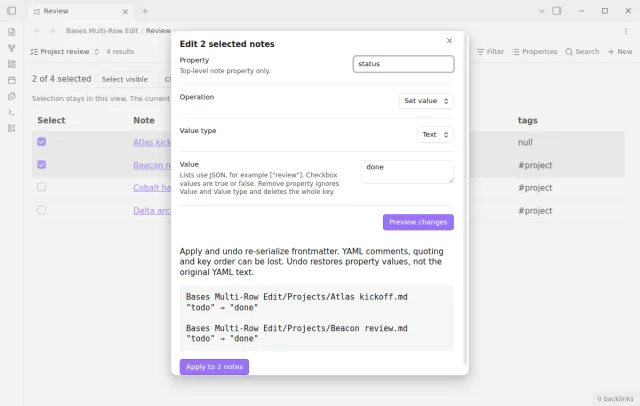
Pick a property and one of five operations. Set value, Append list items, Remove list items, Replace list items and Remove property are all free. The preview lists each note with its old and new value before anything is written.
MIT · no telemetry · core features free
Install Bases Multi-Row Edit from Community plugins and enable it. It needs Obsidian 1.13.4 or newer and the Bases core plugin.
Open a base and switch to the Multi-row edit view. Set the filters so the view shows the notes you need.
Check the rows to change, or choose Select visible, then choose Edit selected.
Enter the property, an operation, a value type and a value. For a tag, choose tags, Append list items, List (JSON) and ["review"].
Choose Preview changes and read the result for each note, then apply. Notes that changed since the preview are skipped and named.
To reverse the batch, choose Undo last batch or run the command Undo the last bulk edit.
No. A paste into selected cells replaces the old values in those cells. To keep the old tags and add one, use an append operation. Bases Multi-Row Edit has Append list items for this, and it adds each new item once.
In the core table, Ctrl+Z or Cmd+Z undoes changes to properties. Bases Multi-Row Edit keeps the last batch in memory until Obsidian restarts or the plugin reloads. Undo skips a property that changed after the apply. Keeping up to 20 batches needs Pro.
The plugin README states no limit. Its tests change 500 notes in one batch and restore them with one undo. Apply writes one note at a time and checks each file against the preview first.
 That's every step, start to finish.
This guide uses Bases Multi-Row Edit. Pro adds "Save repeated actions". One payment of $15 turns on Pro in 129 plugins.
This guide uses Bases Multi-Row Edit. Pro adds "Save repeated actions". One payment of $15 turns on Pro in 129 plugins.
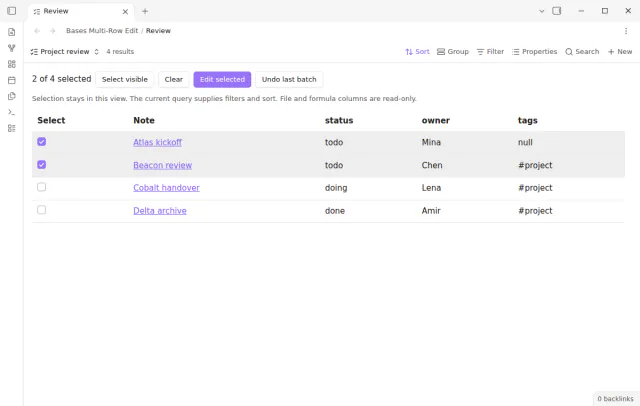
Select rows in a base, preview each new value, apply the change and undo the batch.