How to show headings from embedded notes in the Obsidian outline
The core Outline can't show them, as of October 2026.
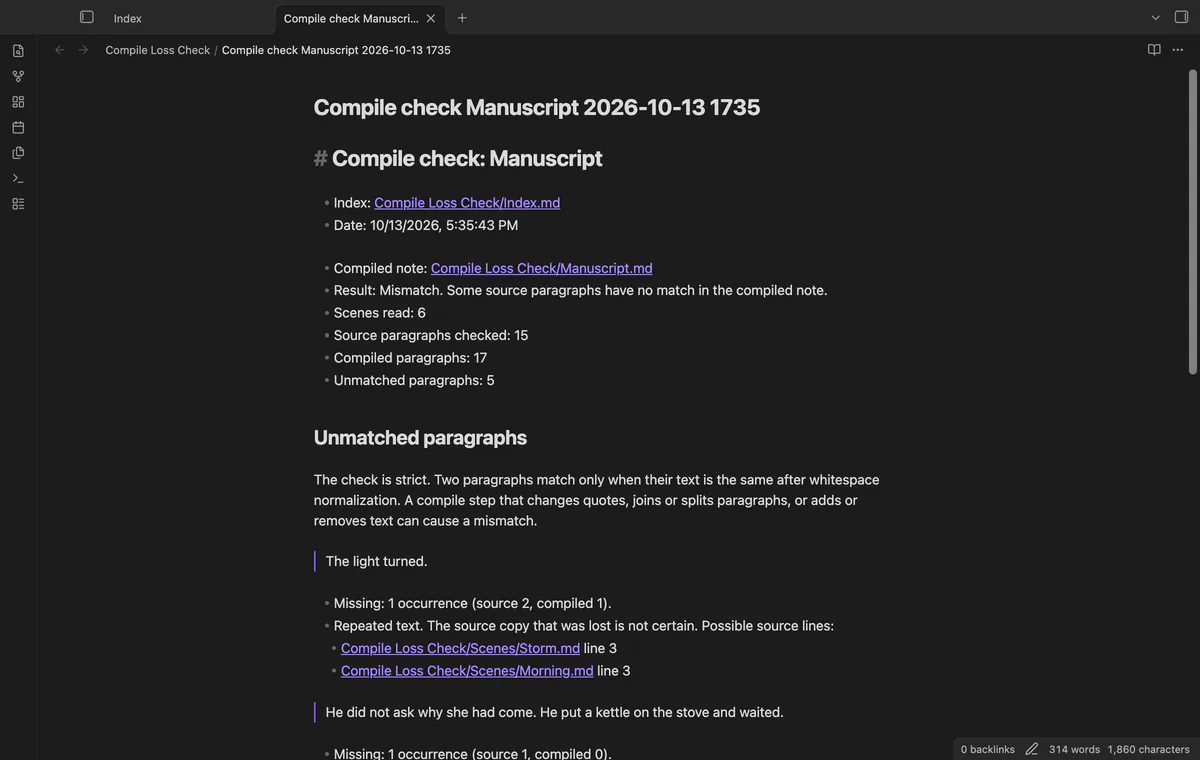
Search your compiled note for suspect scene text, or compare paragraph counts with Compile Loss Check. As of October 2026, Obsidian Search finds text in notes; Compile Loss Check adds a report comparing current scenes with your manuscript. A mismatch needs review because compile steps can change text without losing it.
Longform stores an ordered manuscript as scenes and offers compile workflows. Compile Loss Check reads that saved scene list and compares it with a compiled note, without running the workflow.
Copy a distinctive phrase from a scene and search for it in quotation marks. Use Obsidian Search's path: operator to restrict results to your compiled note.
Repeat this for passages you want to review. Compare the wording in the scene and manuscript when a search finds no match.
Run Check a compiled manuscript and choose your scenes index and compiled Markdown note. Open the saved report to read paragraph text with no match, scene links and source line numbers.
The checker collapses whitespace and compares paragraph occurrence counts. Pro profiles can exclude intentional changes and check several compiled notes in one report.
MIT · no telemetry · core features free
Compile your Longform scenes to a note, or use an existing compiled note.
Run Check a compiled manuscript from the command palette.
Select the project index and then the compiled manuscript note.
Read the result and select Open report.
Compare the source and compiled occurrence counts in the report. If only some copies match, the checker lists possible source lines. It can't identify which copy is absent.
Read the errors before interpreting text without a match. Correct missing scenes or invalid index data, then run a new check. If a note changed during scanning, repeat the scan.
With Pro, save the last check as a comparison profile. Add scene paths to Scenes to skip, including their folder and Markdown extension. The report counts the source paragraphs excluded.
 That's every step, start to finish.
You're officially a regular.
Obsidian rewards people who share. NoteMods is just me and a lot of coffee. If this guide saved you a fight with the syntax, buy me a cup.
That's visit . Regulars are the reason I keep NoteMods running. If it's part of your routine now, a coffee says thanks better than anything.
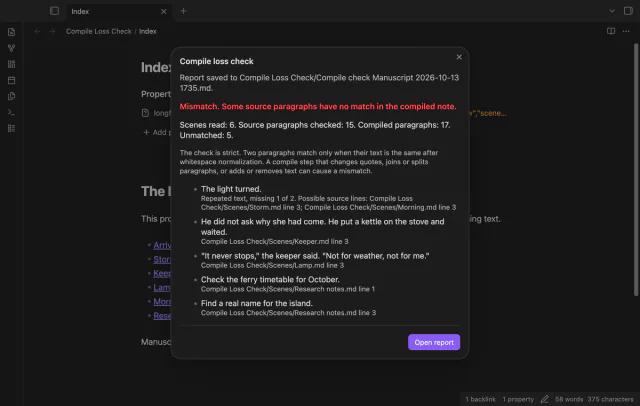
Find compiled paragraphs with no Longform match.