How to import a Joplin JEX export into Obsidian
As of October 2026, the Obsidian help lists import guides for 16 apps and formats, and Joplin is not one of them.
As of October 2026, the official Importer plugin reads TextBundle and TextPack files into a vault. The Importer help page names no way to export a note as a TextPack. A community plugin does both, with the images and links of each note.
TextBundle Files has Pro, and $15 one time turns it on in all 129 plugins.
The forum topic "TextBundle support" opened on 23 July 2020. Later posts ask for import from and export to .textpack files. A TextBundle is a folder with the Markdown text, info.json and an assets folder, and a TextPack is that folder in a zip file.
Install Importer, open it from the command palette, and choose Textbundle under File format. Select your files, review the template preview, then select Import.
Zip files are also accepted. Importer templates let you change how each imported note looks.
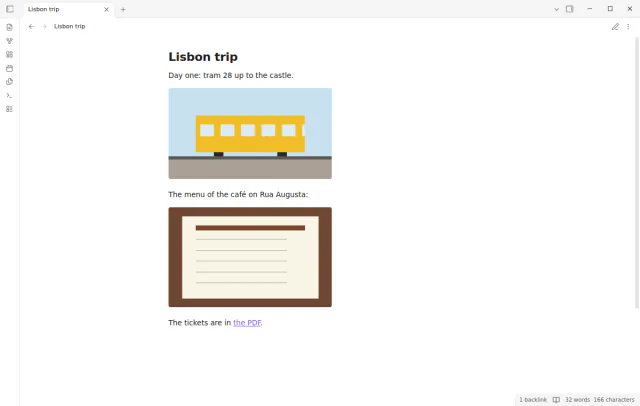
TextBundle Files imports one or more packs as notes in your folder for new notes. Each file in assets/ goes to your attachment folder, and the links in the note point to it. It never overwrites a note or an attachment.
The command Export current note as TextPack writes a pack next to the note, with each image and attachment that the note links to.
MIT · no telemetry · core features free
Open Settings, then Community plugins, and turn off restricted mode.
Select Browse, search for TextBundle Files, then select Install and Enable.
Export a note from Bear, Ulysses, iA Writer or Craft as TextBundle or TextPack.
In Obsidian, run Import TextBundle or TextPack files from the command palette and select the files.
Select Open note in the list. To send the note back, run Export current note as TextPack.
Yes, when no asset name clashes and no asset sits in a subfolder of assets/. A test compares the text bytes. A renamed asset keeps its link, but the link text changes.
Obsidian shows it only when Detect all file extensions is on, under Settings, Files and links. A pack in the vault then has Import TextPack as note in its file menu.
No. A zip entry with .., a leading slash or a drive letter makes TextBundle Files refuse the whole pack. It writes nothing for that pack and shows the reason.
 You can now import and export TextBundle files.
This guide uses TextBundle Files. Pro adds "Folder import with a report" and "Export every note in a folder". One payment of $15 turns on Pro in 129 plugins.
This guide uses TextBundle Files. Pro adds "Folder import with a report" and "Export every note in a folder". One payment of $15 turns on Pro in 129 plugins.
Bring a TextBundle or TextPack into your vault as a note with its images, and send a note back as a TextPack.