How to check CSV column rules in Obsidian
Check parsed CSV fields against rules you choose, then record errors by row and column.
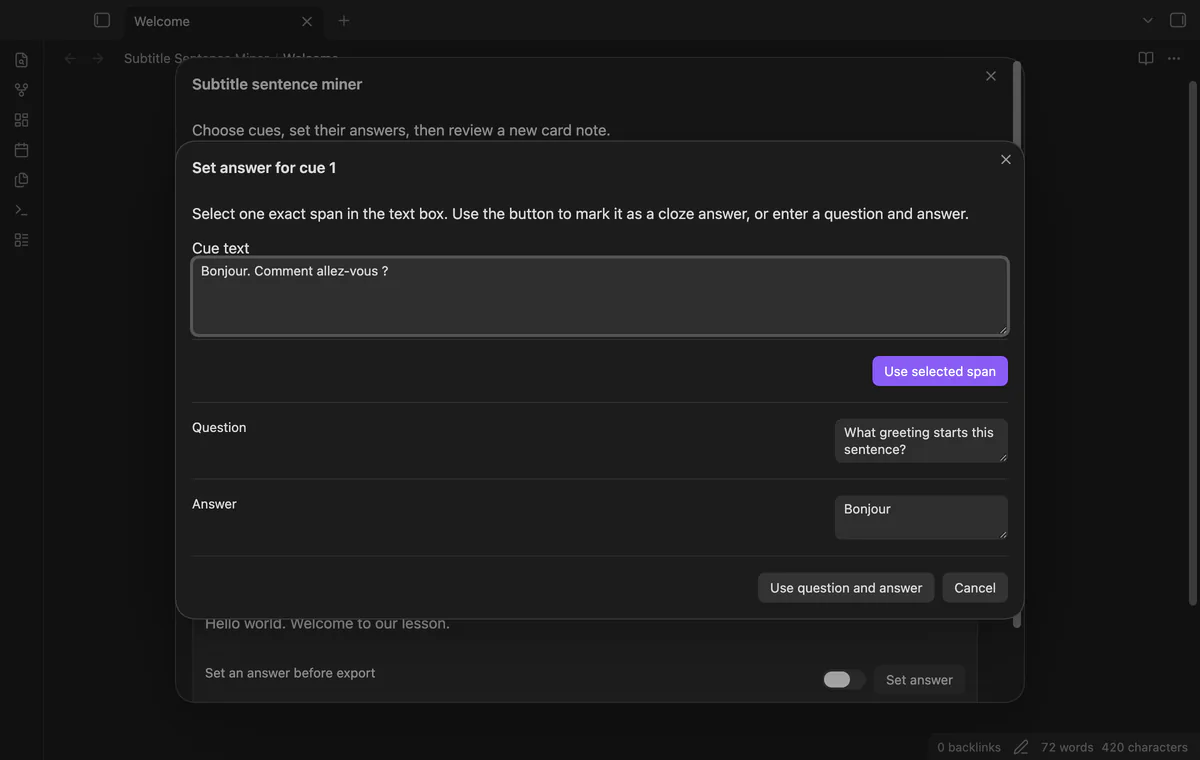
Choose subtitle cues, write a question and answer, and keep the source path and cue times with each card. As of October 2026, Obsidian supports manual Markdown notes; Subtitle Sentence Miner adds cue selection and card previews.
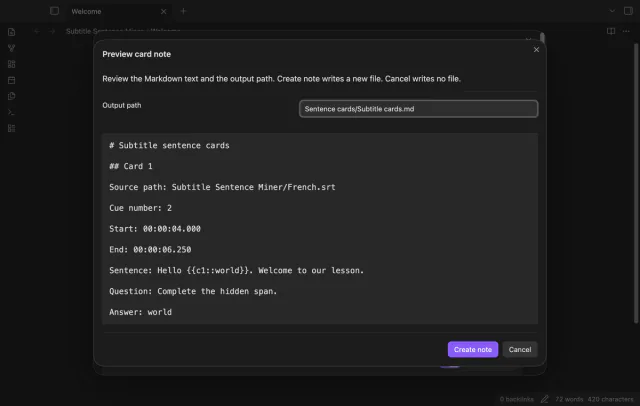
A card needs enough source detail to find the sentence again. The plugin keeps the path, cue number and start and end times outside the card body.
Open your subtitle source in a text editor and copy a sentence into a Markdown note. Add its path, cue number, start time and end time, then write a question and answer below.
Use Markdown headings to separate cards and blank lines between fields. This follows Obsidian’s basic note formatting without needing a study tool connection.
Put an SRT or VTT file in your vault and open its cue list. Select sentences, set an exact hidden span or a question and answer, then preview a new Markdown note.
Review warnings and clear the filter before export so you can see hidden selections. Pro adds saved templates and cues from several sources.
MIT · no telemetry · core features free
Put a UTF-8 SRT or VTT file in your vault, with blank lines between cues.
Run Select a subtitle file and choose the source path.
Filter the list, set answers and select the cues to keep.
Open Preview card note and check its text, paths and timestamps.
Select Create note and read the created path in the notice.
Enter a question and answer rather than selecting a cloze span. The created card also keeps the original sentence.
Hidden cues can remain selected. Clear the filter and review those selections before opening the preview.
 You can now make study cards from subtitles.
You're officially a regular.
Obsidian rewards people who share. NoteMods is just me and a lot of coffee. If this guide saved you a fight with the syntax, buy me a cup.
That's visit . Regulars are the reason I keep NoteMods running. If it's part of your routine now, a coffee says thanks better than anything.
Make Markdown cards from subtitles with source paths and times.