How to rename a heading in Obsidian without breaking links
Right-click the heading and choose Rename this heading.
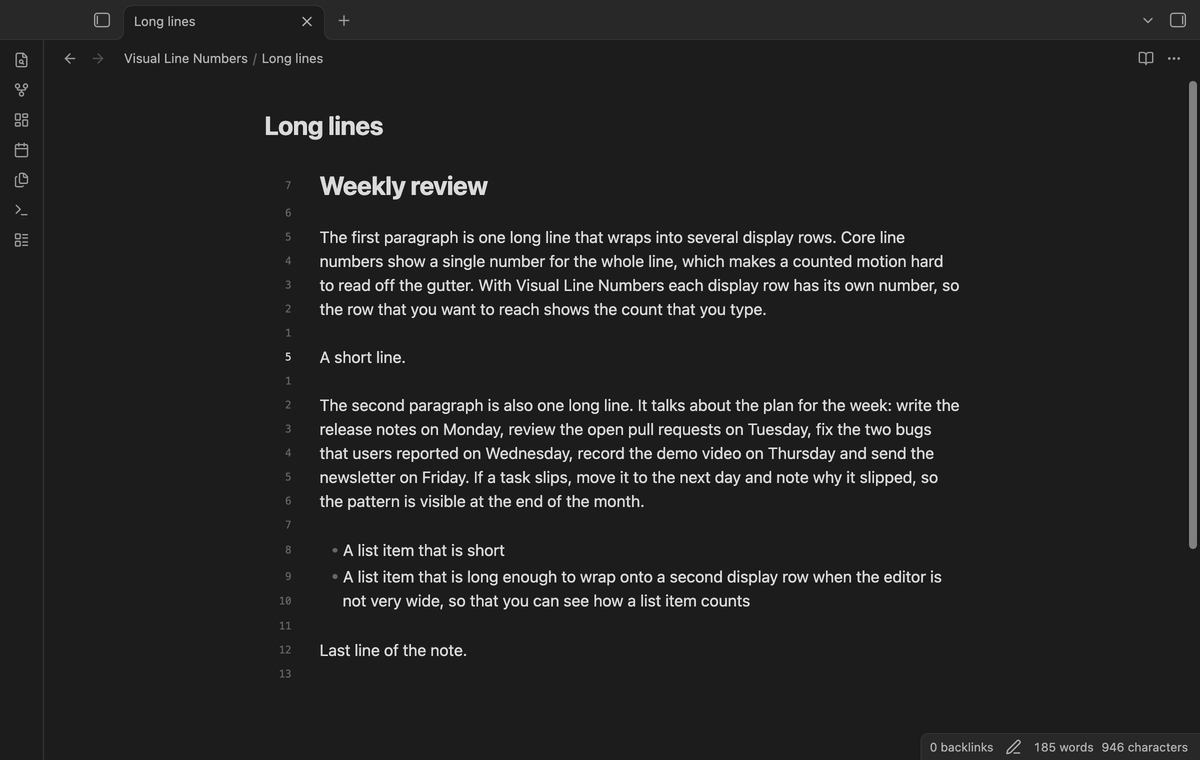
Obsidian's own line numbers give a wrapped paragraph one number, and its Settings help page lists no relative numbers, as of October 2026. Free plugins add relative numbers, but they count lines, so a counted gj won't match the gutter. To number each wrapped row you need Visual Line Numbers, or you keep counted moves on whole lines.
Visual Line Numbers has Pro, and $15 one time turns it on in all 134 plugins.
The forum request Relative line numbers dates from 27 May 2020. It has 56 likes and 14 posts, and a poster linked the Relative Line Numbers plugin there in January 2021.
Wrapped lines came next. The GitHub request Numbering Visual Lines has been open on that plugin since March 2023, with 39 reactions and 3 comments. In May 2025 a commenter wrote that counted moves break across paragraphs once j and k mean gj and gk. A request on Vimrc Support from January 2022 describes the same mismatch.
Settings, Editor has Show line numbers, which shows line numbers in the gutter. The same page has Vim key bindings under Advanced.
A forum reply from August 2021 explains what you see with line wrap on. Your lines are the paragraphs, so one number covers a whole wrapped paragraph.
j and k move by whole paragraphs when lines wrap.Relative Line Numbers is the most used one, with about 113,000 downloads in the community directory. Its README asks you to keep Show line numbers on. Its directory page says the last update was 3 years ago.
Hybrid Line Numbers is newer, with an update on 9 October 2026. It has hybrid, relative and absolute modes, and a folded section counts as one line. With plain j and k, the number beside a line is the count that reaches it.
j to gj and the numbers stop matching your counts.Vimrc Support loads Vim commands from a file in your vault. Its README maps j and k to gj and gk, so single steps follow the rows you see. Better Vim lists the same remap as an optional setting.
A commenter on Vimrc Support issue 81 adds two lines, noremap J j and noremap K k. Counted moves with J and K then go by whole lines, and a relative line number plugin shows those counts.
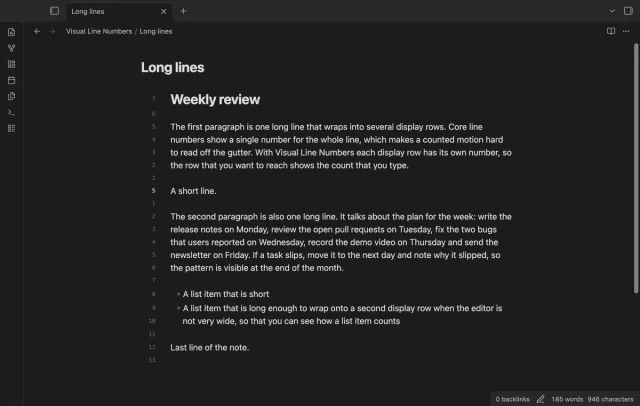
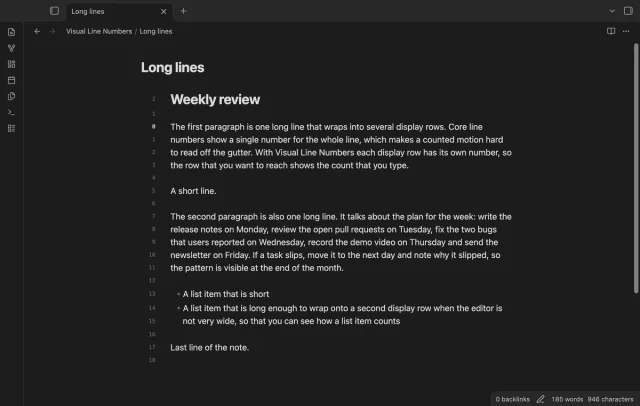
J and K keys. The plugin author wrote there that the count-aware mapping from Vim is beyond Obsidian's Vim emulation.Visual Line Numbers draws its own gutter and puts a number on every display row. In relative and hybrid mode the numbers count rows from the cursor. So with j mapped to gj, 5j lands on the row that shows 5.
The gutter, the four modes and the commands are free. Counting folded lines, a per-note off switch, the current row highlight, the motion hint and mode colors need Pro.
MIT · no telemetry · core features free
Install Visual Line Numbers from Community plugins and enable it. It needs Obsidian 1.13.4 or later.
Open Settings, Editor and turn off Show line numbers. Two gutters of numbers would show together.
Open a note in Live Preview or Source mode. Relative mode is the default, so the cursor row shows 0.
Turn on Vim key bindings in Settings, Editor.
Map j and k to gj and gk. With Vimrc Support, add nmap j gj and nmap k gk to your vimrc file.
Type a count from the gutter, for example 5j. The cursor lands on the row that showed 5.
Check your mapping first. If j is mapped to gj, a count moves by display rows, while a line number plugin counts whole lines. Keep counted moves on whole lines, or use a gutter that numbers rows.
Not as of October 2026. Its README lists a line number gutter with absolute, relative and hybrid modes. Its known limitations file says the status column has no v:virtnum for wrapped lines.
A forum search in October 2026 found none. Visual Line Numbers doesn't count with CSS. It asks the editor where each display row of a line ends, and only for the lines that the editor draws.
Hybrid Line Numbers counts a folded section as one line, and its README says Vim counts a jump that way. Visual Line Numbers does the same by default, because a fold is drawn as one row. Its Pro option Count folded lines counts each hidden line instead.
 That's every step, start to finish.
This guide uses Visual Line Numbers. Pro adds "Count folded lines" and "Highlight the current row". One payment of $15 turns on Pro in 134 plugins.
This guide uses Visual Line Numbers. Pro adds "Count folded lines" and "Highlight the current row". One payment of $15 turns on Pro in 134 plugins.
$15 once. Pro tools in 134 NoteMods plugins with one GitHub sponsorship. Nothing renews.
Pro turns on right after payment. Select Sign in with GitHub in the settings of each plugin you use. Free features stay free.
Secure checkout by GitHub Sponsors - needs a GitHub login.
Show a line number for each wrapped row in the editor.
One sponsorship turns on the Pro features in 134 NoteMods plugins. Free features stay free.
$15 one time: Pro stays on, nothing renews. $5 a month: Pro is on while you sponsor, and stays on after you have paid $15 in total. You pay on GitHub (a GitHub login is needed), then select Sign in with GitHub in the plugin settings. All sponsor tiers