Compact Folder Chains · Obsidian plugin documentation
Compact Folder Chains documentation
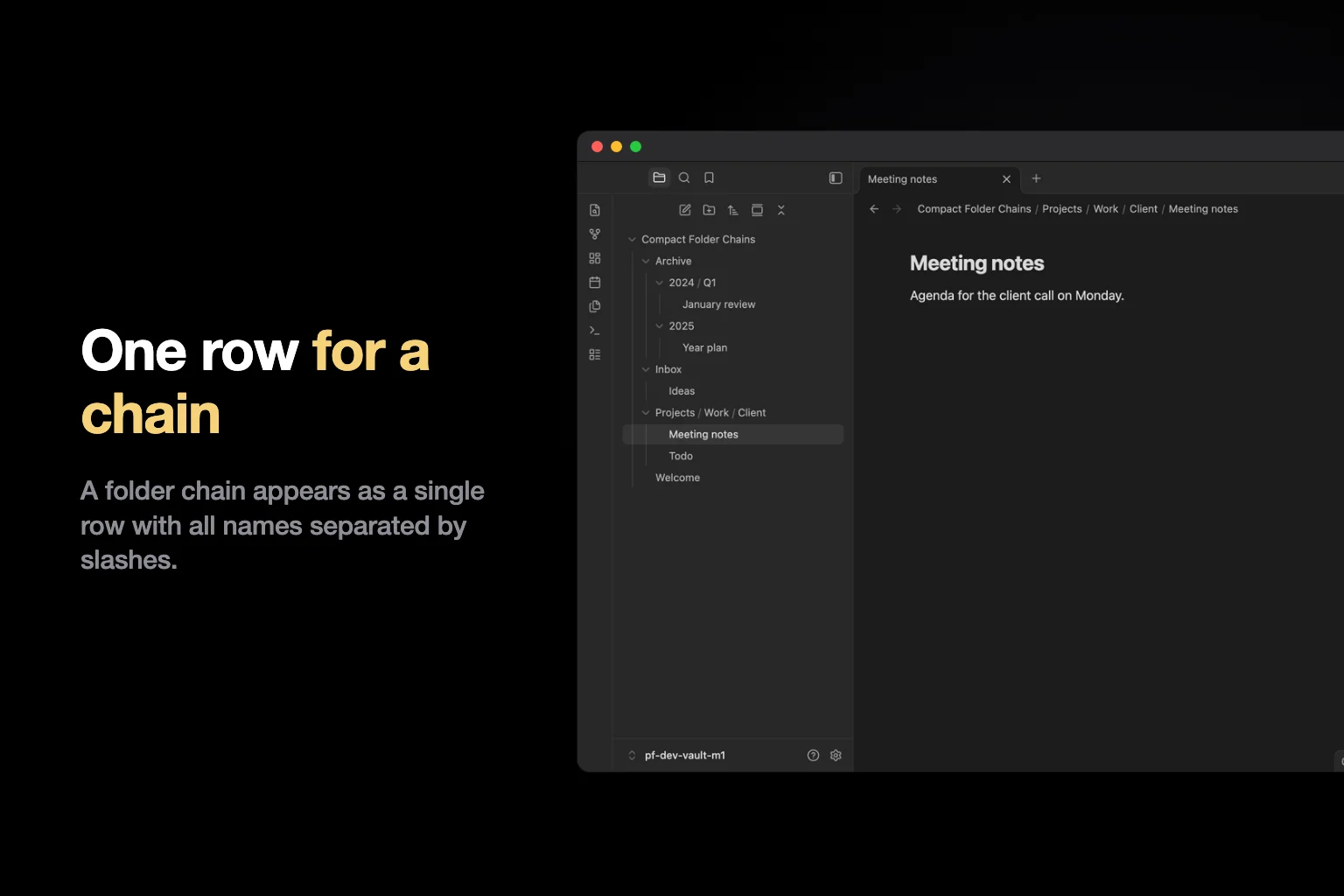
Compact Folder Chains makes deep folder paths shorter in the file explorer. When a folder holds only one folder, the two share one row. A path such as Projects, then Work, then Client shows as one row named "Projects / Work / Client". The notes inside Client sit right below that row.
VS Code calls this compact folders. Obsidian has no such option, and a forum request for it asks for exactly this behavior. The plugin is free, works offline and changes no file in your vault.
Version 1.0.0. Requires Obsidian 1.13.4 or later. Works on desktop and mobile.
1 Installation
When Compact Folder Chains is listed in the community directory, open Settings, then Community plugins, then Browse. Search for "Compact Folder Chains", then select Install and Enable.
To install by hand, download main.js, manifest.json and styles.css from the latest release. Put the three files in <vault>/.obsidian/plugins/compact-folder-chains/. Reload the list of community plugins, then turn on Compact Folder Chains.
The plugin needs Obsidian 1.13.4 or newer. It works on desktop and on mobile.
2 Getting started
Turn the plugin on. Each chain in your vault becomes one row at once. There is nothing else to set up.
Select a chain row to open or close it, the same as a normal folder row. The arrow on the left shows if the chain is open.
To see the normal rows for a moment, run the command "Turn chain rows on or off" from the command palette. Run it again to bring the chain rows back. The command has no default hotkey. You can give it one in Settings, then Hotkeys.
A right-click on a chain row opens the menu of the first folder in the chain. To act on a later folder, for example to rename Client, turn the chain rows off with the command first. You can also open the folder from a note link or from search.
New notes and folders that you make from a chain row go into the first folder of the chain. This breaks the chain, and the rows update to show the new layout.
3 Features
One row for a chain of folders
A chain is a run of folders where each folder holds exactly one folder and nothing else. The plugin finds every chain in the vault and draws it as one row. The row shows each folder name with a separator between them.
Take this tree.
Projects
└── Work
    └── Client
        ├── note.md
        └── todo.md
With the plugin on, the explorer shows this.
Projects / Work / Client
├── note.md
└── todo.md
The chain ends at the first folder that holds a file or more than one folder. That folder is the last name in the row. Its contents show one level below the row, with the normal indent.
Chains anywhere in the tree
A chain can start at any depth. If Projects holds two folders, Projects keeps its own row. A chain can still start inside one of those two folders. The plugin checks every folder in the vault, so a deep archive tree gets shorter in each place where it can.
The vault root never joins a chain. A vault that holds only one folder still shows that folder on its own row.
The rows follow your vault
When you add, move, rename or delete a file or folder, the plugin checks the chains again. Put a note in Work and the chain splits at once into "Projects / Work" with Client below it. Move the note out and the chain joins again. You do not need a command for this.
Hover over a chain row to see the full path of the last folder in the chain.
Folders that keep their own row
Some folders should always stand alone, for example an inbox that is empty most of the time. Add their paths to the list in the settings. A listed folder never joins the folder above it or the folder below it.
A safe patch
Obsidian has no public API for the rows of the file explorer. The plugin reads the explorer rows through an internal field, and it checks each value before it uses it. If a future Obsidian version changes that field, the plugin leaves the explorer as it is. It does not replace any method of the explorer. It adds a label and a few CSS classes, and it removes them when you turn it off.
4 Commands
Open the command palette and type the plugin name to see these commands. You can give each one a hotkey in Settings, Hotkeys.
| Command | Command id |
|---|---|
| Turn chain rows on or off | compact-folder-chains:toggle |
5 Settings
| Setting | Default | What it does |
|---|---|---|
| Compact folder chains | On | Shows each chain as one row. Off gives the normal rows back. |
| Separator | Projects / Work | The text between the folder names. You can also pick a slash with no spaces, or an arrow. |
| Folders to keep apart | Empty | One folder path on each line. These folders always keep their own row. |
Paths in the list are relative to the vault root, such as Projects/Archive. Leading and trailing slashes are ignored. Blank lines and repeats are dropped.
6 Privacy, payment and network
Compact Folder Chains is free and open source. It has no paid features, no license key and no trial. It does not ask you to sign in or create an account. It makes no network requests, and it has no analytics, telemetry or ads. It reads only the folder tree of your vault, never the text of your notes. It writes only its own settings file, data.json in the plugin folder. The fundingUrl in manifest.json points to the GitHub Sponsors page of the author. A gift there is optional and adds no feature.
7 Questions and answers
Does the plugin move or rename my folders?
No. It changes only how the file explorer draws the rows. Your folders, notes and links stay exactly where they are. Turn the plugin off and the explorer looks the same as before.
Why does a folder with one note not join the folder below it?
A chain joins a folder only to a single child folder. If a folder holds a note, that note needs a row of its own under that folder. VS Code uses the same rule.
Why does an empty folder join a chain?
An empty folder at the end of a chain holds nothing that needs its own row. It joins the chain so that the tree stays short. Add it to "Folders to keep apart" to show it alone.
What happens if Obsidian changes the file explorer?
The plugin checks each internal value before it uses it. If a value is missing, the plugin skips that chain and leaves the row as Obsidian drew it. You will see the normal tree, with no error message and no broken rows.
Does it work with other file explorer plugins?
It changes only the core file explorer. Plugins that replace the explorer with their own view are not changed. Plugins that add colors or icons to folder rows are not tested yet. A hidden folder cannot show its own icon.
Does it change the bookmarks or the search results?
No. Only the core file explorer shows chain rows.
Can I drag a note onto a hidden folder?
Drop the note on the chain row to put it in the first folder of the chain. To drop it into a later folder, turn the chain rows off first.
Is it slow in a large vault?
The plugin walks the folder tree once after each change, and it waits a short moment to group many changes into one pass. A test with a chain of 5,000 folders finishes in well under a second.
8 Support
Report a bug or ask for a feature in the issue tracker of this repository. Please include your Obsidian version, your device and a short description of the folder tree that shows the problem. To support the work, use GitHub Sponsors.
To build from source, run these commands.
npm ci
npm run build
npm test
The tests check 13 golden cases, such as the Projects, Work and Client example above, and the guards around the file explorer.
9 License
MIT